

THE BLOG
Author Book Marketing & Website Design Tips
Author Website for New Authors: Essential Setup Guide to Launch Your Online Presence
A beginner-friendly guide to building an author website that looks professional and grows your readership.
Starting an author website can feel overwhelming when you're just trying to focus on writing your next book. You might wonder if you really need one, what to include, or how to make it look professional without spending weeks learning web design.
An author website gives you a home base on the internet where readers can discover your books, sign up for your newsletter, and connect with you directly—all without relying on social media algorithms or third-party platforms. It's your space to control your brand and build lasting relationships with your audience. Even if you're just starting out, having your own website makes you look more professional and helps readers find you when they search for your name or books.
The good news? You don't need to be a tech expert or hire an expensive designer to create a great author website. With the right tools and a clear plan, you can build a site that showcases your work and turns casual visitors into devoted readers.
Want a beautiful author website without spending weeks designing it from scratch? These Squarespace website templates for authors are designed to showcase your books, grow your email list, and look professional instantly.


Here’s how real authors are using these Squarespace author website templates:






Key Takeaways
Every new author needs a website to control their online presence and connect directly with readers
Building an author website is simpler than you think with beginner-friendly platforms and templates
Your website should include key pages like an about section, book information, and an email signup form
AUTHOR WEBSITE EXAMPLES






How to Create an Author Website for New Authors
Building your author website doesn't have to be complicated or expensive. The right platform, paired with essential features and smart design choices, can help you establish a professional online presence that connects with readers and supports your book marketing efforts.
Choosing the Right Website Platform
Your platform choice sets the foundation for everything else. Squarespace is one of the best options for new authors because it combines beautiful design with ease of use—no coding required.
Squarespace offers elegant templates that make your site look professional from day one. You get hosting, security, and mobile optimization built in. The drag-and-drop editor lets you customize layouts without touching code.
WordPress is another popular choice, especially if you want maximum flexibility. It's free to use (you pay for hosting), and thousands of plugins let you add features as you grow. However, it has a steeper learning curve.
Wix works well for beginners who want simplicity. Like Squarespace, it's all-in-one with hosting included. The editor is very visual and intuitive.
Budget matters too. Squarespace starts around $16/month for personal sites. WordPress hosting can cost $3-10/month initially, but premium themes and plugins add up. Wix ranges from $16-45/month depending on features.
For most new authors, Squarespace hits the sweet spot between ease and professionalism. You can launch quickly and focus on content instead of technical issues.
Essential Website Features Every New Author Needs
Your author website needs specific elements to function as an effective marketing tool. Start with these core features and build from there.
Your author bio should appear prominently, either on your homepage or a dedicated About page. Include your author photo, writing background, and what makes your work unique. Keep it conversational and approachable—readers want to connect with you as a person.
A book showcase is essential. Create individual book pages for each title with cover images, descriptions, purchase links, and book excerpts or sample chapters. Make buying easy by linking to all retailers where your books are available.
Newsletter signup is your most important conversion tool. Place an email sign-up form on every page—typically in your header, sidebar, or footer. Your mailing list is the only audience you truly own.
Include contact information or a contact form. Readers, media, and event organizers need a way to reach you. A simple form works better than listing your email publicly (to avoid spam).
Basic navigation should include: Home, About, Books, Blog (if you maintain one), and Contact. Keep it simple—visitors should find what they need in two clicks or less.
Website Design Tips for Building Your Brand
Your author website design should reflect your genre and writing style. A thriller author's site will look different from a romance writer's or children's book author's.
Choose colors and fonts that match your book covers and genre expectations. Dark, moody tones work for mystery and thriller. Bright, warm colors suit romance or uplifting fiction. Clean, simple designs fit literary fiction.
Author branding means consistency across all touchpoints. Use the same author photo, color palette, and tone across your website, social media, and book marketing materials.
Templates like Divi (for WordPress) or Squarespace's author-focused templates give you a professional starting point. Look at best author websites in your genre for inspiration, but don't copy—your brand should be uniquely yours.
Parallax scrolling and other fancy effects can look cool, but don't overdo it. Your website should load quickly and work perfectly on mobile devices. Most readers will visit from their phones.
White space is your friend. Don't cram everything onto one page. Let your content breathe with clear sections and spacing.
Professional author websites prioritize readability. Use legible fonts at appropriate sizes (at least 16px for body text). Ensure good contrast between text and background.
Showcasing Your Books and Writing Portfolio
Your books deserve dedicated space that makes them shine and drives sales. Each book should have its own page with complete information.
Create individual book pages that include:
High-quality cover image
Compelling book description
Purchase links to all retailers (Amazon, Barnes & Noble, independent bookstores, etc.)
Book excerpts or sample chapters as downloadable PDFs
Book trailers if you have them
Reader reviews or endorsements
Awards or recognitions
Use call-to-action buttons that stand out. "Buy Now," "Read Sample," or "Add to Goodreads" buttons should be prominent and easy to click.
For movie adaptations or other media rights deals, create a separate section highlighting this exciting news. It's powerful social proof.
If you write in multiple genres or have a large backlist, organize books by series or category. Make navigation intuitive so readers can find what interests them.
Your writing portfolio should also showcase any published short stories, essays, or articles. Link to these pieces or create a dedicated Publications page.
Update your book pages regularly with new reviews, awards, or sales milestones. Fresh content keeps readers engaged and improves search visibility.
Connecting With Readers: Email, Blog & Social Features
Building direct connections with readers turns casual visitors into loyal fans. Your website should facilitate these relationships.
Email sign-up and newsletter opt-in forms are your highest priority. Offer something valuable in exchange for email addresses—a free short story, exclusive chapter, or early access to new releases.
Mailing list integration should be seamless. Connect your website to email platforms like Mailchimp, ConvertKit, or Squarespace Email Campaigns. These tools manage subscribers and let you send professional newsletters.
Place newsletter signup forms strategically:
Exit-intent popups
Homepage banner or hero section
Sidebar on every page
Footer across your site
Dedicated newsletter page
Your author blog keeps readers coming back. Blog about your writing process, book research, character insights, or personal stories. Post consistently—even once a month builds connection.
Link your social media accounts, but don't rely on them exclusively. Social platforms change algorithms constantly. Your email list and website are assets you control.
Consider adding reader engagement features like:
Comments on blog posts
Reader questions/contact form
Book club discussion guides
Speaking engagements calendar
Event appearances and signings
Optimizing Your Website for Discoverability and Growth
A beautiful website means nothing if readers can't find it. Search optimization and technical setup drive organic traffic.
Start with basic SEO for every page:
Descriptive page titles with relevant keywords
Meta descriptions that entice clicks
Header tags (H1, H2, H3)
Frequently Asked Questions
New authors often have similar questions when building their first website. The answers below cover everything from must-have website elements and branding strategies to SEO tactics, audience building methods, content planning, and social media integration.
What are the essential elements to include on an author's website?
Your author website needs a clear homepage that introduces who you are and what you write. Include your name, a professional photo, and a one-sentence description of your work right at the top.
A dedicated books page is non-negotiable. List each book with its cover, description, buy links, and reviews. Make it easy for visitors to find and purchase your work.
Your about page should tell your story as a writer. Keep it personal but professional. Share what drives your writing and what readers can expect from your books.
Add a contact page so readers, media, and industry professionals can reach you. Include a simple contact form or email address.
An email signup form belongs on every page. Put it in your header, footer, or sidebar so visitors can join your mailing list no matter where they land on your site.
How can a new author effectively brand their website?
Pick two to three colors that reflect your genre and writing style. Romance authors might choose warm, romantic colors while thriller writers often use darker, moodier tones.
Your font choices matter more than you think. Choose one font for headings and another for body text. Make sure they're easy to read on all devices.
Use professional photos of yourself. A blurry phone selfie won't cut it. Invest in at least one high-quality author photo you can use across your site and social media.
Keep your design clean and simple. Too many colors, fonts, or graphics make your site look unprofessional and confuse visitors.
Your brand should match your genre. Mystery writers need different branding than children's book authors. Look at successful authors in your genre and note what works.
What strategies should an author use to optimize their website for search engines?
Write clear, descriptive page titles that include relevant keywords. Your homepage might be "Your Name - Romance Author" instead of just "Home."
Add alt text to every image on your site. Describe what's in the image using natural language. This helps search engines understand your content and makes your site accessible.
Create a blog and post regularly. Each blog post is a new page that search engines can find and rank. Write about topics your readers care about.
Use heading tags properly. Your page title should be an H1, main sections should be H2s, and subsections should be H3s.
Get other websites to link to yours. Guest post on writing blogs, participate in author interviews, and connect with book reviewers. Each quality backlink tells search engines your site matters.
Make sure your site loads fast. Compress your images before uploading them. Large files slow down your site and hurt your search rankings.
How can authors use their website to build and engage with their audience?
Your email list is your most valuable asset. Offer something free in exchange for email signups—a short story, the first chapter of your book, or exclusive content.
Create a reader group or forum on your site. Give fans a place to discuss your books, share fan theories, and connect with each other.
Respond to comments on your blog posts. When readers take time to comment, reply thoughtfully. This builds loyalty and encourages more engagement.
Share behind-the-scenes content about your writing process. Readers love knowing how books come together. Post photos of your workspace, share writing playlists, or discuss research trips.
Host giveaways and contests. Give away signed books, character swag, or exclusive content. Make entering easy and promote it across all your channels.
Ask readers what they want. Create polls about future books, character names, or cover designs. People engage more when they feel heard.
What types of content should be regularly updated on an author's website?
Blog posts should go up at least once a month. Write about your writing process, industry insights, or topics related to your books. Consistency matters more than frequency.
Update your books page whenever you release new work. Add pre-order links as soon as they're available. Remove old buy links if retailers stop carrying your books.
Post news and announcements on your homepage. Upcoming releases, book signings, awards, and media appearances all belong there. Keep this section current.
Refresh your events calendar regularly. Add speaking engagements, book tours, and virtual appearances. Remove past events to avoid confusing visitors.
Share reader reviews and testimonials. Add new positive reviews to your books page and homepage. Fresh social proof helps convert new visitors into readers.
Update your bio as your career grows. Won new awards? Published more books? Changed genres? Keep your about page current.
What are the best practices for integrating social media into an author's website?
Add social media icons to your website header or footer. Link to every platform where you're active. Make the icons visible but not distracting.
Embed your Instagram feed or Twitter timeline on your homepage. This shows visitors you're active online and gives them fresh content without you updating your site constantly.
Don't link to social platforms you don't use. Empty or abandoned accounts make you look inactive. Quality over quantity applies here.
Add social sharing buttons to your blog posts. Make it easy for readers to share your content on their own profiles.
Create graphics sized for social media when you post new blog content. Share links to your website posts across all your social channels to drive traffic back to your site.
Use consistent branding across your website and social media. Your profile photos, cover images, and color schemes should match. This builds recognition and trust.
Ready to launch your author website?
Explore my Squarespace website templates designed specifically for authors — easy to customize, beautifully designed, and built to help you sell more books.

SHOP THE AUTHOR WEBSITE TEMPLATES
THE MANUSCRIPT AUTHOR WEBSITE TEMPLATE — perfect for authors launching their first professional website with a simple, polished layout
THE DEBUT AUTHOR WEBSITE TEMPLATE — designed to highlight your first book, build your email list, and grow an audience from day one
THE SERIES AUTHOR WEBSITE TEMPLATE — ideal for showcasing multiple books with clear series pages and strong reader flow
THE ONE-PAGE AUTHOR AUTHOR WEBSITE TEMPLATE — a streamlined one-page site for authors who want something beautiful, fast, and easy
THE DONE-FOR-YOU AUTHOR WEBSITE EXPERIENCE — your author website built for you so you can launch without touching design or tech
MOST POPULAR BLOG POSTS
Authors Guide to Website Design & Branding
Squarespace Email Campaigns: A Guide for Authors
How to Create an Author Website on Squarespace (Step-by-Step)
Essential Pages Every Author Website Needs: A Complete Guide to Building Your Online Platform
These essential author website pages help readers find your books, trust you, and stay connected.
Your author website is more than just a digital business card. It's where readers discover your books, connect with your story, and decide whether to hit "buy" or move on. But what pages do you actually need to make that happen?
Every successful author website should include six core pages: a homepage, about page, books page, contact page, media or press kit, and an email signup. These aren't just nice-to-haves. They're the foundation that helps readers find you, trust you, and stay connected with your work.
The good news? You don't need a complicated site to make an impact. With the right pages in place, your website becomes a simple, effective tool that works for you while you focus on writing. Let's walk through exactly what each page should include and why it matters for your author career.
Want a beautiful author website without spending weeks designing it from scratch? These Squarespace website templates for authors are designed to showcase your books, grow your email list, and look professional instantly.
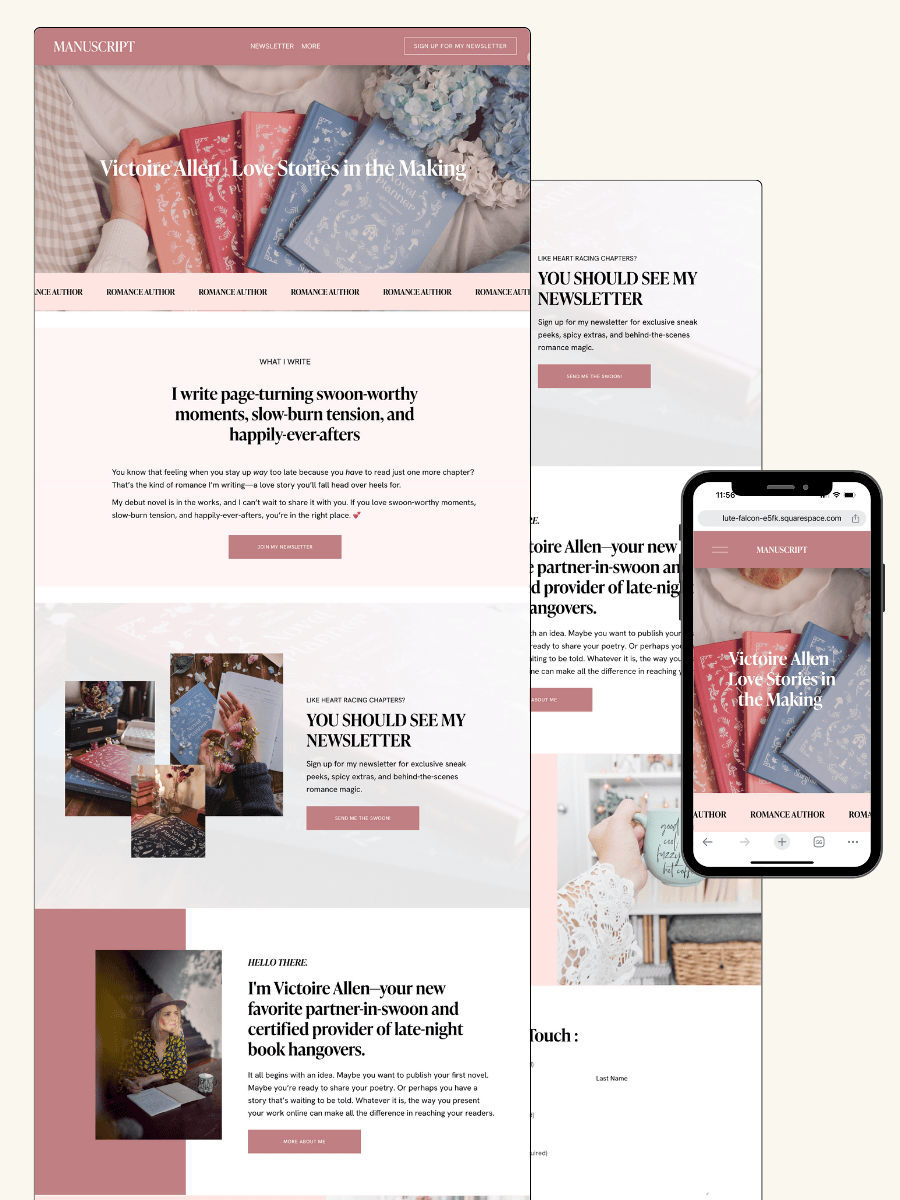
Here’s how real authors are using these Squarespace author website templates:
AUTHOR WEBSITE EXAMPLES
Why Your Author Website Matters
Your website is the only online space you fully control. Social media platforms can change their rules overnight. Your followers might not see your posts. But your website? That's yours.
A professional author site builds trust with readers. It makes you easier to find when someone searches your name. It gives book bloggers, podcasters, and media contacts a place to learn about you and download what they need.
Think of your website as your home base. Everything else—your social media, your newsletter, your book listings—should point back to it.
Essential Pages Every Author Website Needs
Your author website needs more than just a pretty homepage. The right combination of pages turns casual visitors into loyal readers, subscribers, and buyers.
Home Page: Your Digital First Impression
Your home page is where first impressions happen. You have about 5 seconds to convince someone to stay, so make it count.
Start with a clear headline that tells visitors who you are and what you write. No cryptic taglines or vague statements. Something like "Bestselling Mystery Author" or "Historical Romance Novelist" works better than "Wordsmith and Dreamer."
Include a professional author photo above the fold. Readers want to see the person behind the books. Your photo should look current, professional, and approachable.
Add your latest book cover prominently on the home page. This is book marketing 101. If someone lands on your site, they should immediately see what you're selling.
Include a call to action that's impossible to miss. This could be "Join My Newsletter for a Free Book" or "Pre-Order My Latest Release." Make the button stand out with contrasting colors.
Keep your home page mobile-friendly. Over 60% of web traffic comes from phones. Test your site on multiple devices to ensure everything loads quickly and looks good.
Don't forget social media links in your header or footer. Make it easy for readers to follow you wherever they hang out online.
About Page: Building a Connection
Your about page builds the connection between you and your readers. This is where personality matters more than polish.
Write your author bio in a way that feels conversational, not stuffy. Skip the third-person corporate speak unless you're aiming for a formal tone. Most readers prefer "I write cozy mysteries" over "Jane Doe writes cozy mysteries."
Share what makes you interesting beyond writing. Do you have three rescue dogs? Did you live in five countries? These details make you memorable. Keep it relevant to your author brand, but don't be afraid to show personality.
Include a professional author photo that's different from your home page if possible. Variety keeps your site visually interesting.
Consider adding a short FAQ section on your about page. Answer questions like "How did you start writing?" or "Where do you get your ideas?" This cuts down on repetitive contact form messages.
Make sure your about page includes meta descriptions for better SEO. Search engines need to know what your page is about to rank it properly.
Book Showcase: Highlighting Your Work
Dedicated book pages are non-negotiable. Each book deserves its own space with all the details a reader needs to make a purchase decision.
Create individual book pages for every title you've published. Don't just list them all on one crowded page. Each book should have its own URL, description, and purchase links.
Include high-quality book cover images. Blurry or pixelated covers look unprofessional and hurt sales. Make sure covers are optimized for web but still sharp.
Write compelling book descriptions that hook readers in the first sentence. Lead with the most exciting part of your story, not a slow wind-up about the setting.
Add multiple purchase options. Include links to Amazon, Apple Books, Kobo, Barnes & Noble, and any other retailers where your book is available. Don't make readers hunt for buying options.
Include sample chapters when possible. Let readers try before they buy. A well-placed first chapter can convert browsers into buyers.
If you write series, create a series page that shows the reading order clearly. Number your books or use a visual timeline. Confused readers don't buy.
Add reader reviews or testimonials. Social proof sells books. Pick 3-5 strong quotes that highlight what makes your book special.
Newsletter Signup & Email List Building
Your email list is the most valuable marketing asset you own. Social media platforms can disappear or change their algorithms overnight. Your email list stays with you.
Place newsletter signup forms on multiple pages. Your home page, about page, and blog should all have prominent signup options. Don't rely on a single signup page buried in your navigation.
Use a clear call to action that explains what subscribers get. "Join my newsletter" is weak. "Get a free short story plus updates on new releases" tells readers exactly what to expect.
Offer a reader magnet to boost signups. This could be a free novella, the first book in a series, exclusive short stories, or early access to cover reveals. Give people a reason to hand over their email address.
Choose an email service provider that integrates with your site. ConvertKit and Mailchimp both work with Squarespace. Pick one and stick with it.
Set up a welcome email sequence that delivers your lead magnet and introduces new subscribers to your work. Don't just add people to a list and go silent for months.
Keep your signup form simple. Name and email address are usually enough. Every extra field you add reduces conversion rates.
Blog: Engage and Grow Your Audience
An author blog helps you connect with readers between book releases and boosts your site's SEO. Search engines love fresh content.
Post writing updates that give readers a peek behind the scenes. Talk about your current work-in-progress, research trips, or character inspiration. Readers love feeling like insiders.
Share behind the scenes content about your writing process. Photos of your workspace, playlists you write to, or mood boards for your next book all work well.
Keep blog posts between 500-1,000 words unless you're writing a detailed guide. Readers have short attention spans. Make your point and move on.
Post consistently but realistically. Once a month is better than three posts in January and then nothing until July. Pick a schedule you can maintain.
Use your blog to announce book launches, cover reveals, and other big news. This gives you fresh content to share on social media and keeps your site active.
Include images in every blog post. Text-only posts are boring to look at and get skipped. Break up your writing with photos, graphics, or book covers.
Events Page: Where Readers Can Meet You
If you do book signings, speaking events, workshops, or virtual appearances, create an events page. List upcoming appearances with dates, times, locations, and registration links.
Update this page regularly. Remove past events so the page stays current. Nothing looks worse than an events page full of dates from two years ago.
Include a way for people to invite you to events if you’re open to it.
Contact Page: Make Connections Easy
Your contact page should make it simple for the right people to reach you without opening the floodgates to spam.
Add a contact form instead of listing your email address publicly. This cuts down on spam and keeps your inbox manageable. Squarespace has built-in contact forms that work well.
Include a professional email address that uses your domain name. author@yourname.com looks more professional than booklover2001@gmail.com.
Tell people what to contact you about and what not to. Be specific. "For interview requests, podcast appearances, and speaking events, use this form. For reader mail, connect with me on Instagram." This manages expectations.
Add response time expectations. If you only check messages once a week, say so. People appreciate knowing when to expect a reply.
Frequently Asked Questions
New authors often have similar questions when building their websites for the first time. The homepage, about page, and book showcase are the foundation, but you'll also need clear contact options, email signup forms, and strategic places for reviews and testimonials.
What are the must-have pages for a new author's website?
Your author website needs five core pages to get started. These pages create the foundation readers expect when they visit your site.
Start with a homepage that introduces who you are and what you write. This is your first impression, so include a professional photo, a short welcome message, and clear navigation to your other pages.
Add an about page where readers can learn your story. Share why you write, what inspires you, and any relevant background that helps readers connect with you as a person.
Create a books page that showcases your published work. Include cover images, short descriptions, and direct links to where readers can buy your books.
Set up a contact page so readers, media, and industry professionals can reach you. Include a simple contact form or email address, and consider adding links to your social media profiles.
Finally, add a mailing list signup page or form. This is how you'll build your reader community and stay connected with fans between book releases.
How can an author integrate a blog into their website effectively?
A blog gives readers fresh reasons to visit your site and helps search engines find you. The key is to keep it simple and focused on topics your readers actually care about.
Choose a blogging schedule you can stick to. Posting once or twice a month is better than posting weekly for two months and then going silent for a year.
Write about topics related to your books and writing life. Share behind-the-scenes looks at your writing process, discuss themes from your books, or talk about research you've done. You can also write about books you're reading or interview other authors in your genre.
Make your blog easy to navigate by organizing posts into categories. This helps readers find content they're interested in without scrolling through everything you've ever written.
Add a blog subscription option so readers can get new posts delivered to their inbox. This keeps them engaged with your content even when you're between book releases.
Place links to your books naturally within blog posts when relevant. If you're writing about research for your historical novel, mention the book and include a link where readers can purchase it.
What elements are essential for an effective author 'About Me' page?
Your about page needs to feel personal without oversharing. Readers want to know who you are, but they're mainly interested in you as an author.
Start with a professional photo that shows your face clearly. Readers like to see the person behind the books they're reading. The photo doesn't need to be fancy, but it should be well-lit and friendly.
Write your bio in a warm, conversational tone. Skip the formal third-person voice unless your genre demands it. Tell readers what you write, why you write it, and what makes your stories unique.
Include your writing credentials and accomplishments. Mention published books, awards, writing organizations you belong to, and any relevant professional background. Don't worry if you're just starting out—focus on what drew you to writing instead.
Add personal details that help readers connect with you. Share a few interests outside of writing, where you live, or fun facts that make you memorable. Keep it short—three to five personal details is plenty.
End with a call to action. Invite readers to sign up for your newsletter, follow you on social media, or check out your books.
How should an author set up a book sales page on their website?
Your book sales page should make buying as easy as possible. Create a dedicated page for each book, or showcase all your books on one page if you only have a few titles.
Display high-quality cover images that are large enough to see details clearly. Readers judge books by their covers, so make sure yours looks professional and appealing.
Write a compelling book description that hooks readers in the first sentence. Include the genre, a brief plot summary, and what makes your book stand out. Keep it to two or three short paragraphs.
Add multiple purchase links so readers can buy from their preferred retailer. Include Amazon, Barnes & Noble, Apple Books, Kobo, and your publisher's website. If you have signed copies available, make that option prominent.
Include an excerpt or sample chapter if possible. Let readers preview your writing style before they commit to buying. A chapter or two is perfect.
Display reviews and ratings from major retailers or publications. Social proof helps undecided readers feel confident about purchasing. Just two or three strong reviews make a difference.
Add your book's details like page count, publication date, ISBN, and available formats. Some readers care about these specifics before buying.
What is the best way to showcase testimonials and reviews on an author's website?
Reviews and testimonials build trust with new readers. Place them strategically throughout your site where they'll have the most impact.
Feature your strongest reviews on your homepage. Pick two or three powerful quotes that capture what readers love about your books. Keep these visible without cluttering your main page.
Create a dedicated reviews page if you have many testimonials. Organize them by book title so readers can find feedback on specific titles they're interested in.
Pull quotes from professional reviews, book bloggers, and reader reviews. Mix industry recognition with reader reactions to show both critical acclaim and reader enjoyment.
Include the reviewer's name and where the review appeared. Attribution adds credibility. If the reviewer is well-known in your genre, that's even better.
Add review excerpts to your individual book pages. Place them near the purchase buttons so readers see positive feedback right before they decide to buy.
Use actual quotes instead of summarizing what people said. Real words from real readers sound more authentic than your paraphrasing.
Keep reviews updated with your most recent feedback. Old reviews from years ago suggest you haven't published anything lately.
Can you recommend strategies for building a mailing list through an author website?
Your email list is your most valuable marketing tool because you own it. Social media platforms change their rules, but your mailing list stays yours.
Place signup forms in multiple locations on your site. Add one to your homepage, another in your website footer, and consider a pop-up that appears after visitors have spent time on your site.
Offer a reader magnet in exchange for email addresses. This could be a free short story, the first book in your series, exclusive bonus content, or early access to cover reveals and excerpts.
Keep your signup form simple. Only ask for an email address and maybe a first name. The more fields you require, the fewer people will sign up.
Tell visitors exactly what they'll get when they subscribe. Be specific about how often you'll email and what kind of content you'll send. Nobody wants surprise daily emails when they expected monthly updates.
Add signup opportunities to your blog posts. Include
Ready to launch your author website?
Explore my Squarespace website templates designed specifically for authors — easy to customize, beautifully designed, and built to help you sell more books.
SHOP THE AUTHOR WEBSITE TEMPLATES
THE MANUSCRIPT AUTHOR WEBSITE TEMPLATE — perfect for authors launching their first professional website with a simple, polished layout
THE DEBUT AUTHOR WEBSITE TEMPLATE — designed to highlight your first book, build your email list, and grow an audience from day one
THE SERIES AUTHOR WEBSITE TEMPLATE — ideal for showcasing multiple books with clear series pages and strong reader flow
THE ONE-PAGE AUTHOR AUTHOR WEBSITE TEMPLATE — a streamlined one-page site for authors who want something beautiful, fast, and easy
THE DONE-FOR-YOU AUTHOR WEBSITE EXPERIENCE — your author website built for you so you can launch without touching design or tech
MOST POPULAR BLOG POSTS
Authors Guide to Website Design & Branding
Squarespace Email Campaigns: A Guide for Authors
How to Create an Author Website on Squarespace (Step-by-Step)
Author Website Mistakes to Avoid: Common Pitfalls That Kill Conversions and How to Fix Them
These author website mistakes quietly kill sales—here’s what to fix so readers click and buy.
Your author website should be working hard to connect you with readers and sell your books. But many authors unknowingly make simple mistakes that push visitors away instead of drawing them in.
The most common author website mistakes include confusing navigation, missing calls-to-action, outdated content, and websites that don't work well on phones. These issues can cost you readers, subscribers, and book sales. The good news is that most of these problems are easy to fix once you know what to look for.
This guide walks you through the biggest website mistakes authors make and shows you exactly how to avoid them. You'll learn what's hurting your site's performance and get clear steps to make it work better for you.
Want a beautiful author website without spending weeks designing it from scratch? These Squarespace website templates for authors are designed to showcase your books, grow your email list, and look professional instantly.
Here’s how real authors are using these Squarespace author website templates:
Key Takeaways
Poor navigation and unclear calls-to-action prevent visitors from finding your books or signing up for your email list
Mobile-unfriendly websites and slow loading speeds drive potential readers away before they explore your content
Regular updates to your bio, blog, and book information keep your website professional and help build trust with readers
AUTHOR WEBSITE EXAMPLES
Top Author Website Mistakes to Avoid
Your author website can be your most powerful book marketing tool—or the reason readers click away in seconds. Simple mistakes like hard-to-tap buttons on phones or missing buy links can quietly cost you book sales, newsletter signups, and loyal readers.
Ignoring Mobile Optimization
Most readers will visit your author website on their phone. If your site isn't mobile-friendly, they'll leave before ever finding your books.
Mobile optimization means your website automatically adjusts to fit smaller screens. Text should be readable without zooming. Images should resize properly. Touch targets like buttons and links need to be big enough to tap easily.
Check your site on your phone right now. Can you read everything clearly? Do buttons work on the first tap? Is your navigation menu easy to open and use?
Squarespace templates are mobile-responsive by default, but you still need to test them. Long paragraphs that look fine on desktop become walls of text on mobile. Large images can slow load times and increase your bounce rate.
A mobile-friendly website isn't optional anymore. It affects your SEO, your user experience, and whether readers actually buy your books.
Unclear or Missing Call to Action
You need to tell readers exactly what to do next. Without a clear call to action (CTA), visitors wander around your site and leave without taking action.
Every page should have a purpose. Your homepage might feature a "Buy Now" button for your latest release. Your about page could include a "Subscribe to My Newsletter" CTA. Book pages need obvious purchase links.
Don't make readers hunt for next steps. Use buttons, not just text links. Make them stand out with contrasting colors. Use specific language like "Get Your Copy" or "Read Chapter One" instead of vague phrases like "Click Here."
Place your most important CTA above the fold—the part visitors see without scrolling. Add secondary CTAs throughout longer pages to catch readers at different points in their journey.
Hard-to-Find or Outdated Contact Information
Literary agents, event coordinators, and readers need to reach you. Burying your contact information or leaving it outdated makes you look unprofessional and costs you opportunities.
Create a dedicated contact page. Link to it from your main navigation menu—not hidden in your footer. Include an email address or contact form. Add links to your social media profiles if you're active on platforms like Twitter, Facebook, or Instagram.
Keep this information current. If you change your email or stop using a social platform, update your site immediately.
Some authors worry about spam and hide their contact info entirely. That's a mistake. Use a contact form instead of displaying your email directly, or write it out in a way bots can't scrape easily (like "yourname [at] email [dot] com").
Your contact page also helps SEO by giving search engines another page to index with relevant keywords.
Lack of Book Purchase Links and Descriptions
If readers can't quickly find and buy your books, you're losing sales. Every book on your site needs clear purchase links and compelling book descriptions.
Create individual book pages for each title. Include the cover image, a full description, purchase buttons for major retailers, and reader reviews or blurbs. Don't just link to one retailer—readers have preferences. Include Amazon, Barnes & Noble, Apple Books, and any other platforms where your books are available.
Use actual buttons with clear text like "Buy on Amazon" or "Order Paperback." Make them visually prominent. Don't bury links in paragraphs of text.
Your book descriptions should hook readers, not just summarize the plot. Lead with what makes your book unique or exciting. Format descriptions with short paragraphs and line breaks for easy scanning.
Update these pages when you run promotions or receive new reviews. Fresh content helps with SEO and shows readers you're actively managing your writer platform.
Unprofessional Website Design Choices
Your website design tells readers whether to take you seriously. Amateur mistakes like clashing colors, too many fonts, or low-quality images make you look unprofessional.
Professional design doesn't mean complicated. Clean, simple layouts work better than busy pages packed with elements. Stick to two or three fonts maximum. Choose colors that match your book covers and brand.
Use high-quality visuals. Blurry book covers or pixelated author photos damage your credibility. Invest in professional images or use high-resolution versions of everything.
Pay attention to typography. Make sure your text is readable—good contrast between text and background, appropriate font sizes, and proper line spacing. Avoid light gray text on white backgrounds.
Your layout should guide readers naturally from one section to the next. Use white space to prevent pages from feeling cramped. Align elements consistently.
Squarespace templates provide solid design foundations, but you still need to customize thoughtfully. Don't add elements just because you can.
Broken Links and Outdated Content
Broken links frustrate visitors and hurt your SEO. Search engines see them as signs of a neglected website.
Check your site regularly for broken links—especially after updating pages or changing your site structure. Test all purchase links, contact forms, and external links to social media profiles.
Remove or update outdated content. Old event announcements, references to "upcoming" books that released years ago, or outdated author bio details make your site feel abandoned.
Set a reminder to review your entire site every few months. Click every link. Read every page as if you're a first-time visitor. Fix anything that's broken or stale.
Dead links increase your bounce rate because readers give up and leave. They also waste the SEO value you've built by creating content in the first place.
Overly Complex or Confusing Navigation
If readers can't figure out where to find information, they won't stay long. Your navigation menu should be simple and predictable.
Keep your main menu to five or six items maximum: Home, Books, About, Blog, Newsletter, Contact. Use clear labels that tell visitors exactly what they'll find.
Avoid nested dropdown menus with multiple levels. They work poorly on mobile and confuse visitors. If you have many books, create one "Books" page that lists them all rather than individual menu items for each title.
Your homepage should clearly direct readers to your most important pages. Use visual cues like buttons, clear headings, and logical layout to guide them.
Test your navigation by asking someone unfamiliar with your site to find specific information. If they struggle, simplify.
Good navigation improves user experience and helps search engines crawl your site effectively, boosting your SEO.
Frequently Asked Questions
Authors often have specific questions about building and maintaining an effective website. These answers cover design pitfalls, essential features, content presentation, mobile optimization, social media integration, and search visibility strategies.
What are some common design errors authors should avoid on their websites?
Cluttered layouts push readers away fast. When you cram too much onto your homepage—book covers, blog posts, social feeds, and newsletter popups all competing for attention—visitors don't know where to look first. Keep your design clean with plenty of white space.
Using too many fonts is another mistake that makes your site look unprofessional. Stick to two or three fonts maximum—one for headings, one for body text, and maybe one for accents. Your website should feel cohesive, not chaotic.
Poor color contrast makes your text hard to read. If you're using light gray text on a white background because it looks "modern," you're actually making visitors work too hard. Choose colors that create clear contrast so people can actually read your content.
Slow-loading images will drive people away before they even see your work. Compress your photos and book covers before uploading them. Your site should load in under three seconds, or most visitors will bounce.
Which elements should be included on an author website for enhanced user engagement?
Your homepage needs a clear headline that tells visitors exactly who you are and what you write. Don't make people hunt for basic information. Put "Award-winning thriller author" or "YA fantasy writer" right up top where everyone can see it.
An email signup form should appear on every page of your site. This is how you build your reader list—the people who will actually buy your next book. Offer something valuable in exchange, like a free short story or the first chapter of your book.
A dedicated books page showcases all your published works with covers, descriptions, and buy links. Each book should have its own space where readers can learn more and click through to purchase.
An about page lets readers connect with you personally. Share your writing journey, what inspires you, and maybe a photo. People buy books from authors they feel they know.
Contact information or a contact form makes it easy for agents, event organizers, and readers to reach you. Don't hide this—put it in your main navigation menu.
How can authors effectively showcase their published works on their websites?
Create individual pages for each book instead of listing everything on one cramped page. Each book deserves its own spotlight with a high-quality cover image, full description, reader reviews, and multiple purchase links.
Put buy buttons prominently on every book page. Link to Amazon, Barnes & Noble, Apple Books, Kobo, and your local bookstore. Don't make readers search for where to buy—give them options right there.
Include reader reviews and endorsements near the top of each book page. Social proof sells books. When visitors see that others loved your work, they're more likely to buy.
Use your best book or newest release as the hero on your homepage. Feature it with a large cover image and clear call-to-action button that says "Order Now" or "Read Chapter One."
What are best practices for optimizing an author's website for mobile users?
Test your site on your actual phone before you launch it. What looks good on your computer might be a mess on mobile. Check that buttons are easy to tap, text is readable without zooming, and images load quickly.
Make your navigation menu simple on mobile devices. Those elaborate dropdown menus you love on desktop turn into confusing stacks on phones. Stick to your most important pages: Home, Books, About, Blog, Contact.
Keep your paragraphs short on all pages. Big blocks of text are hard to read on small screens. Break your content into one to three sentence paragraphs with subheadings that let people scan quickly.
Use large, tappable buttons for your calls-to-action. A tiny "Buy Now" link that's perfect for a mouse cursor is impossible to tap accurately on a phone screen. Make buttons at least 44 pixels tall.
Squarespace templates are already mobile-responsive, which means they automatically adjust to different screen sizes. But you still need to preview and adjust your content for mobile viewing.
How can authors integrate social media on their website without causing distractions?
Put social media links in your footer instead of making them the first thing people see. Your goal is to keep visitors on your site reading about your books, not sending them off to scroll Instagram.
Add social sharing buttons to your blog posts so readers can easily share your content. This spreads your work without pulling people away from your site prematurely.
Avoid embedding full social media feeds that autoplay or constantly update. These slow down your site and distract from your main message. If you want to show recent posts, limit it to three or four static images.
Link to your social profiles from your about page where it makes sense contextually. When you mention "Follow me on Instagram for behind-the-scenes writing updates," that's the natural place for the link.
Don't use popup windows asking people to follow you on social media. These interrupt the reading experience and feel pushy. Let visitors discover your social presence naturally as they explore your site.
What are the key SEO strategies authors must implement on their website for better discoverability?
Include your author name and genre in your page titles and descriptions. Search engines need clear signals about who you are and what you write. Your homepage title should be something like "Jane Smith - Historical Fiction Author" instead of just "Welcome."
Write blog posts about topics your readers actually search for. If you write cozy mysteries, create content about "best cozy mystery series" or "small-town detective books." This brings new readers to your site through search engines.
Use descriptive alt text for all your images, especially book covers. When you upload your cover, describe it as "Cover of The Dark Woods, a thriller by Jane Smith" instead of leaving it as "IMG_1234.jpg."
Create individual book pages with full descriptions that include relevant keywords naturally. Write about themes, settings, and similar authors readers might search for. But don't stuff keywords awkwardly—write for humans first.
Get other websites to link to yours by guest posting on author blogs, getting featured in book roundups, or earning spots in "authors to watch" lists. These backlinks tell search engines your site is trustworthy.
Make sure your site loads quickly by compressing images and avoiding unnecessary plugins. Page speed is a ranking factor for search engines, and slow sites also frustrate real visitors.
Ready to launch your author website?
Explore my Squarespace website templates designed specifically for authors — easy to customize, beautifully designed, and built to help you sell more books.
SHOP THE AUTHOR WEBSITE TEMPLATES
THE MANUSCRIPT AUTHOR WEBSITE TEMPLATE — perfect for authors launching their first professional website with a simple, polished layout
THE DEBUT AUTHOR WEBSITE TEMPLATE — designed to highlight your first book, build your email list, and grow an audience from day one
THE SERIES AUTHOR WEBSITE TEMPLATE — ideal for showcasing multiple books with clear series pages and strong reader flow
THE ONE-PAGE AUTHOR AUTHOR WEBSITE TEMPLATE — a streamlined one-page site for authors who want something beautiful, fast, and easy
THE DONE-FOR-YOU AUTHOR WEBSITE EXPERIENCE — your author website built for you so you can launch without touching design or tech
MOST POPULAR BLOG POSTS
Authors Guide to Website Design & Branding
Squarespace Email Campaigns: A Guide for Authors
How to Create an Author Website on Squarespace (Step-by-Step)
Best Homepage Layouts for Author Websites: Design Ideas That Convert Readers Into Fans
Homepage layout ideas for author websites that highlight books, grow email lists, and turn visitors into fans.
Your homepage is the first thing readers see when they visit your author website. It needs to make a strong impression fast. A good homepage layout guides visitors to your books, newsletter signup, and about page without making them hunt for anything. The best homepage layouts for author websites use a clear visual hierarchy, feature your latest book or series above the fold, and include an email signup form that's easy to spot.
Most authors struggle with homepage design because they're not sure what to include or where to put it. You might wonder if you need a big photo, what size your book cover should be, or where the newsletter signup should go. The good news is that effective author homepages follow a few simple patterns that work across all genres. Once you understand these layouts, you can pick the one that fits your goals and start connecting with more readers.
This guide breaks down the most effective homepage layouts used by successful authors. You'll learn exactly what elements to include, where to place them, and how to make your homepage work harder for you. Whether you're building your first author website or redesigning an existing one, these layouts will help you create a homepage that turns visitors into fans.
Want a beautiful author website without spending weeks designing it from scratch? These Squarespace website templates for authors are designed to showcase your books, grow your email list, and look professional instantly.
Here’s how real authors are using these Squarespace author website templates:
Key Takeaways
A strong author homepage features your latest book prominently and includes a clear email signup form
Effective layouts follow proven patterns that guide readers naturally from one section to the next
Simple design choices like visual hierarchy and strategic placement make your homepage convert better
AUTHOR WEBSITE EXAMPLES
The Anatomy of the Best Homepage Layouts for Author Websites
A strong homepage layout combines strategic positioning of key elements, clear visual flow, and reader-focused content that drives action. Your homepage needs to capture attention immediately, guide visitors naturally through your content, and make it easy for them to connect with your books.
Above the Fold Essentials
Above the fold refers to everything visitors see before scrolling. This space is your most valuable real estate on your entire author website.
Your name and clear navigation should appear at the top. Visitors need to know whose site they're on within seconds. Best author websites place the author's name prominently in the header, often as a logo or clean typography.
Include a hero image or banner that sets the mood for your work. This could be a professional author photo, your latest book cover, or branded imagery that reflects your genre. The image should be high-quality and optimized for fast loading.
Add a single, clear call-to-action (CTA) in this space. This might be "Get My Latest Book," "Join My Newsletter," or "Read Free Chapter." Don't overwhelm visitors with multiple competing CTAs. Pick the one action that matters most to you right now.
Keep text minimal but impactful. A short tagline or one-sentence hook about your books works well. Think "Award-winning fantasy author" or "Thrillers that keep you up all night."
Visual Hierarchy and First Impressions
Visual hierarchy guides visitors' eyes through your homepage in a deliberate order. You want readers to see your most important content first, then naturally flow to secondary elements.
Size matters for hierarchy. Your largest elements draw attention first. Make your book covers and CTAs larger than supporting text. Your author name should be more prominent than your navigation links.
Use contrast to highlight key information. A bright CTA button on a neutral background stands out. Dark text on light backgrounds (or vice versa) ensures readability.
White space prevents your homepage from feeling cluttered. Don't fill every pixel with content. Give your book covers, text, and images room to breathe. This makes your homepage layouts feel professional and easy to scan.
Color psychology plays a role too. Stick to 2-3 main colors that match your brand and genre. Mystery authors might use darker tones, while romance authors often choose warmer palettes.
Position your book covers strategically. Most successful author websites place cover images in the upper third of the homepage or immediately below the hero section.
Crafting a High-Converting Author Bio
Your author bio on the homepage should be shorter than your full about page. Think 2-4 sentences maximum. This isn't your full life story—it's a hook to make readers want to learn more.
Focus on reader benefits, not just credentials. Instead of "I've written 12 books," try "I write heart-pounding thrillers that readers finish in one sitting." Tell them what they'll experience, not just what you've accomplished.
Include a professional photo. High-quality images of you help readers connect with the person behind the books. The photo should match your genre's tone—formal for literary fiction, approachable for contemporary romance, edgy for thriller writers.
Add credibility markers strategically. If you're a bestseller, award winner, or featured in major publications, mention it. But keep it to one or two impressive facts. Save the full list for your about page.
Link to your complete bio. A simple "Learn more about me" link gives interested readers a path to dive deeper without cluttering your homepage.
Showcasing Books with Clarity and Impact
Your books deserve prominent placement on your homepage. This section directly impacts book sales, so don't hide your covers in a footer or sidebar.
Display cover images at a size where readers can see details clearly. Covers should be clickable, leading to individual book pages or purchase links. Never use blurry or pixelated images—invest in high-quality images of your covers.
Organize books logically. If you have multiple series, group them together. If you write in different genres, separate them visually. For authors with many books, showcase your latest releases or bestsellers on the homepage.
Include clear "Buy Books" buttons. Use direct language like "Buy Now," "Get Your Copy," or "Order Here." Make these buttons stand out with contrasting colors. Link directly to purchase pages, not generic "books" pages that require extra clicks.
Add brief context for each book. A one-sentence hook or tagline helps readers understand what each book offers. "A small-town romance with a second-chance twist" tells readers more than just a title and cover.
Keep this section scannable. Use a grid layout for multiple books rather than long lists. Three books per row works well on desktop, stacking to one column on mobile.
Update this section regularly. When you release a new book, feature it prominently. Rotate which books get top billing to keep your homepage fresh for returning visitors.
Frequently Asked Questions
Author website homepages need strategic layouts that convert visitors into readers and subscribers. These questions address the most common design and functionality concerns authors face when building an effective homepage.
What are the key elements to include in an author's website homepage layout?
Your homepage should feature a clear hero section at the top with your name, a professional photo, and a brief tagline that tells visitors what you write. This section needs to grab attention in the first three seconds someone lands on your site.
Include a prominent email signup form above the fold. Place it where visitors can see it without scrolling, ideally in your hero section or right below it.
Your navigation menu should be simple and easy to use. Stick to 4-6 main menu items like Home, Books, About, Blog, and Contact. Too many options confuse visitors and make them leave.
Add a books section that showcases your latest or most popular titles with clear cover images. Each book should have a visible call-to-action button that leads to purchase links or a dedicated book page.
Include social proof like reader testimonials, reviews, or award badges. These build trust and show new visitors that other readers enjoy your work.
How can authors effectively showcase their books on their homepage?
Display your book covers large enough for visitors to see the details clearly. Small thumbnails don't work well because readers want to see what your books actually look like.
Place your newest or most important book first in the layout. Use a featured book section that gives this title extra space and attention with a larger image and more description text.
Add "Buy Now" or "Get Your Copy" buttons directly under each book cover. Don't make readers hunt for where to purchase. Link these buttons to a page with multiple retailer options so readers can choose their preferred store.
Write short, punchy book descriptions of 2-3 sentences maximum for your homepage. Save the longer descriptions for individual book pages. You want to spark interest, not overwhelm visitors with details.
Consider using a carousel or grid layout if you have multiple books. A grid works better for large catalogs because visitors can see several books at once without clicking through slides.
What strategies can authors use to improve homepage SEO and attract more readers?
Start with a clear page title that includes your name and what you write. Something like "Jane Smith - Romance Author" or "John Doe - Mystery & Thriller Writer" helps search engines understand your page.
Write unique meta descriptions for your homepage that include relevant keywords. Mention your genre, any bestseller status, and what makes your books special. Keep it under 160 characters.
Use header tags properly throughout your homepage. Your name or main headline should be an H1 tag, and other section headers should be H2 or H3 tags. This helps search engines organize and understand your content.
Add alt text to all images on your homepage. Describe what's in each photo or book cover using natural language. This helps with image search rankings and makes your site accessible.
Link to your other important pages from the homepage. Connect to your books page, about page, and blog using descriptive anchor text that tells visitors and search engines what they'll find.
Update your homepage regularly with new content like recent book releases or blog posts. Search engines favor websites that stay current and active.
Which homepage features can help authors build their email subscriber lists?
Place your email signup form in multiple spots on your homepage. Put one in the header area, another in the middle of the page, and one at the bottom. Different visitors scroll to different points.
Offer a specific freebie or incentive for signing up. Generic "subscribe to my newsletter" messages don't convert well. Instead, offer a free short story, sample chapters, or a reader guide that relates to your books.
Keep your signup form simple with minimal fields. Ask only for an email address at first. Adding too many required fields like name, birthday, or preferences reduces signups significantly.
Use clear, benefit-focused copy near your signup form. Tell readers exactly what they'll get and how often you'll email them. "Get free bonus chapters and new release alerts every month" works better than "Join my mailing list."
Add a popup or banner that appears after visitors spend 30-60 seconds on your site. This catches people who are already interested but might miss a static form. Just make sure it's easy to close and doesn't block content.
How can authors balance visual appeal and functionality in their homepage design?
Choose one or two fonts maximum for your homepage. Using too many different typefaces makes your site look messy and unprofessional. Stick with one for headings and one for body text.
Leave plenty of white space around your content sections. Cramming too much information into a small area overwhelms visitors and makes your site hard to scan. Space helps readers focus on what matters.
Make your buttons and links large enough to click easily on mobile devices. Small text links and tiny buttons frustrate mobile visitors who make up more than half of web traffic.
Limit your color palette to 3-4 colors that reflect your brand and genre. Romance authors might use soft pinks and golds while thriller writers might choose darker blues and grays. Consistent colors build brand recognition.
Test your homepage on actual phones and tablets before launching. What looks good on your computer screen might not work on smaller devices. Check that images load properly, text is readable, and buttons are clickable.
What are the best practices for selecting and using images on an author's homepage?
Use high-quality images that are at least 1200 pixels wide for full-width sections. Blurry or pixelated photos make your site look unprofessional and outdated. Invest in good images or hire a photographer.
Choose images that match your genre and brand. If you write cozy mysteries, use warm, inviting photos. If you write dark fantasy, select moodier, atmospheric images. Your visuals should instantly communicate what you write.
Optimize all images before uploading them to your site. Large file sizes slow down your page load time, which frustrates visitors and hurts your search rankings. Use compression tools to reduce file sizes without losing quality.
Include your author photo on your homepage. Readers want to see the person behind the books. Use a professional headshot that looks friendly and approachable, not a casual selfie or vacation photo.
Make sure all images have proper contrast with any text placed over them. Light text needs dark backgrounds and dark text needs light backgrounds. Visitors should be able to read everything easily without straining.
Ready to launch your author website?
Explore my Squarespace website templates designed specifically for authors — easy to customize, beautifully designed, and built to help you sell more books.
SHOP THE AUTHOR WEBSITE TEMPLATES
THE MANUSCRIPT AUTHOR WEBSITE TEMPLATE — perfect for authors launching their first professional website with a simple, polished layout
THE DEBUT AUTHOR WEBSITE TEMPLATE — designed to highlight your first book, build your email list, and grow an audience from day one
THE SERIES AUTHOR WEBSITE TEMPLATE — ideal for showcasing multiple books with clear series pages and strong reader flow
THE ONE-PAGE AUTHOR AUTHOR WEBSITE TEMPLATE — a streamlined one-page site for authors who want something beautiful, fast, and easy
THE DONE-FOR-YOU AUTHOR WEBSITE EXPERIENCE — your author website built for you so you can launch without touching design or tech
MOST POPULAR BLOG POSTS
Authors Guide to Website Design & Branding
Squarespace Email Campaigns: A Guide for Authors
How to Create an Author Website on Squarespace (Step-by-Step)
Author Website Copywriting Tips: How to Write High-Converting Copy That Sells Your Books
Learn how to write author website copy that connects with readers and drives book sales and email signups.
Your author website isn't just a digital business card. It's your most powerful sales tool, reader magnet, and platform builder all rolled into one. But if your copy falls flat, even the most beautiful website won't convert visitors into fans or book buyers.
The difference between a website that sits quietly online and one that actively grows your author career comes down to how well you write your copy. Good website copy speaks directly to readers, shows them why your books matter, and guides them toward taking action—whether that's joining your email list, buying your latest release, or following you on social media.
The good news? You don't need to be a marketing expert to write compelling author website copy. With a few smart strategies and practical tips, you can transform your site into a reader-converting machine that works for you around the clock.
Want a beautiful author website without spending weeks designing it from scratch? These Squarespace website templates for authors are designed to showcase your books, grow your email list, and look professional instantly.
Here’s how real authors are using these Squarespace author website templates:
Key Takeaways
Strong author website copy connects with readers and drives them to take clear actions like buying books or joining your email list
Writing effective copy requires knowing your audience, using clear headlines, and creating compelling calls-to-action throughout your site
Simple adjustments to your existing website copy can boost engagement and turn casual visitors into loyal fans
AUTHOR WEBSITE EXAMPLES
Essential Author Website Copywriting Tips
Strong website copy builds trust with readers and turns casual visitors into loyal fans. The key is knowing who you're talking to, being clear about what makes your work special, showing real value, and keeping your language simple enough that anyone can follow along.
Understand Your Audience and Buyer Personas
You can't write effective copy if you don't know who you're writing for. Your target audience isn't "everyone who reads books." It's a specific group of readers who connect with your genre, voice, and themes.
Start by thinking about demographics—age, reading habits, where they hang out online. But don't stop there. Dig deeper into what keeps them up at night. What problems do they want solved? What emotions do they crave in a story?
Create buyer personas by:
Listening to feedback from current readers
Reading Amazon reviews of similar books in your genre
Joining reader groups on social media
Noting the exact words readers use to describe books they love
When you know your audience, you can speak directly to them. Instead of generic copy like "I write books for everyone," you might say "I write dark fantasy for readers who love morally gray characters and high-stakes magic systems."
Pay attention to the language your readers actually use. If they say they're looking for "cozy mysteries with strong female leads," use those exact phrases in your copy. This creates an instant connection because readers feel understood.
Craft a Compelling Value Proposition
Your value proposition answers one simple question: Why should someone care about your books? It's not just what you write—it's what readers get from your writing.
Think about the specific experience you deliver. Maybe you write romance that makes readers laugh out loud. Or thrillers that keep them guessing until the final page. Or historical fiction that transports them to another era with rich, vivid detail.
Your value proposition should be:
Specific: "Heartwarming contemporary romance" beats "good stories"
Reader-focused: What they experience, not just what you do
Memorable: Something that sticks after they leave your site
Honest: Don't promise what you don't deliver
Place your value proposition prominently on your homepage. Make it one of the first things visitors see. You might put it in your header, your bio, or right below your name.
Test your value proposition by showing it to readers who don't know your work. Can they tell what you write and why they might enjoy it? If not, simplify and clarify until the message lands.
Highlight Benefits Over Features
New authors often list features: "My book is 300 pages" or "I've published five novels." But readers don't care about page counts or publication numbers. They care about what they'll feel, learn, or experience.
Features describe what something is. Benefits describe what it does for the reader.
Here's the difference:
Feature Benefit "A three-book fantasy series" "Lose yourself in a complete fantasy world with no cliffhangers" "Strong female protagonist" "Root for a heroine who fights for what she believes in" "Set in Victorian England" "Escape to a world of drawing rooms, secrets, and scandal"
Focus on benefits by asking "so what?" after every feature. You wrote a standalone novel—so what? Readers get a satisfying story with a complete ending in one book. You research extensively—so what? Readers experience historically accurate details that bring the past to life.
Use emotional language that connects to what readers want. They want to laugh, cry, escape, learn, feel less alone, or experience adventure. Show them how your books deliver those feelings.
Use Clear, Concise, and Readable Language
Clarity matters more than clever wordplay. Your website copy isn't the place to show off your most complex prose. Save that for your novels.
Keep sentences short. Really short. Mix in some longer ones for rhythm, but default to brevity. Short sentences are easier to scan on screens.
Short paragraphs improve readability too. Break up text every 1-3 sentences. White space gives readers' eyes a rest and makes your page less intimidating.
Cut unnecessary words:
"In order to" becomes "to"
"At this point in time" becomes "now"
"Due to the fact that" becomes "because"
Avoid jargon and industry terms unless you're writing for other authors. Your readers don't need to know about your "character-driven narrative arc with a three-act structure." They want to know your story will keep them hooked.
Use active voice whenever possible. "I write thrillers" sounds stronger than "Thrillers are written by me." Active voice creates momentum and confidence.
Read your copy out loud. If you stumble or run out of breath, your sentences are too long. If it sounds stiff or formal, simplify. Write like you talk—natural, friendly, and direct.
Frequently Asked Questions
Author websites need clear answers to common challenges like writing an effective about page, building reader engagement through blog content, and turning visitors into subscribers. These questions focus on the practical decisions you'll face when building or improving your author site.
What are the best practices for crafting an about page on an author's website?
Your about page should start with a strong opening line that connects with readers. Skip the chronological life story and focus on what matters to your audience—why you write, what themes drive your work, and what readers can expect from your books.
Include a professional author photo that feels approachable. This helps readers connect with you as a real person, not just a name on a book cover.
Write in short paragraphs that mix personal details with your writing credentials. Mention awards, publications, or interesting background that relates to your books, but keep it conversational and warm.
End with a clear next step. Do you want readers to join your newsletter, check out your latest book, or follow you on social media? Make that action obvious and easy to complete.
How can authors create a compelling blog content strategy?
Choose 2-3 core topics that connect to your books and expertise. If you write historical fiction, you might blog about research discoveries, writing process insights, and book recommendations in your genre.
Post consistently but realistically. One quality post per month beats four rushed posts that don't serve your readers. Pick a schedule you can actually maintain long-term.
Write posts that provide real value. Answer questions your readers ask, share behind-the-scenes writing stories, or teach something related to your book themes. Every post should leave readers feeling like they learned something or connected with you more deeply.
Include a newsletter sign-up in every blog post. Readers who engage with your content are warm leads who might want more from you.
What are effective ways to showcase testimonials on an author's site?
Place your strongest testimonials on your homepage. Choose quotes that speak to emotional impact or specific benefits readers experienced, not generic praise like "great book."
Use testimonials from recognizable sources when you have them. Reviews from established authors, publications, or industry figures carry extra weight. Mix these with authentic reader reviews that highlight specific story elements.
Keep testimonials short and scannable. Pull the most powerful sentence or two rather than including entire paragraphs. Long blocks of quoted text lose reader attention quickly.
Include attribution with each testimonial. A first name and last initial works for reader reviews. For professional endorsements, use full names and credentials.
What key elements should be included in an author's website homepage design?
Your homepage needs a clear headline that immediately tells visitors who you are and what you write. "Mystery novelist" or "YA fantasy author" works better than clever taglines that require interpretation.
Feature your latest or most important book prominently. Include the cover image, a brief description, and purchase links. This should be visible without scrolling on most devices.
Add a newsletter sign-up form early on the page. Offer something valuable in return—a free short story, the first chapter of your book, or exclusive content subscribers can't get elsewhere.
Include navigation that makes sense. Your main menu should link to your books, about page, blog, and contact information. Don't hide these behind creative labels that confuse visitors.
How can authors optimize their book pages for higher conversion rates?
Start each book page with a compelling book description that hooks readers in the first sentence. Focus on the story's emotional pull and what makes it unique, not a dry plot summary.
Place buy buttons above the fold and repeat them after the description. Make these buttons stand out visually with contrasting colors. Link to multiple retailers so readers can choose their preferred platform.
Include social proof like reader reviews, ratings, and awards. Readers want to know others enjoyed your book before they commit to buying.
Add "read a sample" options when possible. Let visitors read the first chapter or a compelling excerpt. Many readers need to test your writing style before purchasing.
What strategies can authors use for integrating a newsletter sign-up into their website?
Place sign-up forms in multiple locations without being pushy. Your homepage, about page, blog sidebar, and end of blog posts are all natural spots where engaged visitors might want to subscribe.
Offer a specific incentive rather than asking people to "stay updated." A free short story, exclusive chapter, or resource guide gives visitors a concrete reason to share their email address.
Keep your sign-up form simple. Ask for just an email address, or email and first name at most. Every additional field you add reduces conversion rates.
Use clear, direct language in your call-to-action. "Get my free short story" or "Join 2,000 readers" works better than vague phrases like "Join the community." Tell people exactly what they're signing up for and what they'll receive.
Ready to launch your author website?
Explore my Squarespace website templates designed specifically for authors — easy to customize, beautifully designed, and built to help you sell more books.
SHOP THE AUTHOR WEBSITE TEMPLATES
THE MANUSCRIPT AUTHOR WEBSITE TEMPLATE — perfect for authors launching their first professional website with a simple, polished layout
THE DEBUT AUTHOR WEBSITE TEMPLATE — designed to highlight your first book, build your email list, and grow an audience from day one
THE SERIES AUTHOR WEBSITE TEMPLATE — ideal for showcasing multiple books with clear series pages and strong reader flow
THE ONE-PAGE AUTHOR AUTHOR WEBSITE TEMPLATE — a streamlined one-page site for authors who want something beautiful, fast, and easy
THE DONE-FOR-YOU AUTHOR WEBSITE EXPERIENCE — your author website built for you so you can launch without touching design or tech
MOST POPULAR BLOG POSTS
Authors Guide to Website Design & Branding
Squarespace Email Campaigns: A Guide for Authors
How to Create an Author Website on Squarespace (Step-by-Step)
Minimal vs Multi-Page Author Websites: Which Design Strategy Drives More Reader Engagement
A clear comparison of minimal versus multi-page author websites to help you choose the best structure for reader engagement.
As an author building your online presence, one of the first decisions you'll make is choosing between a minimal one-page website and a multi-page site. The right choice depends on how much content you need to share and whether you want room to grow your platform over time. A minimal site keeps things simple and focused, while a multi-page site gives you space to organize books, blog posts, events, and more across separate pages.
Many new authors feel drawn to minimal sites because they're quick to set up and easy to maintain. They work well if you have one main goal, like promoting a single book or collecting email signups. But as your author career grows, you might need more room to showcase multiple projects, share your writing journey, or build a content library that helps readers connect with your work.
This guide will help you understand which structure fits your needs right now and how to make the switch later if your goals change. You'll learn the benefits and limits of each option, plus how to decide based on your publishing timeline, content plans, and long-term author goals.
Want a beautiful author website without spending weeks designing it from scratch? These Squarespace website templates for authors are designed to showcase your books, grow your email list, and look professional instantly.
Here’s how real authors are using these Squarespace author website templates:
Key Takeaways
Minimal sites work best for authors with a single focus like launching one book or building an email list
Multi-page sites give you room to grow with separate areas for multiple books, blogs, events, and media
You can start with one structure and switch to the other as your author platform and content needs expand
AUTHOR WEBSITE EXAMPLES
Minimal vs Multi-Page Author Websites: Which Structure Is Best for You?
A minimal website keeps all your content on one scrollable page, while a multi-page site spreads information across separate pages like About, Books, Blog, and Contact. The right choice depends on how much content you have, what you want readers to do, and how you plan to grow your author platform.
Key Differences Between Minimal and Multi-Page Websites
A single-page website displays everything on one continuous page. You scroll down to see your bio, book covers, testimonials, and contact form without clicking to new pages.
Navigation uses anchor links that jump to different sections when clicked. This creates a smooth scrolling experience that works great on mobile devices.
A multi-page website uses traditional navigation with separate pages for each topic. Your homepage introduces visitors, your about page tells your story, and your blog lives on its own with multiple posts.
Site structure affects how readers find information and how search engines rank your content. Single-page sites work best with one clear call to action, while multi-page structures let you target different reader goals on different pages.
Content organization differs significantly:
Minimal (Single-Page) Multi-Page All content in one location Content split across pages Anchor link navigation Traditional menu navigation Limited content volume Unlimited content depth One primary CTA Multiple CTAs per page Fast initial loading Pages load as needed
Benefits of Minimal (Single-Page) Author Websites
Single page websites deliver a focused user experience perfect for authors with a clear goal. If you're launching one book, building your email list, or driving readers to a single purchase link, a one-page site keeps attention where it matters.
The user journey is simple and linear. Readers scroll through your story in the order you choose—hook them with your author photo, share your book, show testimonials, then hit them with your call to action. No distractions. No wondering where to click next.
Mobile-first design works naturally on single-page sites. Scrolling feels intuitive on phones and tablets. You won't deal with clunky menus or readers getting lost across multiple pages.
Setup and maintenance are easier. You update one page instead of managing five or ten separate pages. Website templates for single-page designs are straightforward, and most website builders make them simple to customize.
Fast loading is another win. With lazy loading, images and content load as readers scroll, keeping page performance strong. Your site feels snappy and responsive.
Higher conversion rates often come from the focused nature of single-page web design. When you remove navigation options and guide readers down one path, they're more likely to complete your main goal—whether that's joining your email list or buying your book.
Strengths of Multi-Page Author Websites
Multi-page websites give you room to grow your author platform over time. When you have multiple books, a blog, speaking events, and different reader audiences, a multi-page structure organizes everything cleanly.
Blogging becomes practical with a multi-page site. You can publish fresh content regularly, which drives organic traffic through search engines. Each blog post targets different keywords and topics your readers care about.
SEO benefits multiply across pages. Your homepage can focus on your author brand, your about page can target "about [your name]," individual book pages can rank for specific titles, and blog posts can capture long-tail searches. Google Analytics tracks which pages perform best, helping you refine your content strategy.
In-depth content fits naturally into a multi-page web design. You can dedicate full pages to case studies, detailed book descriptions, portfolio samples of your writing, or comprehensive resource guides for readers.
Branding and storytelling expand when you're not cramped into one scrolling page. Your about page can tell your full author journey. Book pages can include excerpts, reviews, and purchase options. Your contact page can offer multiple ways to connect.
Navigation helps readers find exactly what they want. A reader interested in your thriller series can jump straight to that book page. A potential client looking for your speaking info can click directly to that page without scrolling past everything else.
User engagement improves when content is organized logically. Readers exploring your site can dive deep into topics they care about and skip what doesn't interest them. This creates a better overall user experience.
Choosing the Right Website Structure for Your Goals
Your content volume should guide your decision. If everything you need to say fits on one screen of scrolling, a single-page site works perfectly. If you have three or more books, active blogging, and multiple services, you need a multi-page structure.
Ask yourself these questions:
Do you have one clear call to action or multiple reader goals?
Will you blog regularly or update content weekly?
Do you have more than two books to showcase?
Do different readers visit your site for different reasons?
One "yes" answer suggests you might need a single page site. Three or more "yes" answers point toward a multi-page website.
Your marketing strategy matters too. If you're running landing pages for specific book launches or promotions, a focused single-page site or dedicated landing page converts better. If you're building long-term organic traffic through content marketing, a multi-page site with blog posts pays off.
Consider your future plans. Starting with a minimal website makes sense when you're just launching your author career. You can always expand to a multi-page site as you publish more books and grow your platform.
A hybrid approach works for many authors. Keep your main site as a clean, focused homepage with simple navigation to essential pages—About, Books, Blog, Contact. This gives you the clarity of a single-page site with the depth of a multi-page structure.
Testing your conversion rate helps you decide if your current structure works. Use Google Analytics to track whether readers complete your CTAs, how long they stay on your site, and which pages they visit most. If your single cta on a one-page site converts well, stick with it. If readers seem lost or bounce quickly, adding pages with clearer navigation might help.
Website builders like Squarespace offer responsive website templates for both structures, making it easy to switch if your needs change.
Frequently Asked Questions
Authors often wonder which website structure best fits their goals and how to make the most of their chosen design. These questions cover the practical advantages of each approach, what pages to include, and how to optimize your site for both readers and search engines.
What are the key advantages of choosing a minimal author website design?
A minimal author website keeps things simple and focused. You get faster load times, easier maintenance, and a clear path for visitors to take action. Everything lives on one scrolling page, so readers don't have to click around to find your books or contact info.
This design works really well if you're launching your first book or building a straightforward author brand. You spend less time managing content and more time writing.
The streamlined approach also makes it easier for mobile visitors to navigate. They can scroll through your bio, books, and newsletter signup without tapping through multiple pages.
How many pages should an author's website have for optimal user engagement?
Most author websites perform well with 4 to 7 main pages. A typical setup includes Home, About, Books, Blog, and Contact. This gives readers enough depth to explore your work without overwhelming them.
If you write in multiple genres or have a speaking career alongside your books, you might need 8 to 10 pages. Each major aspect of your author platform deserves its own dedicated space.
Start with the basics and add pages as your career grows. You can always expand from 5 pages to 8 pages when you launch a new series or add author events to your schedule.
Can a multi-page author website improve SEO compared to a minimal website?
Yes, multi-page websites typically rank better in search engines. Each page targets different keywords related to your books, writing topics, and author brand. A dedicated book page can rank for your title, while blog posts bring in readers searching for topics you write about.
Search engines favor websites with more content to index. When you create separate pages for your thriller series, your romance novels, and your writing advice blog, you give Google more opportunities to match your site with reader searches.
A single-page site limits your SEO potential because all your content competes for attention on one URL. Multi-page sites let you build authority across multiple search terms and topics.
What essential elements should a multi-page author website include?
Your homepage should welcome visitors and guide them to your books or newsletter. Include a compelling headline about your writing, a professional author photo, and clear navigation to your other pages.
An About page tells your author story and builds connection with readers. Share your writing journey, what inspires your books, and personal details that make you relatable.
A Books page showcases your published works with covers, descriptions, and buy links. If you have multiple books, consider giving each one its own page or organizing them by series.
Your Contact page needs an email signup form and ways for readers to reach you. Add social media links and a contact form for speaking requests or media inquiries.
A Blog or News page keeps your site active with fresh content. This improves SEO and gives readers reasons to return to your website between book launches.
How can authors make their minimal website design stand out?
Use high-quality images that reflect your book genre and brand aesthetic. Your header image or background photo sets the mood for your entire site, so choose something striking that matches your writing style.
Strong, clear copy makes a bigger impact than fancy design tricks. Write compelling headlines, concise book descriptions, and a bio that hooks readers in the first sentence.
Strategic use of white space keeps your minimal design from feeling cluttered. Let your content breathe by spacing out sections and avoiding the urge to cram everything above the fold.
Choose one or two accent colors that complement your book covers. This creates visual cohesion without overwhelming visitors with too many competing elements.
Add subtle animations or transitions as visitors scroll through your page. Squarespace templates often include these features, and they add polish without slowing down your site.
What are the best practices for organizing content on a multi-page author website?
Create a logical navigation menu that prioritizes what readers care about most. Put Books, About, and Blog in your main navigation, and move less important pages like Press Kit or Speaking to a footer menu.
Group related content together under parent pages. If you write multiple series, create a main Books page with dropdown links to each series page.
Use consistent layouts across similar pages. All your individual book pages should follow the same structure so readers know where to find buy links, reviews, and series information.
Link between related pages to keep visitors exploring. Mention other books at the bottom of each book page, or link to relevant blog posts from your About page.
Keep your most important calls to action visible on every page. Your newsletter signup and newest book should be easy to find whether someone lands on your homepage or a blog post.
Update your navigation as your career evolves. When you publish your fifth book, it might be time to reorganize from individual book pages to a series-based structure.
Ready to launch your author website?
Explore my Squarespace website templates designed specifically for authors — easy to customize, beautifully designed, and built to help you sell more books.
SHOP THE AUTHOR WEBSITE TEMPLATES
THE MANUSCRIPT AUTHOR WEBSITE TEMPLATE — perfect for authors launching their first professional website with a simple, polished layout
THE DEBUT AUTHOR WEBSITE TEMPLATE — designed to highlight your first book, build your email list, and grow an audience from day one
THE SERIES AUTHOR WEBSITE TEMPLATE — ideal for showcasing multiple books with clear series pages and strong reader flow
THE ONE-PAGE AUTHOR AUTHOR WEBSITE TEMPLATE — a streamlined one-page site for authors who want something beautiful, fast, and easy
THE DONE-FOR-YOU AUTHOR WEBSITE EXPERIENCE — your author website built for you so you can launch without touching design or tech
MOST POPULAR BLOG POSTS
Authors Guide to Website Design & Branding
Squarespace Email Campaigns: A Guide for Authors
How to Create an Author Website on Squarespace (Step-by-Step)
Author Website Designs That Grow Email Lists: 8 Proven Strategies to Convert Readers Into Subscribers
Author website design strategies that grow email lists using lead magnets, smart layouts, and high-converting signup forms.
Your author website can do more than just look pretty. It can become your most powerful tool for building an email list. When designed the right way, your website turns casual visitors into loyal subscribers who actually want to hear from you. The problem is, most author websites miss the basics that make readers stop, connect, and hand over their email address.
The best author websites use smart design choices—like clear signup forms, free reader magnets, and strategic placement—to turn visitors into email subscribers automatically. You don't need fancy tech skills or expensive tools. You just need to understand what works and where to put it on your site.
This guide walks you through simple, proven strategies to design your author website so it grows your email list while you sleep. You'll learn where to place signup forms, what to offer readers in exchange for their email, and how to make the whole process feel natural instead of pushy.
Want a beautiful author website without spending weeks designing it from scratch? These Squarespace website templates for authors are designed to showcase your books, grow your email list, and look professional instantly.
Here’s how real authors are using these Squarespace author website templates:
Key Takeaways
Strategic placement of email signup forms on your website increases subscriber conversions without overwhelming visitors
Offering a free reader magnet like a short story or bonus chapter gives visitors a clear reason to join your list
Simple design changes to your author website can turn passive browsers into engaged email subscribers
AUTHOR WEBSITE EXAMPLES
Author Website Designs That Grow Email Lists: Step-By-Step Strategies
Your author website can be your most powerful tool for building a loyal readership, but only if it's designed to turn visitors into subscribers. The strategies below show you exactly how to structure your site, choose the right tools, and create irresistible offers that grow your mailing list.
Why Building an Author Email List Matters
Your email list is the only audience you truly own. Social media platforms can change their algorithms overnight, but your mailing list stays with you no matter what.
When you have direct access to your readers' inboxes, you control the conversation. You can announce book launches, share exclusive content, and build relationships without competing for attention in a crowded feed.
Email converts better than any other marketing channel. Readers who sign up for your newsletter are already interested in your work, which means they're more likely to buy your books, leave reviews, and recommend you to friends.
Direct communication builds trust. When readers hear from you regularly through a welcome email or newsletter, they feel connected to you as a person, not just an author. That connection turns casual readers into lifelong fans who show up for every release.
Choosing the Right Mailing List Provider for Authors
Your mailing list provider handles everything from storing subscriber information to sending emails and tracking results. Pick the wrong one, and you'll waste time fighting with clunky interfaces.
MailerLite offers a generous free plan (up to 1,000 subscribers) and simple automation tools. It's perfect for authors just starting out who need basic newsletter features without complexity.
ConvertKit (now called Kit) is built specifically for creators. It excels at tagging subscribers, creating welcome sequences, and segmenting your list based on reader interests. The interface is clean and beginner-friendly.
Mailchimp is the biggest name in email marketing, but it's not always the best for authors. The free plan has limitations, and the interface can feel overwhelming if you just want to send simple newsletters.
Flodesk wins on design—its templates are gorgeous right out of the box. If visual branding matters to you and you want stunning emails without design skills, it's worth considering. Pricing is flat-rate, not based on subscriber count.
Substack handles both hosting and email delivery, making it incredibly simple. However, you don't own the design or subscriber data the same way you do with other platforms.
Look for providers that integrate easily with BookFunnel, StoryOrigin, and Prolific Works if you plan to use reader magnets (more on that below).
Core Author Website Elements That Convert Visitors Into Subscribers
Your author website needs specific elements in specific places to turn browsers into subscribers. Random placement won't cut it.
Navigation menu visibility matters more than you think. Include a "Newsletter" or "Free Book" link in your main navigation so visitors see it immediately. Don't bury it three clicks deep.
Your homepage should feature your signup form above the fold—meaning visitors see it without scrolling. Use a clear headline that tells them exactly what they'll get: "Get a free short story delivered to your inbox" beats "Join my newsletter" every time.
Footer forms catch people who read to the bottom of any page. Include a simple email capture in your site footer with a one-line benefit statement.
Create an About page that feels personal. Readers want to know who you are before they commit to your mailing list. Include a photo, your author story, and why they should subscribe.
Book covers should appear on your homepage and books page with clear calls-to-action. When readers see your work, give them an immediate next step—whether that's subscribing or buying.
Your author branding needs to be consistent across every page. Use the same colors, fonts, and tone so your site feels cohesive and professional.
Strategic Landing Pages and Email Sign-Up Forms
A landing page has one job: collect emails. Unlike your homepage, which serves multiple purposes, a dedicated landing page focuses entirely on conversion.
Build separate landing pages for different offers. One page for your free ebook, another for your novella, another for exclusive short stories. This lets you track which lead magnet performs best and tailor your messaging.
Keep forms short. Ask for first name and email address only. Every additional field you add drops your conversion rate. You can learn more about subscribers later through list segmentation and welcome sequences.
Place your signup form in multiple locations: header, sidebar, mid-content, and footer. Test which positions get the most signups. Mid-content forms (appearing after the first few paragraphs) often outperform others because readers are already engaged.
Use two-step signup forms when possible. The first step is just a button ("Yes, send me the free book!"), and the second step is the actual form. This approach can boost conversions by 20-40% because the initial click feels like less commitment.
Your landing page template should include a compelling headline, 2-3 benefit bullets, an image of what they're getting (your book cover or lead magnet design), and the signup form. Remove navigation menus to eliminate distractions.
Designing Effective Lead Magnets Readers Actually Want
A lead magnet (also called a reader magnet) is the free content you offer in exchange for an email address. Generic offers don't work—your lead magnet needs to be specific and valuable.
Free ebooks work best when they're related to your main books. If you write fantasy, offer a prequel novella. If you write nonfiction, offer the first three chapters of your latest release.
Short stories set in your book's universe give readers a taste of your writing style without overwhelming them. Keep it under 10,000 words so they can finish it in one sitting and want more.
Exclusive content like deleted scenes, character interviews, or behind-the-scenes looks at your writing process appeal to existing fans who want to go deeper.
Checklists and cheat sheets work brilliantly for nonfiction authors. If you write about productivity, offer a checklist. If you write about cooking, offer a cheat sheet of substitutions.
Avoid audiobook lead magnets unless you already have the production done. They're expensive to create and complicated to deliver compared to PDFs or epub files.
Physical giveaways like signed copies or swag can work, but they're better for growing engagement than building your initial list. Use them as bonuses for long-time subscribers.
Deliver your lead magnet through BookFunnel, StoryOrigin, or Prolific Works. These services handle file delivery across all devices and integrate with most
Frequently Asked Questions
Building an email list through your website requires the right tools, smart design choices, and a clear strategy. Authors often wonder how to set up sign-up forms, create compelling lead magnets, and use automation without getting lost in technical details.
What email list-building features should authors include in their website design?
Your website needs a clear and visible sign-up form on every main page. Place one in your header, footer, or sidebar so visitors can subscribe no matter where they land.
A dedicated landing page for email sign-ups works better than scattered forms. This page should explain what readers get when they subscribe and include a simple form with just an email field (and maybe a name field).
You also need a compelling lead magnet—a free download that makes people want to join your list. This could be a free chapter, a short story, a character guide, or a reading checklist.
Connect your forms to an email service provider that works with your website platform. Squarespace integrates with several email tools, making it easy to collect and manage subscribers.
How can authors create effective lead magnets to grow their email list?
Start with something your readers actually want. If you write romance, offer a free prequel novella or bonus epilogue. Mystery writers might share a deleted scene or character backstory.
Your lead magnet should be easy to consume. A 3,000-word short story works better than a 50,000-word novel. Readers want something they can enjoy quickly, which makes them excited for more.
Make it exclusive. Your lead magnet should only be available to email subscribers, not for sale or free elsewhere. This exclusivity gives people a real reason to sign up.
Create a simple landing page that describes your lead magnet clearly. Use a straightforward headline like "Get a Free Short Story When You Subscribe" and include a sample or teaser to build interest.
Design your lead magnet to look professional. Use a simple PDF format with your branding, a nice cover image, and clean formatting. Tools like Canva make this easy even if you're not a designer.
What are the best practices for integrating sign-up forms into an author's website?
Keep your forms short. Ask only for an email address, or add a first name field if you want to personalize emails. Long forms with too many questions scare people away.
Place sign-up forms in high-traffic spots. Your homepage, about page, and blog posts should all have easy ways to subscribe. The end of blog posts works especially well because readers who finish an article are already engaged.
Write clear copy that tells readers what they'll get. Instead of "Subscribe to my newsletter," try "Get free short stories delivered to your inbox" or "Join 1,000+ readers who get early access to new releases."
Make your forms visually stand out without being annoying. Use your brand colors and make the submit button easy to spot. But don't use flashing graphics or aggressive colors that feel pushy.
Test your forms on mobile devices. More than half of web traffic comes from phones, so your sign-up forms need to work perfectly on small screens.
How can authors leverage pop-ups and landing pages to increase email subscriptions?
Pop-ups work when you use them smartly. Set them to appear after someone has been on your site for 30 seconds or scrolled halfway down a page. This timing shows the pop-up to engaged visitors, not people who just arrived.
Exit-intent pop-ups catch people as they're about to leave your site. These give you one last chance to convert a visitor into a subscriber before they click away.
Create dedicated landing pages for different reader groups or book series. If you write in multiple genres, make separate landing pages with targeted lead magnets for each audience.
Your landing pages should focus on one clear action: signing up. Remove navigation menus and other distractions. Include a strong headline, 2-3 sentences about what subscribers get, and a simple form.
Use compelling images on your landing pages. Show your book cover, your lead magnet cover, or an author photo. Visual elements make the page feel more personal and trustworthy.
A/B test your pop-ups and landing pages. Try different headlines, form placements, and lead magnet descriptions to see what gets more sign-ups. Small changes can make a big difference.
In what ways can content upgrades add value to an author's website and help build their email list?
Content upgrades give readers something extra related to what they're already viewing. If you write a blog post about character development, offer a downloadable character worksheet as an upgrade.
These targeted offers work better than generic sign-up forms because they match what the reader is interested in right now. Someone reading about writing fantasy maps probably wants a fantasy world-building guide.
Place content upgrade offers inside your blog posts. Add a colorful box after a few paragraphs that says something like "Want the checklist version of this post? Enter your email below."
Create different content upgrades for different posts or topics. This takes more work upfront, but it lets you segment your list based on what people download. You'll know who cares about plotting versus who cares about marketing.
Content upgrades don't have to be complicated. A one-page PDF checklist, a printable worksheet, or a bonus tip list all work well. Focus on usefulness, not length.
Track which content upgrades get the most downloads. This tells you what your readers care about most and helps you plan future content and books.
Can authors utilize Squarespace tools to segment and automate emails for their subscriber list growth?
Squarespace Email Campaigns let you create different mailing lists for different purposes. You might have one list for your fantasy readers and another for your contemporary romance fans.
The platform includes automation features that send welcome emails when someone subscribes. Set up a simple welcome sequence that delivers your lead magnet, introduces yourself, and tells new subscribers what to expect.
You can tag subscribers based on their actions, like which lead magnet they downloaded or which links they clicked. These tags help you send more relevant emails to specific groups.
Squarespace's integration with your website means you can automatically add people to specific lists based on which form they fill out. If someone signs up through your fantasy series page, they go straight to your fantasy readers list.
The built-in analytics show you who opens your emails and clicks your links. Use this information to identify your most engaged subscribers and send them special content or early book announcements.
Automated email sequences save you time and keep new subscribers engaged. Set up a 3-5 email welcome series once, and every new subscriber gets it automatically without you lifting a finger.
Ready to launch your author website?
Explore my Squarespace website templates designed specifically for authors — easy to customize, beautifully designed, and built to help you sell more books.
SHOP THE AUTHOR WEBSITE TEMPLATES
THE MANUSCRIPT AUTHOR WEBSITE TEMPLATE — perfect for authors launching their first professional website with a simple, polished layout
THE DEBUT AUTHOR WEBSITE TEMPLATE — designed to highlight your first book, build your email list, and grow an audience from day one
THE SERIES AUTHOR WEBSITE TEMPLATE — ideal for showcasing multiple books with clear series pages and strong reader flow
THE ONE-PAGE AUTHOR AUTHOR WEBSITE TEMPLATE — a streamlined one-page site for authors who want something beautiful, fast, and easy
THE DONE-FOR-YOU AUTHOR WEBSITE EXPERIENCE — your author website built for you so you can launch without touching design or tech
MOST POPULAR BLOG POSTS
Authors Guide to Website Design & Branding
Squarespace Email Campaigns: A Guide for Authors
How to Create an Author Website on Squarespace (Step-by-Step)
One-Page Author Websites — Are They Enough? What You Need to Know Before Launching
Are one-page author websites enough? Pros, limits, and when to upgrade as your writing career grows.
You've probably heard you need a website as an author. But maybe you're wondering if you really need multiple pages, or if something simpler would work just fine.
A one-page author website can be enough if you're just starting out, have a limited budget, or only need to share basic information about yourself and your books. It's a solid first step that gives readers a place to find you online without the complexity or cost of a full multi-page site. But whether it's truly enough depends on your goals, how many books you have, and how much you plan to grow your author platform.
The good news? You don't need to decide forever right now. Starting with a one-page site is better than having no website at all. And if you build it right, you can always expand later when you're ready.
Want a beautiful author website without spending weeks designing it from scratch? These Squarespace website templates for authors are designed to showcase your books, grow your email list, and look professional instantly.
Here’s how real authors are using these Squarespace author website templates:
Key Takeaways
One-page author websites work well for beginners who need an affordable, simple online presence
They have limits when it comes to SEO, content depth, and growing your author platform long-term
You can start with one page and expand to multiple pages as your author career grows
AUTHOR WEBSITE EXAMPLES
Are One-Page Author Websites Enough? (Benefits, Limitations & Key Elements)
A one-page author website can serve you well if you're just starting out or prefer a minimalist approach. But whether it's truly "enough" depends on your goals, the number of books you've published, and how you plan to grow your author brand over time.
Essential Elements of a One-Page Author Website
Your one-page author website needs to cover the basics without overwhelming visitors. Start with a clear author bio that tells readers who you are and what you write—keep it to 2-3 sentences at most. Include your book covers with call to action buttons that link directly to where readers can buy (Amazon, your local bookstore, etc.).
Add a simple contact form or sign-up box for your email list. This is your most important element because it's the only way to stay connected with readers if social media platforms change or disappear. If you use an email marketing tool like MailerLite or Squarespace Email Campaigns, you can embed the sign-up form directly on your page.
Don't forget a professional headshot and links to your social media accounts. If you have upcoming book signing events or speaking engagements, include a small section for those too. The key is to keep each element short—you don't have room for long descriptions or detailed behind-the-scenes content on a single page.
Advantages: Simplicity, Speed, and User Experience
One-page websites load fast and work great on mobile devices. Visitors can scroll through everything in seconds without clicking through multiple pages or getting lost in navigation menus. This smooth user experience keeps readers engaged instead of frustrated.
They're also affordable and easy to maintain. You can set one up with a free website builder or pay just $12 per year for a custom domain. You don't need to know how to code or design—most platforms offer templates you can customize in minutes.
Benefits at a glance:
Fast setup — Get online in hours, not weeks
Low cost — Minimal investment for domain and hosting
Mobile-friendly — Single-scroll design works perfectly on phones
Easy updates — Change one page instead of managing multiple sections
Clear focus — Visitors see your books and sign-up form immediately
For new authors or those with just one or two books, a one-page author website gives you an online presence without the overwhelm. It's better than having no website at all, and it gives readers a place to find you that you actually control.
Where One-Page Websites Fall Short for Authors
If you've published multiple books or want to build a deeper connection with readers, a single page gets limiting fast. You can't go into detail about each book's themes, characters, or inspiration. There's no space for book club questions, reading guides, or bonus content that keeps readers coming back.
Search engines also prefer multi-page websites. A one-page site gives you only one chance to rank in Google, while separate pages for each book, an about page, a blog, and other content create multiple opportunities for readers to discover you through search. This SEO limitation means fewer people will find you organically.
Where you'll feel the squeeze:
No room for detailed book content or series information
Limited SEO potential with only one page to optimize
Can't build out a blog or share regular updates
Hard to organize as you publish more books
No dedicated space for media kits, speaking topics, or press materials
Your author brand also suffers when everything's crammed onto one scrolling page. You can't create distinct experiences for different reader needs—like someone discovering you for the first time versus a fan looking for your latest release versus a book club searching for discussion guides.
Strategic Alternatives: When to Upgrade to a Multi-Page Website
Consider moving to a multi-page website once you've published three or more books. At that point, you need dedicated pages for each title so readers can explore them properly. A separate blog section also helps you show up in more Google searches and gives readers reasons to visit regularly.
Upgrade when you start getting interview requests, speaking invitations, or book club inquiries. These activities need their own pages with specific information—media kits, event calendars, discussion guides—that don't fit on a single scrolling page.
Signs it's time to expand:
Situation Why You Need More Pages Publishing book 3+ Each book needs its own dedicated space Starting a blog Regular content needs organized structure Booking events Event calendar and booking info requires separate page Getting press requests Media kit and press materials need dedicated section Building courses or products Digital products need their own sales pages
You can start with a one-page author website and upgrade later as your career grows. Most website builders make it easy to add pages without starting over. The important thing is getting online now—you can always expand when you're ready.
Frequently Asked Questions
Authors considering a one-page website often wonder about the practical details of making it work. The key is balancing simplicity with strategic content placement, SEO fundamentals, and smart conversion tactics that turn casual visitors into engaged readers.
What crucial elements should be included on an author's one-page website?
Your one-page author website needs six essential elements to be effective. Start with a clear bio that tells readers who you are and what you write—keep it to three or four sentences maximum.
Display your book covers prominently with direct buy links underneath each one. Include a short description for each title, just one or two sentences that hook the reader without overwhelming them.
Add a newsletter signup form above the fold if possible. This is your most important conversion tool, so make it visible and easy to find.
Include your professional author photo and contact information. End with links to your social media profiles and any upcoming events or speaking engagements.
How frequently should content be updated on an author's one-page website?
Update your one-page website whenever you have significant news to share. This includes new book releases, upcoming events, or major awards and recognition.
You should refresh your site at minimum every three to six months, even if it's just updating your bio or rotating which book appears first. Search engines favor sites that show recent activity.
If you're between books, update your newsletter signup copy or add a new author photo. Small changes signal that your site is active and professionally maintained.
Can a single-page author website effectively showcase a writer's portfolio?
Yes, but with limitations you need to understand. A one-page site works best if you have three books or fewer to display.
Use book covers as your primary visual showcase. Stack them vertically or display them in a grid, depending on your layout preference. Each cover should link directly to purchase pages on major retailers.
For short stories or essays published elsewhere, create a simple list with publication names and links. Keep this section concise—your goal is to highlight, not overwhelm.
If you have more than five published works, a one-page site starts to feel cramped. That's when you'll need to consider expanding to a multi-page structure.
What are the best practices for SEO optimization on a one-page author website?
Start with your page title and description tags. Include your name and genre in both—something like "Jane Smith | Fantasy Author & Novelist."
Use header tags strategically throughout your page. Your name should be an H1, and each major section (Books, About, Contact) should use H2 tags.
Write alt text for every image, especially your book covers. Describe what's in the image and include the book title.
Add structured data markup if your platform supports it. This helps search engines understand that you're an author and connects your books to your profile.
Keep your URL simple and clean. Use your author name as your domain if possible, like yourname.com.
Link out to your books on retailer sites and your social profiles. These external links help establish your credibility and build your web presence.
How can an author's one-page website convert visitors into newsletter subscribers?
Place your signup form in at least two locations on your page. The first should appear near the top, right after your main introduction.
Offer something valuable in exchange for an email address. This could be a free short story, the first chapter of your book, or exclusive content not available anywhere else.
Keep your signup form simple—just ask for an email address and maybe a first name. The more fields you add, the fewer people will complete it.
Write compelling copy above your form. Tell visitors exactly what they'll get and how often you'll email them. Be specific: "Get a free short story plus monthly updates on new releases" works better than "Join my newsletter."
Use a clear call-to-action button. "Get My Free Story" converts better than generic text like "Submit" or "Subscribe."
Test your form on mobile devices. Most of your visitors will access your site from their phones, so make sure the signup process works smoothly on smaller screens.
What strategies can authors use on a one-page website to promote their latest book?
Feature your newest release at the top of your books section. It should be the first thing readers see when they scroll to your work.
Add a banner or announcement bar at the very top of your page. Keep the message short: "New Release: [Book Title] — Available Now" with a direct buy link.
Include a short excerpt or book trailer if you have one. Embed it directly on the page so visitors don't have to click away to another site.
Create urgency with limited-time offers. If your book is on sale or you're running a preorder campaign, make that clear with specific dates.
Add reader reviews or blurbs from other authors near your book description. Social proof helps convert browsers into buyers.
Link your newsletter signup to your book launch. Promise subscribers early access, bonus content, or special pricing for your next release.
Ready to launch your author website?
Explore my Squarespace website templates designed specifically for authors — easy to customize, beautifully designed, and built to help you sell more books.
SHOP THE AUTHOR WEBSITE TEMPLATES
THE MANUSCRIPT AUTHOR WEBSITE TEMPLATE — perfect for authors launching their first professional website with a simple, polished layout
THE DEBUT AUTHOR WEBSITE TEMPLATE — designed to highlight your first book, build your email list, and grow an audience from day one
THE SERIES AUTHOR WEBSITE TEMPLATE — ideal for showcasing multiple books with clear series pages and strong reader flow
THE ONE-PAGE AUTHOR AUTHOR WEBSITE TEMPLATE — a streamlined one-page site for authors who want something beautiful, fast, and easy
THE DONE-FOR-YOU AUTHOR WEBSITE EXPERIENCE — your author website built for you so you can launch without touching design or tech
MOST POPULAR BLOG POSTS
Authors Guide to Website Design & Branding
Squarespace Email Campaigns: A Guide for Authors
How to Create an Author Website on Squarespace (Step-by-Step)
High-Converting Author Website Layouts: 5 Proven Designs That Turn Readers Into Fans
Five proven author website layouts that guide readers to subscribe, buy books, and become long-term fans.
Your author website can look amazing and still not sell books. The difference comes down to layout. A high-converting author website layout guides visitors to take action—whether that's buying your book, joining your email list, or following you on social media—by using strategic design choices that make the next step obvious.
Most authors focus on pretty designs but miss the small tweaks that actually turn visitors into readers. Things like where your call-to-action button sits, how fast someone understands what you write, and whether your site works on phones all play a role. The good news? You don't need to be a designer or tech expert to get this right.
This guide walks you through the exact elements your author website needs to convert browsers into buyers. You'll learn what to put above the fold, how to organize your content so people actually read it, and which features make the biggest difference in getting people to click. No fluff, no overwhelm—just clear steps you can take today.
Want a beautiful author website without spending weeks designing it from scratch? These Squarespace website templates for authors are designed to showcase your books, grow your email list, and look professional instantly.
Here’s how real authors are using these Squarespace author website templates:
Key Takeaways
Your website layout should make it clear what you write and what action visitors should take within seconds of landing on your page
Strategic placement of calls-to-action, mobile-friendly design, and easy navigation are essential elements that convert visitors into readers
A professional author website combines clean design with clear messaging to build trust and drive book sales
AUTHOR WEBSITE EXAMPLES
Building a High-Converting Author Website Layout
A high-converting author website layout combines strategic design with reader psychology to turn visitors into fans and subscribers. Your layout should prioritize clear messaging, intuitive navigation, and compelling calls to action that guide readers toward your books and newsletter.
Crafting Your Value Proposition and Above-the-Fold Experience
Your value proposition needs to tell visitors exactly who you are and why they should care within three seconds. Place this message above the fold—the area visible before scrolling—along with your author photo, genre, and most recent or bestselling book.
Above the fold is your most valuable real estate. Your primary CTA should live here, whether that's "Get My Free First Chapter" or "Join 5,000+ Readers." Don't waste this space on generic welcomes or navigation clutter.
Test your above-the-fold section by asking a friend what you write and what action you want them to take. If they can't answer in seconds, your layout isn't working. Your author bio can be brief here—save the full story for your About page.
Showcasing Books with Strategic Book Covers and Mockups
Book covers are visual magnets. Display them prominently using high-quality mockups that show your books as physical or digital products. A simple grid or slider works better than cramming every title onto one screen.
Your book showcase should include:
Cover images at consistent sizes
One-line hook for each book
Buy buttons for each retailer
Series order if applicable
Book mockups (your cover on a 3D book, tablet, or in a reader's hands) convert better than flat covers alone. They help readers visualize owning your book. Keep mockups clean and professional—overly busy backgrounds distract from your cover design.
Link each book cover to a dedicated landing page with excerpts, reviews, and multiple purchase options. Don't force readers to hunt for buy links.
Optimizing Calls to Action and Lead Magnet Placement
Every page needs one clear call to action. Your homepage should push your primary CTA—usually your lead magnet or newest release. Secondary CTAs (like social follows or your back catalog) come after.
Your lead magnet—a free chapter, short story, or reader guide—belongs above the fold and in your sidebar or footer. Make the opt-in offer specific: "Download the First Three Chapters" beats "Join My Newsletter" every time.
CTAs must stand out visually. Use contrasting colors, white space around buttons, and action-oriented text. "Send Me the Free Book" converts better than "Submit." Test button copy using tools like Hotjar to see what readers actually click.
Place your newsletter signup in multiple spots: header, after blog posts, pop-up (sparingly), and footer. But keep the same offer consistent so you're not confusing readers.
Harnessing Social Proof and Reader Testimonials
Social proof turns skeptical visitors into buyers. Reader testimonials, review snippets, and media mentions prove your books deliver what you promise.
Display testimonials strategically:
Pull quotes with star ratings on your homepage
Full reviews on individual book pages
Media mentions in a dedicated press section
Reader praise near CTAs to reduce hesitation
Keep testimonials specific. "This book changed how I see the world" means nothing. "The plot twist in chapter 12 made me gasp out loud on the subway" shows real reader experience. Include first names or initials for authenticity.
Media mentions add credibility fast. If you've been featured in publications, podcasts, or blogs, create a simple logo grid or quote carousel. Even small mentions count—readers trust authors who've been vetted by others.
Design Principles: Visual Hierarchy, White Space, and Responsive Design
Visual hierarchy guides readers through your content using size, color, and placement. Your book covers and primary CTA should be the largest elements. Body text stays smaller and consistent. Headlines use your brand fonts at attention-grabbing sizes.
White space isn't wasted space. It gives your content room to breathe and makes your author website feel professional, not cluttered. Don't pack every inch with text, images, or buttons.
Responsive design means your layout adapts to phones, tablets, and desktops automatically. Over 60% of web traffic comes from mobile devices. Test your author website on your phone—if you're pinching to zoom or buttons are too small to tap, you're losing readers.
Mobile optimization checklist:
Tap-friendly button sizes (minimum 44x44 pixels)
Readable font sizes without zooming
Single-column layouts on small screens
Fast-loading images under 200KB
Use author website templates that handle responsive design automatically. Squarespace, WordPress with author themes, and dedicated author platforms build this in by default.
Guiding the Reader Journey and Minimizing Bounce Rate
Your reader journey is the path from landing on your site to taking action. Map it deliberately: Homepage → Lead Magnet → Thank You Page → First Email → Book Launch Page. Remove friction at every step.
Bounce rate measures visitors who leave without clicking anything. High bounce rates signal confusion, slow loading, or mismatched expectations. Reduce bounce by:
Matching your homepage message to how readers found you
Loading pages in under three seconds
Making your primary CTA obvious
Using clear navigation labels
Navigation should be simple. Stick to: Home, Books, About, Blog, Contact. Readers shouldn't puzzle over where to find your latest release. A contact page with a simple form keeps communication easy.
Landing Pages and A/B Testing for Author Websites
Landing pages are single-purpose pages designed to convert. Create dedicated landing pages for each book launch, lead magnet, or promotion. Strip away navigation and focus entirely on one goal: getting the click.
Your landing page needs:
Compelling headline matching your ad or social post
Book cover or lead magnet image
3-5 bullet points of benefits
One clear CTA button
Optional: short video or testimonial
A/B testing means showing two versions of a page to see which converts better. Test your book preview length, CTA button color, headline variations, or testimonial placement. Tools like Google Optimize (free) or Hotjar let you run simple tests.
Test one element at a time. Changing your headline and button color simultaneously won't tell you which actually improved your conversion rate. Run tests for at least two weeks or 100 visitors before drawing conclusions.
Effective Book Marketing and Promotion Integration
Your author website should work as your book marketing hub. Integrate promotional elements naturally into your layout without turning every page into a sales pitch.
Create a prominent homepage section for your newest release with countdown timers for pre
Frequently Asked Questions
Author websites need to balance creativity with conversion goals, and smart design choices make all the difference. The right mix of trust signals, clear calls-to-action, and strategic content placement can turn casual visitors into loyal readers and buyers.
What are the essential elements to include in an author website for high conversion rates?
Your author website needs a clear value proposition above the fold. This means visitors should know who you are, what you write, and why they should care within three seconds of landing on your homepage.
Include a prominent email signup form on every page. Put it in your header, sidebar, or as a banner at the bottom. Make the offer specific—like "Get the first chapter free" instead of just "Subscribe."
Your book covers should be visible and clickable. Add buy buttons that link directly to retailers or your own sales page. Don't make readers hunt for ways to buy from you.
A professional author photo and short bio build trust. Keep the bio focused on your writing credentials and what makes your books unique.
Contact information or a contact form belongs in your footer or on a dedicated page. Readers, media, and potential collaborators need an easy way to reach you.
How should authors structure their website content for the best user engagement?
Start with a homepage that acts as your hub. Feature your latest or most popular book, a brief welcome message, and clear navigation to other key pages.
Your navigation menu should be simple. Include Home, Books, About, Blog (if you have one), and Contact. Anything beyond five or six main menu items overwhelms visitors.
Create individual pages for each book or series. Include the cover, description, buy links, reviews, and any bonus content like character art or maps.
Put your most important content in the top third of each page. Most visitors won't scroll past the first screen unless you give them a reason to.
Use white space generously. Dense blocks of text drive readers away, even if they love reading books.
What are the best practices for designing an author website to showcase a portfolio effectively?
Feature your books with high-quality cover images. Covers should be large enough to read the title and author name clearly, usually at least 300 pixels wide.
Group books logically if you write in multiple genres or series. Use separate pages or clearly labeled sections so readers can find what interests them quickly.
Include short descriptions for each book on your main books page. Save the full back cover copy for individual book pages.
Add reader testimonials or review quotes near your book covers. Social proof increases conversion rates by showing new visitors that others enjoyed your work.
Keep your design consistent across all book pages. Use the same layout template so visitors know what to expect and can focus on the content.
Link to all available purchase options. Some readers prefer Amazon, others want direct sales or library options.
What strategies can authors use on their websites to effectively capture email leads?
Offer a reader magnet that delivers immediate value. A free short story, the first book in a series, or exclusive bonus scenes work better than generic newsletter signups.
Place your signup form in multiple locations. Test a popup, header banner, sidebar widget, and end-of-blog-post placement to see what converts best.
Keep your signup form simple. Ask only for an email address, or add a first name field if you want to personalize emails later.
Write compelling copy for your signup button. "Get my free story" converts better than "Submit" or "Join."
Create a dedicated landing page for your reader magnet. Drive traffic from social media and ads to this focused page instead of your homepage.
Use exit-intent popups strategically. These appear when someone is about to leave your site and can capture visitors who might otherwise disappear forever.
Test different reader magnets for different audiences. Romance readers might want bonus scenes while thriller readers prefer a standalone prequel story.
Which Squarespace templates are most suited for authors looking to increase their online presence?
The Clune template works well for authors who want a clean, book-focused design. It features large images and plenty of white space that puts your covers front and center.
Forte offers a traditional layout with a sidebar that's perfect for blog-focused author sites. The sidebar keeps your email signup and book covers visible while readers browse your content.
Paloma provides an elegant, minimalist design that works for literary fiction and memoir writers. Its simple navigation and centered layout create a sophisticated feel.
The Waverly template includes portfolio features that adapt perfectly for showcasing multiple books or series. Its grid layout makes it easy to display many titles without overwhelming visitors.
Skye works for authors who want bold, full-screen imagery. Use it if you have professional photos or branded graphics that support your author brand.
Choose a template with mobile responsiveness as a priority. Over half of website visitors browse on phones, and a template that looks broken on mobile kills conversions.
How can authors integrate social proof elements into their website design for greater credibility?
Display review quotes prominently on your homepage and book pages. Pull the best lines from reader reviews and professional publications.
Add star ratings near your book covers. Visual ratings register faster than text and immediately signal quality to new visitors.
Show actual sales numbers if they're impressive. "Over 50,000 copies sold" or "Amazon bestseller" badges build instant credibility.
Include logos of publications that featured you or your work. Media mentions from recognizable outlets boost your authority.
Create a dedicated praise page if you have extensive reviews. Link to it from your navigation menu and individual book pages.
Embed social media feeds that show real reader engagement. Active comments and shares prove people care about your work.
List any writing awards or recognition you've received. Place these on your About page and consider adding badge graphics to your homepage.
Ready to launch your author website?
Explore my Squarespace website templates designed specifically for authors — easy to customize, beautifully designed, and built to help you sell more books.
SHOP THE AUTHOR WEBSITE TEMPLATES
THE MANUSCRIPT AUTHOR WEBSITE TEMPLATE — perfect for authors launching their first professional website with a simple, polished layout
THE DEBUT AUTHOR WEBSITE TEMPLATE — designed to highlight your first book, build your email list, and grow an audience from day one
THE SERIES AUTHOR WEBSITE TEMPLATE — ideal for showcasing multiple books with clear series pages and strong reader flow
THE ONE-PAGE AUTHOR AUTHOR WEBSITE TEMPLATE — a streamlined one-page site for authors who want something beautiful, fast, and easy
THE DONE-FOR-YOU AUTHOR WEBSITE EXPERIENCE — your author website built for you so you can launch without touching design or tech
MOST POPULAR BLOG POSTS
Authors Guide to Website Design & Branding
Squarespace Email Campaigns: A Guide for Authors
How to Create an Author Website on Squarespace (Step-by-Step)
How to Add a Mailing List to an Author Website: A Step-by-Step Guide for Squarespace Users
Learn how to add a mailing list to your author website using Squarespace, step by step, without coding.
An email list is one of the most powerful tools you can have as an author. It gives you a direct way to reach your readers without depending on social media algorithms or book retailer platforms. When you own your email list, you control how and when you communicate with the people who care about your work.
Adding a mailing list to your author website is simpler than you might think, especially if you're using Squarespace. Most email service providers offer easy-to-use signup forms that you can add to your site in minutes. You don't need to be tech-savvy or know how to code. The right tools make it straightforward to start collecting email addresses and building relationships with your readers.
Building your email list opens doors to better book launches, stronger reader connections, and more consistent sales. The sooner you start, the sooner you can grow a community of loyal readers who actually want to hear from you. This guide will walk you through exactly how to add a mailing list to your author website, step by step.
Want a beautiful author website without spending weeks designing it from scratch? These Squarespace website templates for authors are designed to showcase your books, grow your email list, and look professional instantly.
Here’s how real authors are using these Squarespace author website templates:
Key Takeaways
Adding an email signup form to your author website is a simple process that doesn't require technical skills
Offering a reader magnet like a free chapter or bonus content helps convert visitors into subscribers
An email list gives you direct access to your readers and more control over your book marketing
AUTHOR WEBSITE EXAMPLES
Step-by-Step: How to Add a Mailing List to Your Author Website
Adding a mailing list to your author website gives you direct access to readers without relying on social media algorithms. You'll need to pick a provider, set up sign-up forms, create a reader magnet, and automate your welcome sequence to start building real connections with your audience.
Understand the Benefits of an Author Mailing List
A mailing list gives you full control over how you reach readers. Social media platforms can change their algorithms overnight, but your email list stays yours.
When you promote your book through email, you're talking directly to people who already want to hear from you. That means better open rates and more sales compared to posting into the void on social platforms.
Your author email list also helps you build real relationships. You can share behind-the-scenes updates, early chapter previews, and launch announcements with people who actually care about your work. These email subscribers are your most loyal fans—the ones who'll buy your books on release day and leave reviews.
Plus, email marketing costs less than ads. Once you've built your list, sending emails is either free or very affordable depending on your provider.
Choose the Best Mailing List Provider for Authors
Your ESP (email service provider) is the platform that manages your subscribers and sends your emails. Popular options for authors include MailerLite, ConvertKit, Mailchimp, Flodesk, and AWeber.
MailerLite offers a generous free plan (up to 1,000 subscribers) and includes automation, landing pages, and sign-up forms. It's budget-friendly and simple for beginners.
ConvertKit is built specifically for creators. It makes list segmentation easy so you can send different emails to different reader groups. The interface is clean, and automation setup is straightforward.
Mailchimp is well-known and offers a free tier, but it can get pricey as your list grows. The interface has more features but feels less intuitive than MailerLite or ConvertKit.
Flodesk charges a flat monthly rate no matter your list size, which works well if you plan to grow fast. The email templates are beautiful and perfect for visual branding.
Other options include Constant Contact, HubSpot, AWeber, and Substack (which works more like a blog platform with email built in).
Pick based on your budget, technical comfort level, and whether you want advanced automation or just simple newsletters.
Create and Customize Your Email Sign-Up Box
Your email sign-up box is where readers enter their email address to join your list. Make it simple, clear, and visible on your author website.
Most mailing list providers give you code (called an embed code) that you paste into your Squarespace site. The sign-up box usually asks for a name and email address—don't ask for more than that or people won't fill it out.
Write a clear call to action that tells readers exactly what they'll get. Instead of "Subscribe to my newsletter," try "Get a free short story when you join my reader list" or "Be the first to know when my next book launches."
You can customize colors, fonts, and button text to match your website's branding. Keep it clean and easy to read on both desktop and mobile devices.
Place your email sign-up box in high-traffic spots: your homepage, blog sidebar, and after blog posts. You can also create a dedicated sign-up page.
Design an Effective Reader Magnet and Landing Page
A reader magnet is a free bonus you give readers in exchange for their email address. Common examples include a free short story, the first chapters of your book, a character guide, or an exclusive email course.
Your reader magnet should appeal directly to your target readers. If you write fantasy novels, offer a prequel story set in your book's world. If you write thrillers, give away a standalone mystery short.
Create a landing page specifically for your reader magnet. This is a single page on your author website with one goal: getting email sign-ups. Write a compelling headline, describe what readers will get, and include a clear sign-up form.
Keep your landing page simple. Remove navigation menus so visitors stay focused. Add a book cover image or mockup of your reader magnet so it feels like a real gift.
You can use tools like BookFunnel or StoryOrigin to deliver your reader magnet automatically after someone subscribes. These platforms also help with group promos and newsletter swaps where authors cross-promote to each other's lists.
Integrate Your Mailing List Form on Squarespace
Squarespace makes adding email sign-up forms easy with its built-in blocks and code embedding options.
Option 1: Use Squarespace's Newsletter Block
Go to the page where you want your sign-up form. Click to add a block, then choose "Newsletter." Connect it to your mailing list provider if Squarespace supports direct integration, or use it as a simple form that collects emails you can export.
Option 2: Embed Code from Your ESP
Most mailing list providers give you an embed code. Copy the code from your provider (MailerLite, ConvertKit, etc.), then add a "Code Block" to your Squarespace page and paste it in. This method gives you more customization options.
Option 3: Create a Pop-Up Form
Many ESPs offer pop-up forms that appear when someone visits your site. Copy the pop-up code and paste it into your Squarespace site's footer code injection area (Settings > Advanced > Code Injection).
Test your form after adding it. Enter your own email to make sure it works and that you receive the confirmation email.
Add your email sign-up box to multiple pages: homepage, about page, and individual blog posts. The more visible it is, the more email subscribers you'll collect.
Setting Up Welcome Emails and Automations
A welcome email goes out automatically when someone joins your author mailing list. This is your first impression, so make it warm and personal.
In your welcome email, thank new subscribers and deliver your reader magnet right away. Introduce yourself briefly and tell them what kind of emails to expect (new releases, behind-the-scenes updates, etc.).
Most mailing list providers include welcome automation features. Set up a sequence of 3-5 emails that go out over the first two weeks after someone subscribes.
Example welcome sequence:
Email 1: Welcome message + reader magnet delivery
Email 2: Tell your author story and why you write
Frequently Asked Questions
Setting up and managing an author mailing list involves choosing the right platform, creating sign-up forms, maintaining your subscriber list, writing engaging emails, growing your audience, and using the best tools for the job.
What are the initial steps to set up a mailing list on an author website?
First, you need to choose an email marketing service that works with your website. If you're using Squarespace, you can use Squarespace Email Campaigns, which is built right into your site. Other options include Mailchimp, ConvertKit, or MailerLite.
Next, create a new account with your chosen service and connect it to your website. Most platforms will give you a simple way to integrate with your site through plugins or embed codes.
You'll also need to decide what kind of emails you want to send. Will you share book updates, writing tips, or exclusive content? Having a clear purpose helps you attract the right readers.
How do I integrate a sign-up form for my mailing list into my website?
Most email marketing platforms give you an embed code or plugin that you can add directly to your website. On Squarespace, you can add a Newsletter Block to any page by dragging it into place from the content editor.
Place your sign-up form where visitors can easily see it. Popular spots include your homepage, the end of blog posts, your footer, or a dedicated "Subscribe" page.
Keep your form simple. Ask for just an email address to start, or add a first name field if you want to personalize your emails. The fewer fields you require, the more people will sign up.
Make sure your form clearly tells readers what they'll get. A simple message like "Get updates on new releases and exclusive content" works better than just "Subscribe to my newsletter."
What are the best practices for managing subscribers on an author's mailing list?
Send emails regularly so readers remember who you are, but don't overwhelm them. Most authors send 1-4 emails per month. Find a schedule you can stick to and let your subscribers know what to expect.
Always include an unsubscribe link in every email. It's required by law in most countries, and it's also respectful to your readers. Losing an uninterested subscriber is better than annoying them.
Keep your list clean by removing inactive subscribers every few months. If someone hasn't opened your emails in six months to a year, they probably won't start now.
Organize your subscribers with tags or segments if your email service allows it. You can group readers by interests, which books they've bought, or where they signed up. This lets you send more targeted emails that readers actually care about.
How can authors craft compelling email content to engage their mailing list subscribers?
Write like you're talking to a friend. Your emails should sound like you, not like a corporation. Use the same voice you'd use in person or on social media.
Start with a strong subject line that makes people curious or tells them exactly what's inside. Keep it under 50 characters so it doesn't get cut off on mobile phones.
Get to the point quickly. Put your most important information near the top because many people skim emails. Use short paragraphs, bullet points, and clear headings to make your content easy to scan.
Include one clear call to action per email. Do you want readers to buy your book, read your blog post, or reply with their thoughts? Tell them exactly what to do next.
Give value in every email. Share behind-the-scenes updates, exclusive excerpts, writing tips, or personal stories. Your readers should feel like being on your list is worth their time.
What strategies should authors use to grow their mailing list effectively?
Offer a lead magnet—a free gift in exchange for an email address. This could be a short story, the first chapters of your book, a character guide, or exclusive bonus content. Make sure it's something your ideal readers actually want.
Mention your mailing list everywhere. Add it to your social media bios, mention it in podcast interviews, include it in your book's back matter, and talk about it when you meet readers in person.
Use pop-ups on your website, but make them helpful, not annoying. Set them to appear after someone has been reading for 30 seconds or when they're about to leave your site.
Run giveaways or contests that require an email sign-up to enter. Partner with other authors in your genre to reach more potential readers.
Add a sign-up incentive to your existing content. If you write blog posts, offer a downloadable checklist or resource at the end in exchange for an email address.
What tools or services are recommended for authors to manage and send emails to their mailing list members?
Squarespace Email Campaigns works great if you already have a Squarespace website. Everything stays in one place, and your emails automatically match your website's branding. It's simple to use and perfect for authors who want an all-in-one solution.
Mailchimp is popular with beginners because it has a free plan for up to 500 subscribers. The interface is user-friendly, and it includes basic automation features to send welcome emails automatically.
ConvertKit is built specifically for creators and is loved by many authors. It makes segmentation and tagging easy, so you can send different messages to different groups of readers. The automation features are powerful without being complicated.
MailerLite offers a generous free plan and sits between Mailchimp and ConvertKit in terms of features. It's affordable as you grow and includes landing pages and automation.
ActiveCampaign gives you advanced automation and segmentation if you're ready to get more sophisticated with your email marketing. It has a steeper learning curve but powerful features for authors with larger lists.
Choose based on your website platform, budget, and how complex you want your email marketing to be. If you're just starting out, pick something simple and upgrade later as your needs grow.
Ready to launch your author website?
Explore my Squarespace website templates designed specifically for authors — easy to customize, beautifully designed, and built to help you sell more books.
SHOP THE AUTHOR WEBSITE TEMPLATES
THE MANUSCRIPT AUTHOR WEBSITE TEMPLATE — perfect for authors launching their first professional website with a simple, polished layout
THE DEBUT AUTHOR WEBSITE TEMPLATE — designed to highlight your first book, build your email list, and grow an audience from day one
THE SERIES AUTHOR WEBSITE TEMPLATE — ideal for showcasing multiple books with clear series pages and strong reader flow
THE ONE-PAGE AUTHOR AUTHOR WEBSITE TEMPLATE — a streamlined one-page site for authors who want something beautiful, fast, and easy
THE DONE-FOR-YOU AUTHOR WEBSITE EXPERIENCE — your author website built for you so you can launch without touching design or tech
MOST POPULAR BLOG POSTS
Authors Guide to Website Design & Branding
Squarespace Email Campaigns: A Guide for Authors
How to Create an Author Website on Squarespace (Step-by-Step)
Best Author Website Examples (Updated for 2026): Inspiring Design Ideas to Build Your Brand
Explore the best author website examples for 2026 and learn what design elements help authors build brands and sell books.
Your author website is your home base online. It's where readers discover your books, connect with you, and decide whether to join your email list or buy your next release. But building a site that looks professional and actually works can feel overwhelming, especially when you're trying to figure out what to include and how to organize it.
The best author websites in 2026 share common features: clean design, easy navigation, a clear book showcase, and a simple way for readers to subscribe or contact you. These sites don't try to do everything at once. Instead, they focus on guiding visitors toward one or two key actions, like buying a book or signing up for updates.
Looking at successful author websites can help you skip the guesswork. You'll see what works, what doesn't, and how to create a site that feels professional without needing to be a web designer. This guide walks you through real examples and shows you exactly what makes each one effective.
Key Takeaways
Strong author websites prioritize simple navigation and clear calls to action that guide readers
The best designs showcase books prominently while maintaining clean, uncluttered layouts
Successful author sites make it easy for visitors to subscribe, buy books, or connect directly
Want a beautiful author website without spending weeks designing it from scratch? These Squarespace website templates for authors are designed to showcase your books, grow your email list, and look professional instantly.
Here’s how real authors are using these Squarespace author website templates:
The Best Author Website Examples for 2026
Author websites in 2026 combine clean design with smart features that actually work. The best examples prioritize reader engagement, direct book sales, and SEO optimization—all while maintaining a professional look that builds trust.
What Makes a Great Author Website in 2026?
A professional author website starts with clear navigation and a strong author bio. Your bio should hook readers in the first sentence and tell them why your books matter. Pair it with a high-quality author photo that matches your book branding.
Newsletter signup forms need to be visible on every page. The best author websites place a call to action above the fold and again at the bottom. Your CTA should promise specific value—like sample chapters or exclusive content—not just "join my mailing list."
Book covers should be large, clickable, and lead directly to purchase options. Bestselling authors know that showing your covers prominently drives book sales. Include multiple buying options, including links to sell books directly from your site when possible.
Social media icons belong in your header or footer, but they shouldn't distract from your main goal: building your mailing list. A great author site balances discoverability with keeping readers on your own platform.
Standout Author Website Designs and Layouts
Minimalist design dominates the best author websites in 2026. Clean layouts with plenty of white space make book covers pop and keep readers focused on your call to action. Your website layout should guide visitors from your author bio to your books to your newsletter signup without confusion.
Key Design Elements:
Homepage hero section with your latest book cover and clear CTA
Dedicated book pages for each title with excerpts and testimonials
About page featuring your author bio, media coverage, and photos
Events page listing upcoming events and appearances
Professional author website designs use consistent book branding across all pages. Your fonts, colors, and imagery should match your book covers and create a cohesive experience. This consistency builds recognition and makes your author site memorable.
Engaging author websites include multimedia integration. Add character art, podcast episodes, or book trailers to keep readers on your site longer. These elements boost engagement without cluttering your design.
Mobile-responsive layouts are non-negotiable. Over 60% of readers browse author websites on phones. Test your site on multiple devices to ensure book covers, CTAs, and newsletter signups work perfectly everywhere.
AUTHOR WEBSITE EXAMPLES
SEO-Optimized Features That Drive Book Sales
Your author website needs meta descriptions for every page. Write compelling 150-character summaries that include your book titles and key terms like "bestselling author" or specific genres. This helps readers find you through search engines.
Essential SEO Features:
Feature Purpose Impact Meta descriptions Search engine visibility Higher click-through rates Book page URLs Direct book discoverability Better Amazon and retailer ranking Blog content Long-term organic traffic Builds mailing list over time Alt text on book covers Image search optimization Additional discovery channels
Create individual pages for each book with testimonials and reviews, sample chapters, and links to all retailers. These book pages rank in search results when readers look for your titles. Include information about translated editions to reach international readers.
Your author newsletter should offer exclusive content that makes signing up worth it. Sample chapters, deleted scenes, or early access to book news convert casual visitors into subscribers. Mailing list integrations should be seamless and automatic.
Book marketing through your website means creating engaging content regularly. Blog posts, character interviews, and behind-the-scenes updates keep readers coming back. This consistent activity signals to search engines that your author site is active and relevant.
Actionable Steps to Create Your Own High-Converting Author Site
Start with a clear website layout plan. Sketch out your homepage, about page, books page, and contact page before you build anything. Decide where your newsletter signup and call to action will appear on each page.
Step-by-Step Setup:
Choose a domain name that matches your author name or most popular book series
Select a minimalist design template that showcases book covers effectively
Write your author bio focusing on reader benefits, not just credentials
Upload high-resolution book covers and create individual book pages
Add mailing list integrations with a compelling opt-in offer
Set up social media icons that open in new tabs
Write meta descriptions for all pages
Test your call to action placement on mobile and desktop
Add testimonials and reviews to every book page. Pull quotes from professional reviews, reader feedback, and media coverage. Real praise builds trust faster than any marketing copy you can write.
Create a clear path to sell books directly when possible. While Amazon links are necessary, offering signed copies or exclusive editions through your own site builds your author business. Direct book sales mean higher profit margins and stronger reader relationships.
Update your upcoming events section monthly. Even virtual events and podcast appearances belong here. This shows readers you're active and gives them reasons to return to your author website regularly.
Test your newsletter signup process yourself. Make sure confirmation emails arrive quickly and your welcome sequence delivers promised content. Your mailing list is your most valuable asset—protect it with a smooth signup experience.
Frequently Asked Questions
Author websites need to balance professional presentation with reader engagement, and these common questions address the practical decisions you'll face when building or updating your site in 2026.
What are the key elements of a successful author website in 2026?
Your author website needs five core elements to work effectively. First, a clean homepage that immediately tells visitors who you are and what you write. Second, an "About" page that connects with readers on a personal level while establishing your credentials.
Third, a dedicated books page that showcases your published works with covers, descriptions, and purchase links. You also need a way to capture email addresses—usually through a newsletter signup form with a compelling reason to subscribe. Finally, clear contact information or a contact form so readers, agents, or media can reach you.
Your site should load quickly and look professional without overwhelming visitors. Simple navigation matters more than fancy features. Most successful author sites in 2026 stick to straightforward layouts that put books and content front and center.
How can authors best showcase their published works on their websites?
Create a dedicated books page with high-quality cover images that catch the eye. Each book should have its own section with the cover displayed prominently, a compelling description, and clear buy buttons linking to major retailers.
Include reader reviews or endorsements when you have them. These build trust with potential readers who are deciding whether to buy. You can pull short quotes from reviews and display them near each book's description.
Consider adding bonus content like chapter previews, character artwork, or behind-the-scenes details about your writing process. This gives visitors more reasons to spend time on your site and builds anticipation for your work. If you write a series, group those books together so readers can easily find the reading order.
What are effective ways for authors to integrate social media into their websites?
Add simple social media icons in your website's header or footer that link to your active profiles. Don't include every platform—just the ones where you actually post and engage with readers. Quality matters more than quantity.
Embed your latest social media posts directly on your homepage or a dedicated page. This shows visitors that you're active online without requiring them to leave your site. Many website builders offer widgets that automatically display your recent Instagram posts or Twitter updates.
Avoid letting social media overshadow your website content. Your site should feel complete on its own, with social media serving as a supplement rather than the main attraction. Remember that you control your website, but social platforms can change their rules or algorithms anytime.
What strategies can authors use to grow their email lists through their websites?
Offer a reader magnet—something valuable that visitors can only get by subscribing. This could be a free short story, a deleted scene from your novel, exclusive character artwork, or early access to book announcements. Make sure it's something your target readers actually want.
Place signup forms in multiple locations without being pushy. Your homepage should have one, and you can add another in your website footer or sidebar. A popup that appears after someone's been browsing for 30 seconds can work well, but avoid immediate popups that interrupt visitors right away.
Be clear about what subscribers will receive and how often. Nobody wants mystery emails. Tell them they'll get updates about new releases, exclusive content, or writing news—and stick to that promise. Keep your signup form simple with just name and email address.
What website features should authors include to engage their audience?
A blog section lets you share writing updates, book news, and personal stories that help readers connect with you between releases. You don't need to post daily—consistency matters more than frequency. Even one quality post per month keeps your site active.
Add a media or press page if you've done interviews, podcasts, or received significant coverage. This builds credibility and gives journalists easy access to your bio, photos, and past features. Include downloadable press materials like high-resolution author photos and book covers.
Consider an events page if you do book signings, virtual readings, or speaking engagements. List upcoming appearances and include past events with photos or videos when possible. This shows you're actively connecting with readers and can encourage more people to attend future events.
How can authors optimize their website for both desktop and mobile users?
Choose a responsive website template that automatically adjusts to different screen sizes. Most modern website builders offer this by default, but always test your site on your phone before publishing. More than half of your visitors will likely browse on mobile devices.
Keep your navigation simple with clear menu labels. What works on desktop might feel cluttered on a small screen, so prioritize the most important pages. Your books, about page, and contact form should be easy to find regardless of device.
Optimize image sizes so your pages load quickly on mobile connections. Large, uncompressed images slow down your site and frustrate visitors. Most website platforms automatically handle this, but it's worth checking your load speed using free tools like Google PageSpeed Insights.
Make sure all buttons and links are easy to tap on touchscreens. Small text links placed close together create frustration on mobile devices. Leave enough space between clickable elements and use button styles for important actions like "Buy Now" or "Subscribe."
Ready to launch your author website?
Explore my Squarespace website templates designed specifically for authors — easy to customize, beautifully designed, and built to help you sell more books.
SHOP THE AUTHOR WEBSITE TEMPLATES
THE MANUSCRIPT AUTHOR WEBSITE TEMPLATE — perfect for authors launching their first professional website with a simple, polished layout
THE DEBUT AUTHOR WEBSITE TEMPLATE — designed to highlight your first book, build your email list, and grow an audience from day one
THE SERIES AUTHOR WEBSITE TEMPLATE — ideal for showcasing multiple books with clear series pages and strong reader flow
THE ONE-PAGE AUTHOR AUTHOR WEBSITE TEMPLATE — a streamlined one-page site for authors who want something beautiful, fast, and easy
THE DONE-FOR-YOU AUTHOR WEBSITE EXPERIENCE — your author website built for you so you can launch without touching design or tech
MOST POPULAR BLOG POSTS
Authors Guide to Website Design & Branding
Squarespace Email Campaigns: A Guide for Authors
How to Create an Author Website on Squarespace (Step-by-Step)
How to Showcase Books on an Author Website: Design Tips and Best Practices for Squarespace
Showcase your books with dedicated pages, crisp covers, strong blurbs, and buy buttons readers can’t miss.
Your author website should be more than a digital business card. It's your storefront, your portfolio, and your best shot at turning curious visitors into loyal readers. But if your books aren't displayed in a way that grabs attention and makes buying easy, you're leaving sales on the table.
The key to showcasing books on your author website is creating dedicated, visually appealing book pages with high-quality cover images, compelling descriptions, and direct purchase links. When done right, your website becomes a 24/7 sales tool that works harder than any social media post ever could.
You don't need to be a web designer or tech expert to make this happen. With a few simple strategies, you can turn your author website into a book showcase that builds excitement, helps readers discover your entire catalog, and makes buying as easy as one click.
Want a beautiful author website without spending weeks designing it from scratch? These Squarespace website templates for authors are designed to showcase your books, grow your email list, and look professional instantly.
Here’s how real authors are using these Squarespace author website templates:
Why Your Author Website Matters for Book Sales
Social media platforms come and go. Algorithms change. Accounts get suspended. But your website? That's yours. It's the one place online where you control everything—the design, the message, and most importantly, how your books are presented.
A well-designed author website gives you full control over how readers discover your work. Unlike retailer pages where your book sits next to dozens of competitors, your website puts you and your books front and center. No distractions. No competing ads. Just your brand and your stories.
Your website also builds trust. When readers see a professional site that's easy to navigate and showcases your books clearly, they take you seriously as an author. It signals that you're invested in your career and makes them more likely to invest in your books.
AUTHOR WEBSITE EXAMPLES
Essential Elements of a Book Showcase
Every book on your website needs certain elements to convert browsers into buyers. These aren't optional extras. They're the building blocks of an effective book display.
High-Quality Cover Images
Your book cover is the first thing readers notice. Use high-resolution images that look sharp on all devices. Blurry or pixelated covers make your books look unprofessional and hurt sales.
Display covers at a size that's easy to see but doesn't slow down your page. A good rule is to show them large enough that readers can read the title and see the artwork clearly.
Consider showing your covers from multiple angles or with 3D mockups. This adds visual interest and makes your books feel more like real, tangible products readers want to own.
Compelling Book Descriptions
Your book description needs to hook readers fast. Start with your best pitch—the one sentence that makes someone want to know more. Then build on it with emotional stakes, character appeal, or the promise your book makes to readers.
Keep paragraphs short. Three sentences max. White space makes descriptions easier to scan and more inviting to read.
Include genre, series information, and any reader warnings or content notes. Be upfront about what readers are getting. This builds trust and helps the right readers find you.
Direct Purchase Links
Make buying easy. Include clear, clickable buttons that take readers straight to retailers where they can purchase your book. Don't make them hunt for where to buy.
Offer multiple purchase options if possible. Some readers prefer Amazon. Others want to support indie bookstores. Give them choices and you'll capture more sales.
Place purchase buttons in obvious spots. Right below your cover image and description works well. Repeat them at the bottom of the page too, so readers who scroll down don't have to scroll back up.
Creating Dedicated Book Pages
Each book deserves its own page. Don't cram all your titles onto one crowded page where they compete for attention. Individual pages let you give each book the spotlight it deserves.
A dedicated page gives you room to include everything readers need to make a buying decision. Cover, description, purchase links, reviews, extras like character art or playlists, and even the first chapter.
Individual pages also help with search engine optimization. Each page can target specific keywords related to that book, making it easier for new readers to find you through Google.
What to Include on Each Book Page
Start with the cover image at the top where it's impossible to miss. Place your purchase buttons right next to or below it.
Add your book description next. Make it scannable with short paragraphs and bullet points if needed.
Include praise and reviews. Reader testimonials and professional reviews add social proof that convinces fence-sitters to buy.
Consider adding extras like a sample chapter, bonus content, or behind-the-scenes details about writing the book. These create a deeper connection and make your page more engaging.
Don't forget series information if applicable. Link to other books in the series and show reading order clearly.
Organizing Multiple Books
If you have several books, organization matters. Group them by series, genre, or publication date—whatever makes sense for your catalog.
Use clear navigation so readers can find what they're looking for fast. A dropdown menu in your main navigation or a dedicated "Books" page with thumbnails works well.
Feature your newest or most popular book prominently on your homepage. This catches attention immediately and drives traffic to your latest release.
Design Tips That Drive Sales
Design isn't just about looking pretty. It's about making your books easy to find, understand, and buy. Good design removes friction from the buying process.
Keep It Simple and Scannable
Avoid cluttered layouts. Give your books breathing room with plenty of white space. This makes your pages easier to read and your books easier to focus on.
Use headings and subheadings to break up text. Readers scan web pages. Make it easy for them to find what they need.
Limit fonts to two or three at most. Too many fonts look messy and unprofessional.
Mobile-Friendly Display
More than half of web traffic comes from mobile devices. If your book pages don't look good on phones, you're losing sales.
Test your pages on multiple devices. Make sure covers are visible, text is readable, and buttons are easy to tap.
Keep load times fast. Large images can slow down mobile pages. Compress files without sacrificing quality.
Consistent Branding
Your website should feel cohesive. Use the same colors, fonts, and style across all your book pages.
This builds brand recognition. When readers see consistent design, they remember you and your books more easily.
Pull design elements from your book covers if possible. This creates a visual connection between your website and your books.
Adding Interactive Features
Interactive elements make your book showcase more engaging and memorable. They give readers a reason to stick around and explore.
Book Previews and Sample Chapters
Let readers try before they buy. Offering a sample chapter or preview reduces risk and increases conversions.
Embed previews directly on your book page or link to a PDF. Make it easy to access with one click.
Some authors use services like BookFunnel to deliver samples.
How to Showcase Books on an Author Website
Your author website is your digital storefront, and displaying your books effectively can make the difference between a quick visit and an actual sale. A well-organized book showcase builds reader trust, highlights your writing style, and makes it easy for visitors to find and purchase your work.
Create a Dedicated Books Page
Your books page is the centerpiece of your author website. Create a clear, easy-to-find books page in your main navigation menu. Label it simply as "Books" or "My Books" so visitors know exactly where to look.
This page should list all your published works in one place. You can organize them by series, genre, or publication date depending on what makes sense for your catalog. If you have a large catalog, consider using categories or filters to help readers browse.
Each book listing should include the cover image, title, a brief description, and purchase links. Keep the layout clean and scannable. Readers should be able to quickly see what you've written and decide what interests them.
Don't bury your books page in a dropdown menu or sub-navigation. Make it prominent and accessible from every page on your site.
Optimize Book Covers and Descriptions
Book covers are your first impression. Use high-quality images that are crisp and clear on all devices. Your cover image should be large enough to read the title and see design details, but not so large that it slows down your page load time.
Make sure your covers are consistent in size and format across your books page. This creates a professional, polished look. Most author websites display covers at a minimum of 300 pixels wide for good visibility.
Write book descriptions that hook readers in the first sentence. Include the genre, main character or premise, and what makes your book unique. Keep descriptions between 100-200 words—long enough to intrigue but short enough to read quickly.
Use formatting to make descriptions scannable. Break up text into short paragraphs. Bold key phrases or quotes. Include publication details like release date and page count if relevant.
Add Reader Reviews and Testimonials
Social proof sells books. Reader reviews and testimonials show potential buyers that real people loved your work. Display 2-3 strong testimonials directly on each book's page or your main books page.
Choose reviews that are specific and emotional. Generic praise like "good book" doesn't convert. Look for testimonials that mention plot points, character connections, or how the book made them feel. Include the reviewer's name and where the review came from (Goodreads, Amazon, book blogger, etc).
You can pull reviews from Amazon, Goodreads, or other retailers. Ask permission from reviewers if you're using their full name or photo. If you have professional reviews from publications or well-known authors, feature those prominently—they add credibility.
Keep testimonials fresh by updating them after each book launch. New reviews show your books are actively being read and discussed.
Set Up Clear Buy Links and Purchase Options
Make it easy to buy. Every book on your website should have clear, obvious purchase links. Use buttons with action-oriented text like "Buy Now," "Get Your Copy," or "Order Here."
Offer multiple purchase options. Not everyone shops at Amazon. Include links to:
Amazon (Kindle and paperback)
Apple Books
Barnes & Noble
Kobo
Your direct store (if you have one)
Local bookstores (use Bookshop.org)
Place buy buttons in multiple spots—near the book cover, at the end of the description, and in a sidebar. Don't make readers hunt for how to purchase.
If you offer freebies or reader magnets, use BookFunnel or similar services and include those links too. Some readers want to try before they buy.
Color-code or style your buy buttons to stand out from regular text links. They should be immediately visible when someone lands on your books page.
Highlight Featured and Upcoming Titles
Feature your newest or most popular book prominently. Create a hero section at the top of your books page or homepage that showcases your latest release. This catches visitors' attention immediately and drives them toward your current book marketing focus.
Include a countdown or announcement banner for upcoming book launches. Build anticipation by sharing the cover, description, and pre-order links. Update this section regularly as you release new work.
If you have a backlist, don't hide it—but do prioritize what you want readers to buy first. You can create a "Start Here" section that recommends the best entry point into your series or catalog.
Create dedicated book pages for each title, not just listings on your main books page. These individual pages give you space for longer descriptions, more reviews, bonus content, and deeper engagement. They also improve your SEO by creating more content around your book titles.
Integrate Social Proof and Author Bio
Connect your author bio to your book showcase. Readers want to know who wrote these books. Include a professional author photo and a short bio on or near your books page. Keep it 50-100 words—focus on your writing credentials, what you write, and one personal detail.
Link to your full about page if readers want more. Your author bio builds trust and helps readers connect with you as a person, not just a name on a cover.
Add social proof beyond reviews. Display awards, bestseller status, publication credits, or media mentions near your books. If you've been featured in notable outlets or won writing contests, mention it. This validates your work for new visitors.
Include follower counts, subscriber numbers, or reader community size if they're impressive. Numbers like "Join 10,000+ readers" show popularity and encourage others to follow.
Improve User Experience with Modern Website Design
Your author website design affects how readers interact with your books. A cluttered or outdated site drives visitors away. Use clean, modern layouts with plenty of white space. Make sure your books are easy to see and navigate.
Mobile optimization is critical. Over 60% of web traffic comes from mobile devices. Test your books page on phones and tablets. Covers should display clearly, descriptions should be readable, and buy buttons should be easy to tap.
Site speed affects both user experience and bounce rate. Compress your book cover images so pages load quickly. Slow sites frustrate visitors and hurt your search rankings. Aim for page load times under 3 seconds.
Choose website builders that support author needs. Squarespace, WordPress.com, self-hosted WordPress, and Bluehost all offer templates designed for writers. Pick one with good mobile responsiveness and fast loading speeds out of the box.
Leverage Multimedia and Author Blog Content
Add multimedia elements to your book pages. Create book trailers, narrated excerpts, or behind-the-scenes videos about your writing process. Videos increase engagement and give readers a reason to get extra excited about your book.
Frequently Asked Questions
Authors often wonder how to display their books, promote new releases, and build their email list directly from their website. The answers below cover practical ways to organize your book pages, create engaging content, choose the right Squarespace template, display reviews, and grow your newsletter subscribers.
What are the best practices for displaying my books on my author website?
Create a dedicated page for each book instead of listing everything on one crowded page. Each book should have its own space where readers can really get to know it.
Use high-quality cover images that are crisp and professional. Make sure the image is large enough to see clearly but doesn't slow down your page load time.
Include multiple purchase links below each book cover. Link to Amazon, Barnes & Noble, Kobo, Apple Books, and any other retailers where your book is available. This gives readers choices based on where they prefer to shop.
Write a compelling book description that hooks readers in the first sentence. Keep it between 100-200 words and focus on what makes your book interesting, not just a dry summary.
Add reader reviews or testimonials near the purchase buttons. Social proof helps convince visitors that your book is worth reading.
How can I use my author website to effectively promote my new book release?
Create a homepage banner or announcement bar that directs visitors straight to your new release page. This ensures everyone who lands on your site sees your latest book first.
Write a dedicated blog post about your new release. Share the inspiration behind the story, your writing process, or behind-the-scenes details that make readers feel connected to your work.
Add a "New Release" or "Latest Book" section on your homepage that features your newest title with its cover, a short description, and a clear call-to-action button. Update this section whenever you publish something new.
Set up a pre-order page if your book isn't out yet. Include the cover, description, release date, and pre-order links to build momentum before launch day.
Use Squarespace's announcement bar feature to create urgency. You can add text like "New Release Available Now" or "Pre-Order Today and Get Exclusive Bonus Content" that stays visible as visitors browse your site.
What content should I include on my book detail pages for optimal engagement?
Start with a full-size book cover at the top of the page. This should be the first thing readers see when they land on your book's page.
Write two versions of your book description—a short hook (1-2 sentences) and a longer synopsis (3-4 paragraphs). The short version grabs attention, and the longer one gives details for readers who want to know more.
List key book details in an easy-to-scan format. Include genre, page count, publication date, ISBN, and format options (paperback, hardcover, ebook, audiobook).
Add reader reviews and ratings prominently on the page. Pull quotes from positive reviews and include star ratings if you have them.
Include buy buttons or purchase links in multiple spots on the page. Put them near the top, in the middle after your description, and at the bottom so readers can buy whenever they're ready.
Feature any awards, bestseller status, or notable endorsements your book has received. This builds credibility and makes readers more likely to trust that your book is worth their time.
Add related books at the bottom of the page. If readers like one of your books, they'll probably want to know about others in the same series or genre.
How can I integrate reviews and testimonials on my website to showcase my books?
Create a dedicated testimonials section on each book's detail page. Pull 3-5 of your best reviews and display them in quote blocks with the reviewer's name and where the review came from (like Goodreads or Amazon).
Use a testimonials block or carousel on your homepage to rotate through positive reviews from multiple books. This shows visitors that readers love your work across your entire catalog.
Add star ratings near your book covers wherever they appear. Visual ratings are quick to scan and immediately communicate quality to potential readers.
Include blurbs from other authors, industry professionals, or media outlets near the top of your book pages. These carry extra weight because they come from trusted sources in the writing community.
Link directly to your Goodreads or Amazon review pages so visitors can read more opinions if they want to. This transparency builds trust and shows you're confident in your reviews.
Create a reviews page that collects praise for all your books in one place. Organize it by book or chronologically, and update it regularly as you receive new positive feedback.
What strategies can I employ on my website to encourage visitors to sign up for my newsletter?
Offer a free reader magnet in exchange for email signups. This could be a free short story, a sample chapter from your next book, or exclusive bonus content related to your series.
Place newsletter signup forms in multiple locations on your site. Add one in your header or announcement bar, one at the end of blog posts, and one on your homepage.
Write clear, benefit-focused copy for your signup forms. Instead of just saying "Join my newsletter," tell visitors what they'll get—like "Get free stories, early book announcements, and behind-the-scenes updates delivered to your inbox."
Create a dedicated newsletter landing page that explains exactly what subscribers will receive and how often. Be specific about the type of content you send and why it's valuable.
Use pop-ups strategically without being annoying. Set them to appear after someone has been on your site for 30-60 seconds or when they're about to leave the page.
Add social proof near your signup forms. Mention how many subscribers you have or include a testimonial from a reader who loved your book.
Ready to launch your author website?
Explore my Squarespace website templates designed specifically for authors — easy to customize, beautifully designed, and built to help you sell more books.
SHOP THE AUTHOR WEBSITE TEMPLATES
THE MANUSCRIPT AUTHOR WEBSITE TEMPLATE — perfect for authors launching their first professional website with a simple, polished layout
THE DEBUT AUTHOR WEBSITE TEMPLATE — designed to highlight your first book, build your email list, and grow an audience from day one
THE SERIES AUTHOR WEBSITE TEMPLATE — ideal for showcasing multiple books with clear series pages and strong reader flow
THE ONE-PAGE AUTHOR AUTHOR WEBSITE TEMPLATE — a streamlined one-page site for authors who want something beautiful, fast, and easy
THE DONE-FOR-YOU AUTHOR WEBSITE EXPERIENCE — your author website built for you so you can launch without touching design or tech
MOST POPULAR BLOG POSTS
Authors Guide to Website Design & Branding
Squarespace Email Campaigns: A Guide for Authors
How to Create an Author Website on Squarespace (Step-by-Step)
Simple Author Website Examples That Look Professional: Real Designs to Inspire Your Portfolio Site
Simple author website examples and clean design elements that make your site look polished and professional.
Your author website doesn't need fancy animations or complicated features to look professional. What it needs is clean design, easy navigation, and a clear way for readers to connect with you and your books.
A simple, well-designed author website can be just as effective (and often more effective) than a complex one—especially when it focuses on what readers actually want: information about your books, ways to stay in touch, and a sense of who you are as a writer. The best part? You don't need to be a web designer or spend thousands of dollars to make it happen.
In this post, you'll see real examples of simple author websites that look polished and professional. You'll learn what makes them work, what features to include (and skip), and how to build something similar for yourself without overthinking it.
Want a beautiful author website without spending weeks designing it from scratch? These Squarespace website templates for authors are designed to showcase your books, grow your email list, and look professional instantly.
Here’s how real authors are using these Squarespace author website templates:
Why Simple Author Websites Work Better
Simple websites load faster and are easier to use. When a reader lands on your site, they usually want one of three things: to learn about your books, sign up for your newsletter, or find out how to contact you. A clean, simple layout helps them do that without digging through menus or scrolling past clutter.
Complicated websites can confuse visitors. Too many pop-ups, auto-playing videos, or buried navigation can make people leave before they even see what you have to offer.
What Makes an Author Website Look Professional
A professional author website doesn't need to be flashy. It needs to be clear, organized, and easy to read.
Good websites use plenty of white space, readable fonts, and a consistent color scheme. They also include high-quality images of book covers and a professional author photo. These small details make a big difference in how polished your site looks.
Navigation should be simple and obvious. Visitors should find what they need in two clicks or less. A basic menu with options like Home, Books, About, and Contact is usually enough.
AUTHOR WEBSITE EXAMPLES
Must-Have Pages for Your Author Website
Every author website should include a few basic pages. These are the building blocks that help readers learn about you and your work.
Your homepage should introduce who you are and what you write. It's the first thing people see, so make it count. Include a short bio, your latest book, and a clear call to action like "Join my newsletter" or "Read my latest release."
Your Books page should showcase your titles with covers, descriptions, and buy links. Make it easy for readers to see what you've written and where they can get it.
The About page tells your story. Keep it personal but professional. Readers want to know who you are, what you write, and why you write it.
Simple Author Website Examples That Work
Let's look at what makes certain author websites effective without being overly complex.
Clean Homepage Layouts
The best author homepages get straight to the point. They show your name, what you write, and your latest book above the fold. This means visitors see it without scrolling.
A simple hero image with your book cover and a tagline works well. Below that, you might add a short bio, a newsletter signup, and links to your books. That's it. No clutter, no confusion.
Book Showcase Pages
Your book pages should focus on one thing: making it easy to buy. Each book needs a clear cover image, a compelling description, and visible buy buttons.
Some authors create a single page that lists all their books. Others create individual pages for each title. Both approaches work as long as the information is clear and the buy links are easy to find.
Author Bio and About Sections
Your About page is where readers get to know you. You don't need a long life story. A few paragraphs about your writing journey, what inspires you, and what readers can expect from your books is enough.
Include a professional photo and maybe a personal touch like where you live or what you do when you're not writing. This helps readers feel connected to you.
Design Elements That Make It Look Polished
Small design choices can make your site look more professional. These don't require technical skills, just attention to detail.
Typography and Readability
Choose fonts that are easy to read on all devices. Stick to one or two font families throughout your site. Use larger text for body copy (at least 16px) so people don't have to squint.
Headings should stand out from body text. Make them bigger, bolder, or a different color. This helps readers scan your content quickly.
Color Schemes and Branding
Pick two or three main colors and use them consistently. Your colors should match your book covers and author brand. If you write romance, you might use softer colors. Thriller writers might choose darker, moodier tones.
Don't use too many colors. It looks busy and unprofessional. Stick to your main colors plus black or dark gray for text.
Images and Book Covers
Use high-quality images everywhere. Blurry or pixelated photos make your whole site look cheap. Your book covers should be sharp and large enough to see the title clearly.
Make sure your author photo looks professional. You don't need a studio shoot, but good lighting and a clean background go a long way.
Features You Actually Need (And What to Skip)
Not every website feature is worth your time. Focus on what helps you connect with readers and sell books.
Essential Features
A newsletter signup form is the most important feature on your site. Put it on every page, especially your homepage. This is how you build your reader list and stay in touch between book launches.
Contact information or a contact form lets readers reach you. Social media links help them follow you on other platforms. Buy buttons make it easy to purchase your books.
Features to Avoid
Auto-playing music or videos annoy visitors. Pop-ups that appear immediately are pushy and drive people away. Complicated navigation menus confuse readers instead of helping them.
You don't need a blog if you won't update it regularly. An outdated blog makes your site look abandoned. Only add features you'll actually use and maintain.
Platform Options for Simple Professional Sites
You have several good options for building a simple author website. The right choice depends on your budget, technical comfort level, and how much control you want.
Squarespace for Authors
Squarespace is popular with authors because it's easy to use and looks professional right out of the box. The templates are clean and modern. You can customize colors, fonts, and layouts without touching code.
It includes hosting, so you don't need to buy that separately. Plans start around $16 per month if you pay annually. Email campaigns and some commerce features are built in at higher tiers.
WordPress and Other Options
WordPress offers more flexibility but has a steeper learning curve. You need to find hosting, install the platform, and choose from thousands of themes. It's more work upfront but gives
Simple Author Website Examples That Look Professional
A professional author website doesn't need to be complicated or expensive. The best author websites balance clean design with essential features like an engaging author bio, book showcase, and easy navigation that keeps readers coming back.
What Makes a Simple Yet Professional Author Website
A professional author website starts with clarity. Readers should understand who you are and what you write within seconds of landing on your site.
The best author websites use clean typography and a consistent color scheme. Pick two or three fonts—one for headings, one for body text, maybe one for accents. Stick with them across every page.
Your website design should feel uncluttered. White space matters. High-quality images of your book covers and author photo should stand out without competing for attention.
Professional design doesn't mean fancy. It means intentional. Every element should serve a purpose—guiding readers to your books, your bio, or your mailing list.
Key Features Found in Top Author Website Examples
The best author websites share common website features that work. They're not reinventing the wheel—they're using proven tools that convert visitors into readers.
Essential features include:
Book showcase with clear book pages for each title
Author bio (both short bio and long bio versions)
Contact page with a simple form
Newsletter signup with subscription form
Engaging blog or journal
Social media integration with visible social media icons
Call-to-action buttons throughout the site
Look at what makes a great author website work in practice. Neil Gaiman's site uses a blog to share updates. Colleen Hoover includes community features like forums and book clubs.
Your author platform should also have testimonials and reviews from readers. Book reviews build credibility fast.
Choosing the Right Squarespace Author Website Template
Squarespace offers author website templates built specifically for writers. These templates give you a professional starting point without requiring design skills.
Website builders for authors like Squarespace include features you actually need—book pages, blog layouts, and mailing list integration. You're not starting from scratch.
When picking an author website template, consider your genre and personal branding. Mystery writers might want darker color schemes. Romance authors often use softer palettes.
The right template should support your book marketing goals. Does it have space for a book showcase? Can you add a subscription form above the fold? Will your book covers look good in the layout?
Test mobile views before committing. Most readers will find you on their phones.
Homepage Design: Creating a Strong First Impression
Your homepage is your book cover for your entire author site. Readers decide in three seconds whether to stay or leave.
Put your best book front and center. Include your author photo—readers want to see the person behind the words. Add a short bio (two to three sentences) that tells readers what you write.
A clear call-to-action button should appear above the fold. "Get My Free Chapter," "Join My Newsletter," or "Buy My Latest Book" work well.
Use visual hierarchy to guide eyes down the page. Big, bold headlines. Smaller subheadings. Body text that's easy to scan. Break up sections with images or white space.
Famous authors like Brandon Sanderson use parallax scrolling for visual interest. But simple scrolling works just fine if it keeps focus on your books.
Crafting a Standout Author Bio and About Page
Your author bio answers the question every reader has: "Who is this person and why should I care?"
Write two versions. A short bio (50-75 words) goes in your sidebar or footer. A long bio (200-300 words) gets its own About page.
Your short bio should cover:
Your name and what you write
One impressive credential
Where readers can find your work
Your long bio can tell your story. How did you become a writer? What drives your work? What should readers know about you as a person?
Include your author photo on the About page. Professional doesn't mean stuffy—just clear, well-lit, and representing your author branding.
Add personality. Readers connect with humans, not résumés.
Book Showcase and Book Pages That Convert
Every book you've written deserves its own dedicated page. This is where casual browsers become buyers.
Your book pages should include:
High-quality images of book covers
Book description (hook them in the first line)
Buy buttons linking to retailers
Book reviews or pull quotes
ISBN and publication details
Create a separate book showcase on your homepage. Display covers as clickable thumbnails that lead to individual book pages.
Use call-to-action buttons strategically. "Buy Now," "Pre-Order Today," or "Add to Cart" should stand out with contrasting colors.
If you sell books directly through your site, make checkout obvious. Add to cart buttons should be large and unmissable.
Consider grouping books by series. Maps or series guides help readers navigate your fictional worlds.
Built-In Blog and Publishing Journals
An engaging blog keeps readers coming back between book launches. It's also good for SEO and building your author platform.
Post consistently—weekly is ideal, monthly is fine, sporadic doesn't work. Pick a schedule you can maintain.
Blog content ideas for authors:
Writing process updates
Behind-the-scenes content from book launches
Character insights or world-building details
Reading recommendations
Personal essays about writing life
Keep posts scannable. Use short paragraphs (one to three sentences). Add subheadings. Include images.
A journal section works differently than a blog. Journals feel more personal—daily observations, creative experiments, or educational content about your craft.
Both formats build connection with readers. Pick the one that fits your style.
Effective Calls-to-Action and Contact Pages
Call-to-action buttons drive readers to take specific actions. Without them, visitors browse and leave.
Place call-to-action buttons on every page. Your homepage needs at least two—one above the fold, one at the bottom.
Effective CTA examples:
"Download Your Free First Chapter"
"Join 5,000+ Readers on My Newsletter"
"Pre-Order My New Release"
"Book Me for Speaking Events"
Your contact page should be simple. Name, email, message box. That's it.
Add context about why someone might contact you. "For interview requests, speaking engagements, or reader questions, use the form below."
Don't hide your contact page in a hamburger menu. Make it accessible from your main navigation.
Consider adding a reader magnet—a free short story or chapter—in exchange for email addresses. This grows your mailing list fast.
Social Media Integration and Reader Community Features
Social media links should be visible but not overwhelming. Add
Frequently Asked Questions
Authors building their first website often have similar questions about design, functionality, and visibility. These answers cover the core elements you need to make your site work, from showcasing books to connecting with readers through search and social platforms.
What are the key elements of a professional author website?
A professional author website needs a homepage that clearly states who you are and what you write. Your homepage should include your name, a brief tagline or description of your work, and a professional photo or headshot.
You'll also need an About page that tells your story in a conversational tone. Keep it focused on your writing journey and what readers can expect from your books.
A Books page is essential for showcasing your published work. Include cover images, book descriptions, and buy links for each title.
You should add a Contact page with a simple form or email address. This makes it easy for readers, media contacts, and potential collaborators to reach you.
An email signup form should appear on multiple pages, not just buried on a separate page. Your homepage and Books page are good places to add it.
How can an author effectively showcase their books on their website?
Start with high-quality cover images that are large enough to see clearly. Each book should get its own section or card with the cover displayed prominently.
Write a compelling book description that hooks readers in the first sentence. Keep it under 150 words and focus on what makes the story or content unique.
Include all the important details like publication date, page count, and ISBN. Add direct buy links to retailers like Amazon, Barnes & Noble, or your preferred bookstore.
You can organize multiple books by series, publication date, or genre. Choose whatever makes the most sense for your catalog.
Add reader reviews or blurbs from other authors to build credibility. Pick the strongest 2-3 testimonials for each book rather than listing everything.
What are the best practices for creating an author website on a platform like Squarespace?
Choose a template that puts your books front and center. Squarespace offers clean, modern designs that work well for authors without requiring custom code.
Use your site's style editor to match your brand colors and fonts. Pick 2-3 colors maximum and stick with readable font combinations.
Keep your navigation simple with 4-6 main menu items. Most author sites need Home, About, Books, Blog, and Contact at minimum.
Make sure your site works on mobile devices by previewing it on different screen sizes. Over half of your visitors will view your site on phones or tablets.
Connect your domain name to your Squarespace site for a professional web address. Your own domain (like yourname.com) looks more credible than a generic Squarespace URL.
Set up basic SEO by adding page titles and descriptions. Squarespace has built-in fields for this in each page's settings.
How can authors integrate social media into their website design?
Add social media icons to your header or footer that link to your active profiles. Only include platforms you actually use and update regularly.
You can embed your Instagram feed or Twitter timeline directly on your homepage. This shows visitors that you're active and engaged with readers.
Include social sharing buttons on your blog posts. Make it easy for readers to share your content with one click.
Don't overdo it with too many platforms. Focus on 2-3 social networks where your readers actually spend time.
You can also add a social media feed to your Books page. Show readers posting about your work or share behind-the-scenes content from your writing process.
What are some tips for maintaining an engaging blog on an author's website?
Post consistently on a schedule you can actually maintain. Once a week is better than daily posts that fizzle out after a month.
Write about topics your readers care about. Share your writing process, book recommendations, or insights related to your genre.
Keep posts between 500-1000 words for better readability. Break up text with subheadings, images, and short paragraphs.
Use a conversational tone that matches how you'd talk to a reader in person. Skip the formal academic writing unless that's your brand.
End each post with a question or call-to-action. Invite comments, suggest related posts, or encourage readers to sign up for your newsletter.
Add categories or tags to organize your content. This helps readers find posts on specific topics they're interested in.
How can authors optimize their website for search engine visibility?
Start with keyword research to find what terms readers use when searching for books like yours. Include these naturally in your page titles, headings, and content.
Write unique page titles and meta descriptions for every page. These show up in search results and help people decide whether to click.
Use descriptive alt text for all images on your site. This helps search engines understand your content and improves accessibility.
Create quality content that answers reader questions or provides value. Blog posts about writing craft, your genre, or book-related topics can attract organic traffic.
Build internal links between your pages by linking from blog posts to your Books page or About page. This helps search engines crawl your site more effectively.
Make sure your site loads quickly by optimizing image sizes. Large, uncompressed photos slow down your pages and hurt your search rankings.
Ready to launch your author website?
Explore my Squarespace website templates designed specifically for authors — easy to customize, beautifully designed, and built to help you sell more books.
SHOP THE AUTHOR WEBSITE TEMPLATES
THE MANUSCRIPT AUTHOR WEBSITE TEMPLATE — perfect for authors launching their first professional website with a simple, polished layout
THE DEBUT AUTHOR WEBSITE TEMPLATE — designed to highlight your first book, build your email list, and grow an audience from day one
THE SERIES AUTHOR WEBSITE TEMPLATE — ideal for showcasing multiple books with clear series pages and strong reader flow
THE ONE-PAGE AUTHOR AUTHOR WEBSITE TEMPLATE — a streamlined one-page site for authors who want something beautiful, fast, and easy
THE DONE-FOR-YOU AUTHOR WEBSITE EXPERIENCE — your author website built for you so you can launch without touching design or tech
MOST POPULAR BLOG POSTS
Authors Guide to Website Design & Branding
Squarespace Email Campaigns: A Guide for Authors
How to Create an Author Website on Squarespace (Step-by-Step)
Multi-Page Author Websites: When You Need One and How to Know If You're Ready
When a one-page site isn’t enough, here’s how to know you’re ready for a multi-page author website.
Most authors start with a simple one-page website. It gets the job done when you're just starting out or only have one or two books to share. But as your career grows, you might notice your site feels cramped, confusing, or just not doing the work it needs to do anymore.
A multi-page author website becomes necessary when you have multiple books, write in different genres, offer additional services, or need dedicated space for a mailing list, blog, media kit, and speaking engagements. If readers are scrolling endlessly to find what they need or your brand feels unclear, it's time to expand.
The good news? You don't need to be a web designer or spend a fortune. This guide walks you through exactly when a multi-page site makes sense, what pages you actually need, and how to set it up without the overwhelm.
Key Takeaways
One-page websites work at first, but multi-page sites become essential as your author career and book catalog expand
You'll need multiple pages when you write in different genres, offer services beyond books, or want organized space for your blog and media resources
A well-organized multi-page website helps readers find what they need quickly and strengthens your professional author brand
Want a beautiful author website without spending weeks designing it from scratch? These Squarespace website templates for authors are designed to showcase your books, grow your email list, and look professional instantly.
Here’s how real authors are using these Squarespace author website templates:
When You Need a Multi-Page Author Website
A multi-page author website makes sense when you have multiple books, several ways to engage readers, or content that needs its own space. The right structure depends on how much you have to share and where your author career is headed.
Multi-Page vs One-Page Author Websites
A one-page author website puts everything on a single scrolling page. You get your bio, book info, and contact details all in one place. This works great when you're just starting out or only have one book to promote.
A multi-page author website splits your content across separate pages. Each page focuses on one topic—like your books, your bio, or your blog. This gives you more room to showcase your work and makes it easier for readers to find what they need.
The biggest difference is how much you can say. With one page, you're limited to what fits on that scroll. With multiple pages, you can go deeper into each topic without overwhelming visitors.
Single-page sites work best for:
Brand new authors with one book
Writers who want something simple
Authors who prefer minimal web presence
Multi-page sites work best for:
Authors with multiple books
Writers with ongoing blogs or newsletters
Authors building a long-term platform
Multi-page websites also let you target different search terms. Each page can focus on a different keyword, which helps more readers find you through Google.
AUTHOR WEBSITE EXAMPLES
Essential Pages in a Multi-Page Author Website
Your multi-page author website needs a few core pages to work well. These pages help readers learn about you and your books without getting lost.
Home Page
This is where visitors land first. Keep it simple with a welcome message, your newest book, and clear links to your other pages. Think of it as your digital handshake.
Books Page
This is where you showcase your books. Give each book its own section with the cover, description, and buy links. If you have multiple books, organize them by series or genre. Strong book pages drive book sales.
About Page
Readers want to know who you are. Share your author bio, your photo, and why you write. Keep it personal but professional. This page builds connection.
Contact Page
Make it easy for readers, agents, or event coordinators to reach you. Include a contact form or email address. You can also add links to your social media here.
Blog or News Page
If you write regular content, you need a dedicated blog page. This gives you space to share updates, writing tips, or behind-the-scenes content. Regular posts also help with search rankings.
Some authors add extra pages like speaking events, media kits, or reader resources. Add these as your career grows.
Deciding Factors: Is Multi-Page Right for You?
You need to think about your content, your goals, and your time before choosing a multi-page structure. Not every author needs one right away.
Amount of content matters most. If you have three or more books, each one deserves space to shine. A single page gets crowded fast when you're trying to feature multiple titles with covers, descriptions, and reviews.
Your author brand plays a role too. If you write in multiple genres or have different series, separate pages help readers navigate your work. A romance author who also writes thrillers needs clear organization.
Website builders for authors like Squarespace make multi-page sites affordable at $200-300 per year. The cost stays the same whether you build one page or twenty.
Think about updates and maintenance. More pages mean more content to manage. If you post weekly blog entries or add new books regularly, you need a structure that handles growth. Static pages that rarely change are easier to maintain than blogs that need fresh content.
Your long-term goals matter too. If you plan to grow your platform, start with multi-page now. Switching later means redesigning and redirecting links.
Signs You're Ready for a Multi-Page Site
You'll know it's time for a multi-page author website when your single page feels cramped. Here are clear signs you've outgrown the one-page format.
You have multiple books to promote. When readers have to scroll past three books to find your contact form, you need more pages. Each book deserves dedicated space with proper formatting.
You're blogging regularly. If you post weekly or monthly content, that content needs its own home. Blog posts buried on a single page don't get read or ranked by search engines.
Readers can't find things easily. When visitors ask where to find your mailing list signup or which book to read first, your navigation isn't working. Multiple pages with clear menus solve this.
You want better search visibility. Each page on your website can rank for different keywords. A dedicated books page ranks for your titles. A blog post about writing craft ranks for that topic. One page limits your reach.
You're getting professional opportunities. Media requests, speaking invitations, and collaboration offers mean you need a media kit or speaking page. These don't fit well on a single scrolling page.
Your brand is expanding. If you're adding merchandise, courses, or multiple pen names, you need room to organize everything. A multi-page website gives each part of your business its own space.
Frequently Asked Questions
Authors often have questions about when a multi-page website makes sense and how to build one that actually works. The right structure can help readers find your books faster, while smart SEO and social media integration can bring new fans to your site.
What are the signs that an author should consider creating a multi-page website?
You need a multi-page website when you have multiple books to showcase, especially across different series or genres. A single-page layout gets cluttered fast when you're trying to feature three or more titles with covers, descriptions, and buy links.
If you're actively building an email list and offering freebies, resources, or bonus content, separate pages help organize everything. Readers can find what they need without endless scrolling.
You should also consider going multi-page when you blog regularly or share writing updates. A dedicated blog page keeps your content organized and makes it easier for search engines to find and rank your posts.
Professional authors who want to appear in Google search results for different topics need multiple pages. Each page can target specific keywords like "historical romance books" or "thriller author" to help different readers find you.
How can multi-page websites benefit an author's online presence and book promotion?
Multi-page websites give you more real estate to work with. You can create dedicated pages for each book or series, which means more space for reader reviews, character art, and detailed descriptions that actually sell.
Search engines rank multi-page sites better because you can target different keywords on different pages. Your home page might focus on your author brand, while individual book pages rank for specific titles and genres.
You can guide readers through a clear journey. New visitors land on your home page, discover your books on a dedicated page, sign up for your newsletter on another, and find your blog posts easily. Each page serves one purpose and does it well.
Multi-page sites also load faster than cramming everything onto one long page. Faster sites keep readers around longer and rank better in Google.
What steps should authors take to structure their multi-page website effectively?
Start with your essential pages: Home, Books, About, and Contact. These four cover what most readers need to know about you and your work.
Your home page should clearly state who you are and what you write. Include a hero image, a short intro, and clear links to your books and email signup.
Create a Books page that showcases all your titles. If you have multiple series or write in different genres, organize them into clear sections or create separate pages for each series.
Your About page tells your story. Keep it focused on what readers care about—your background as a writer, what inspires your books, and maybe a personal detail or two that makes you relatable.
Add specialized pages as you grow. A blog page for regular content, a media kit page for journalists and podcast hosts, or a resources page for free downloads and bonus materials.
Link your pages clearly in your navigation menu. Keep it simple—if readers can't find what they need in three clicks, your structure needs work.
What are the best practices for authors to optimize their multi-page websites for SEO?
Each page needs a clear focus on one main topic or keyword. Your thriller book page should use "thriller" and your book title throughout the text naturally.
Write unique page titles and descriptions for every page. Your home page might be "Sarah Jones | Bestselling Thriller Author," while your latest book page could be "Dark Waters | New Psychological Thriller by Sarah Jones."
Use headings (H1, H2, H3) to organize your content. Search engines read these to understand what your page is about, and they help readers scan your content quickly.
Add alt text to every image. Describe what's in the photo using keywords when it makes sense—like "Dark Waters thriller book cover by Sarah Jones."
Create internal links between your pages. Link from your blog posts to your book pages, from your home page to your newsletter signup, and from your About page to your Books page.
Keep your URLs clean and descriptive. Use "yoursite.com/books/dark-waters" instead of "yoursite.com/page-7829."
Update your content regularly, especially your blog. Fresh content tells search engines your site is active and worth showing to readers.
How can authors integrate social media and blogging into their multi-page websites?
Add a dedicated blog page with clear categories. Group posts by topics like "Writing Tips," "Behind the Scenes," or "Book Updates" so readers can find what interests them.
Embed social media feeds on your home page or a dedicated social page. This keeps your site feeling active even between major updates.
Include social sharing buttons on every blog post. Make it easy for readers to share your content on Facebook, Twitter, or Pinterest with one click.
Link to your social profiles in your site footer and on your Contact page. Don't hide them—you want readers to connect with you everywhere.
Create blog posts that support your book launches. Write about your research process, character inspiration, or deleted scenes, then link directly to your book pages.
Use your blog to grow your email list. Add signup forms within blog posts and offer content upgrades related to specific topics.
Cross-promote between platforms. Share blog snippets on Instagram, tweet links to new posts, and use Facebook to announce new content on your site.
What website templates do you recommend for authors looking to build a multi-page site on Squarespace?
The Rivoli template works well for authors with multiple books. It features a clean grid layout that showcases book covers beautifully and includes built-in blog styling.
Paloma offers an elegant, simple design perfect for literary fiction authors. Its minimal style puts your words front and center without distraction.
Forma provides a modern magazine-style layout that's great if you blog regularly. The homepage can feature your latest posts alongside your books and newsletter signup.
Burke gives you a classic, traditional look that works for any genre. It's highly customizable and includes strong navigation options for multi-page sites.
Cadence suits romance and contemporary fiction authors with its warm, welcoming design. The template naturally guides readers from your home page through to your books and blog.
All these templates are mobile-responsive and easy to customize. Pick one that matches your genre and brand, then adjust colors and fonts to make it yours.
Ready to launch your author website?
Explore my Squarespace website templates designed specifically for authors — easy to customize, beautifully designed, and built to help you sell more books.
SHOP THE AUTHOR WEBSITE TEMPLATES
THE MANUSCRIPT AUTHOR WEBSITE TEMPLATE — perfect for authors launching their first professional website with a simple, polished layout
THE DEBUT AUTHOR WEBSITE TEMPLATE — designed to highlight your first book, build your email list, and grow an audience from day one
THE SERIES AUTHOR WEBSITE TEMPLATE — ideal for showcasing multiple books with clear series pages and strong reader flow
THE ONE-PAGE AUTHOR AUTHOR WEBSITE TEMPLATE — a streamlined one-page site for authors who want something beautiful, fast, and easy
THE DONE-FOR-YOU AUTHOR WEBSITE EXPERIENCE — your author website built for you so you can launch without touching design or tech
MOST POPULAR BLOG POSTS
Authors Guide to Website Design & Branding
Squarespace Email Campaigns: A Guide for Authors
How to Create an Author Website on Squarespace (Step-by-Step)
What Makes an Author Website Actually Sell Books: Design and Strategy Tips That Convert Readers
A book-selling author website builds trust, makes buying easy, and captures emails for repeat sales.
Most authors think their website just needs to exist. They set one up, add a few book covers, and hope readers will somehow find them and click "buy." But a website that actually sells books does something different—it guides visitors through a clear path from curious stranger to committed reader.
An author website that sells books builds trust, makes buying easy, and gives readers a reason to stay connected with you. It's not about fancy design or clever copy. It's about creating a simple experience where readers can learn about your work, feel confident in their decision, and complete a purchase without confusion or second-guessing.
Your website should work like a helpful bookstore clerk, not a billboard. When someone lands on your site, they should immediately understand who you are, what you write, and how to get your books. If your website isn't selling, it's usually because one of these pieces is missing or buried. The good news? You can fix it with a few focused changes that don't require tech skills or a big budget.
Key Takeaways
Your author website needs clear navigation that guides readers from discovery to purchase without confusion
Trust-building elements like sample chapters, reviews, and an email list turn visitors into loyal readers
Direct sales through your website give you higher profits and direct relationships with your audience
Want a beautiful author website without spending weeks designing it from scratch? These Squarespace website templates for authors are designed to showcase your books, grow your email list, and look professional instantly.
Here’s how real authors are using these Squarespace author website templates:
How to Build an Author Website That Actually Sells Books
Building an author website that sells books requires more than just pretty design. You need the right platform, clear book pages, direct sales tools, and a way to capture email addresses so you can turn casual visitors into loyal readers who buy everything you publish.
Claiming Your Domain and Choosing the Right Platform
Your domain should be simple and professional. Grab yourname.com if it's available. This makes you easy to find and remember.
If yourname.com is taken, try variations like yourfullname.com or authorjohnsmith.com. Keep it short and avoid numbers or hyphens.
Top Platform Options for Authors:
Squarespace - Beautiful templates, built-in email marketing, and e-commerce tools for selling books directly
WordPress - Most flexible but requires more technical knowledge
Wix - Beginner-friendly with drag-and-drop design
Author websites platforms - Specialized tools built specifically for authors
Pick a platform that lets you sell books direct without complicated setup. Squarespace and WordPress with WooCommerce handle direct book sales well. Your author platform starts with this foundation, so choose something you can actually manage yourself.
Creating a Homepage That Converts Visitors into Buyers
Your homepage is your storefront. It needs to tell visitors who you are and what you write in under five seconds.
Start with a clear headline that states your genre and what makes your books different. "Science fiction thrillers for readers who love complex characters" beats "Welcome to my website" every time.
Essential Homepage Elements:
Your newest or most popular book prominently displayed with cover image
A strong call-to-action button (Buy Now, Start Reading, Get the First Chapter Free)
A newsletter signup form with a compelling opt-in offer
Professional author photo
Navigation that makes finding your books easy
Your homepage should guide readers toward two actions: buying a book or joining your email list. Everything else is secondary. Remove clutter and focus on these conversion goals. High-converting author websites keep it simple and direct readers to the next step.
Designing Book Pages That Drive Direct Sales
Each book needs its own dedicated book page or book landing page. This is where you make the sale happen.
Your book cover should be the largest visual element. Readers buy with their eyes first. Include multiple purchase options with clear buttons.
What Every Book Page Needs:
Large, high-quality book cover image
Compelling book description that hooks readers in the first sentence
Buy buttons for multiple retailers (Amazon, Apple Books, etc.)
Direct sales option if you're selling books direct
Book reviews and ratings from readers
Sample chapter or "Look Inside" feature
Series information if applicable
Write your book description for skimmers. Use short paragraphs, bold key phrases, and bullet points. Lead with the hook, not the backstory. Make it about what the reader gets, not just what the book contains.
Add social proof through book reviews from readers and review sites. Even a few good quotes build trust and push hesitant visitors toward buying.
AUTHOR WEBSITE EXAMPLES
Setting Up a High-Converting Email Signup Form
Your email list is your most valuable author business asset. You own it completely, unlike your social media followers.
Place your email signup form in multiple locations: homepage, sidebar, end of blog posts, and as a popup. Don't be shy about asking people to join.
Creating Irresistible Reader Magnets:
Free short story in your book's world
First book in a series at no cost
Character deep dives and bonus scenes
Reading order guide for complex series
Exclusive prequel content
Your opt-in offer needs to be specific and valuable. "Join my newsletter for updates" doesn't work. "Get a free 50-page prequel story delivered instantly" does work.
Use an email marketing service like MailerLite, ConvertKit, or Squarespace Email Campaigns. These tools let you automate welcome sequences and segment your readers by genre preference. Keep your newsletter signup process simple. Ask for first name and email only. The fewer fields, the more signups you get.
Showcasing Your Author Brand with Compelling Bios and Photos
Your author bio tells readers why they should trust you with their time. Write it in third person for your main bio page, but use first person in your newsletter.
Keep multiple versions ready: 150 words for your website, 100 words for guest posts, and 50 words for social media. Focus on your writing credentials, the genres you write, and interesting personal details that connect with readers.
Your author photo matters more than you think. Use a professional-looking image that matches your genre. Romance and cozy mystery authors often use warm, friendly photos. Thriller writers might go for something more dramatic.
Author Bio Must-Haves:
What genres you write
Publishing credits and achievements
Why you write what you write
Personal details that humanize you
Links to your books
Update your bio when you hit new milestones. "Award-winning author of twelve novels" sells better than "aspiring writer." Your author brand comes through in both the photo and the words you use to describe yourself.
Adding Trust: Book Reviews, Media & Contact Pages
Social proof builds trust fast. Dedicate space on your author website to reviews, media coverage, and ways to contact you.
Create a media page that includes your author photo, bios in multiple lengths, book covers in high resolution, and any press mentions. Make it easy for bloggers and journalists to feature you.
What to Include on Your Media Page:
Press kit downloads (bio, photos, covers)
Interview questions and answers
Past media appearances and links
Contact information for interview requests
Your contact page should include a simple form or email address. Readers want to reach out when they love your books. Book bloggers need a way to request review copies. Don't hide this information.
Display book reviews from Amazon, Goodreads, BookBub, and reader emails throughout your site. Pull the best quotes and feature them on your homepage and individual book pages. Real reader reactions convince other readers to buy.
Optimizing Your Website for Direct Book Sales
Selling books directly means you keep more money per sale and own the customer relationship. It's worth setting up even if Amazon remains your main sales channel.
Direct book sales let you earn 70-90% of the retail price instead of 35-70% through retailers. You also capture customer emails automatically when readers buy from you.
Benefits of Selling Books Direct:
Higher profit margins on each sale
Direct relationship with readers
Ability to bundle books and offer exclusive editions
Full control over pricing and promotions
Customer data you own
Frequently Asked Questions
Building a website that converts visitors into readers requires the right approach to book presentation, content strategy, design choices, mobile optimization, launch planning, and audience engagement.
How can authors effectively showcase their books on their website to encourage sales?
Your book pages need to do more than just exist. They need to sell.
Create a dedicated page for each book with a clear, high-resolution cover image at the top. Include the book description, but keep it punchy and focused on what readers get from your story—not a long summary of every plot point.
Add multiple buy buttons throughout the page. Put one near the top, one after the description, and one at the bottom. Make them stand out with contrasting colors that match your brand.
Include reader reviews and testimonials prominently. Real feedback from actual readers builds trust faster than anything else you can say about your own work.
Show your book's formats clearly. List whether it's available in ebook, paperback, hardcover, or audiobook. Some readers have strong format preferences and won't buy if they can't quickly see their option.
Add sample chapters or a "Look Inside" feature. Let readers preview your writing style before they commit to buying. This works especially well for series books or if you're a new author building trust.
What kind of content should an author include on their website to attract and retain readers?
Your website content should give readers a reason to come back, not just visit once.
Start with a blog that shares behind-the-scenes content about your writing process. Talk about character development, research trips, or what inspired specific scenes. This creates connection without being salesy.
Create a resources page if you write nonfiction. Share tools, reading lists, or worksheets related to your book's topic. This positions you as an authority and gives visitors something valuable for free.
Build an email signup form with a compelling freebie. Offer a short story, deleted chapter, character guide, or exclusive content. Make it clear what subscribers get and how often you'll email them.
Add an about page that feels personal. Share your writing journey, what drives your work, and what readers can expect from your books. Skip the formal third-person bio and write like you're talking to a friend.
Include upcoming release information and a book news section. Keep your most excited fans updated on what's next without making them hunt for information.
Which website design elements are crucial for authors to convert site visits into book sales?
Simple, clean design beats flashy every time.
Your navigation menu should be straightforward. Use labels like "Books," "About," "Blog," and "Contact." Visitors need to find your books in two clicks or less.
Make your call-to-action buttons visible and action-oriented. Use phrases like "Get Your Copy," "Start Reading," or "Download Now" instead of generic "Click Here" buttons.
Choose fonts that are easy to read on screens. Stick to two fonts maximum—one for headings and one for body text. Fancy script fonts might look pretty, but they slow readers down.
Use white space intentionally. Don't cram everything together. Give your content room to breathe so visitors' eyes naturally flow to what matters most.
Add trust signals throughout your site. Display any bestseller badges, awards, media mentions, or professional associations. These visual cues tell new visitors you're legitimate.
Place your book covers prominently on your homepage. They should be large enough to see clearly and clickable to their respective book pages.
How important is a mobile-responsive author website in driving book sales?
Most of your visitors will find you on their phones. If your site doesn't work on mobile, you're losing sales.
Over 60% of web traffic now comes from mobile devices. Readers browse social media, click your link, and expect a smooth experience. If they have to pinch and zoom to read anything, they'll leave.
Mobile-responsive design adjusts automatically to any screen size. Your content reflows, images resize, and buttons stay tappable. This isn't optional anymore—it's essential.
Test your site on actual phones regularly. Load times matter even more on mobile than desktop. Compress your images and remove any elements that slow down your pages.
Make sure your buy buttons are thumb-friendly. They need to be large enough to tap easily without accidentally hitting something else.
Check that your email signup forms work perfectly on small screens. A broken form on mobile means lost subscribers and potential readers.
Can you recommend strategies for authors to use their website for successful book launches?
Your website should be launch headquarters, not an afterthought.
Create a dedicated launch page at least a month before release. Include the cover, blurb, buy links (even if they're preorder), and a countdown timer. Update this page as you get closer to launch day.
Set up an email sequence specifically for launch. Capture emails with an exclusive bonus related to the new book. Then send a series of messages building excitement before release day.
Add a preorder incentive that only exists on your website. Offer signed bookplates, exclusive bonus chapters, or entry into a launch giveaway for anyone who preorders and submits their receipt.
Plan content that supports your launch. Write blog posts about the book's themes, share character interviews, or post deleted scenes. Schedule these strategically in the weeks around release.
Create a launch day event on your site. Host a live Q&A, virtual book signing, or interactive reader chat. Promote it beforehand and keep the page active for anyone who can't attend live.
Update your homepage entirely for launch week. Make the new book impossible to miss. Every visitor should immediately know you have something new out.
What are the best practices for authors to engage with their audience through their website?
Engagement turns casual visitors into loyal readers who buy every book you release.
Enable comments on your blog posts and respond to every single one. This creates conversation and shows readers you're accessible and interested in what they think.
Add a contact form that's easy to find. Some readers want to reach out directly. Make it simple and promise to respond within a specific timeframe.
Create a reader group or community section. This could be a forum, a members-only area, or links to your Facebook group or Discord server. Give your biggest fans a place to connect with you and each other.
Share reader-generated content on your site. Feature fan art, book club photos, or reader reviews in a gallery or dedicated page. This recognition encourages more engagement.
Host regular website events. Run contests, challenges, or themed discussions tied to your books. Change these up seasonally to give readers reasons to check back often.
Use polls and surveys to involve readers in decisions. Ask what they want to see next, which cover they prefer, or what topics interest them for your blog. People engage more when they feel heard.
Ready to launch your author website?
Explore my Squarespace website templates designed specifically for authors — easy to customize, beautifully designed, and built to help you sell more books.
SHOP THE AUTHOR WEBSITE TEMPLATES
THE MANUSCRIPT AUTHOR WEBSITE TEMPLATE — perfect for authors launching their first professional website with a simple, polished layout
THE DEBUT AUTHOR WEBSITE TEMPLATE — designed to highlight your first book, build your email list, and grow an audience from day one
THE SERIES AUTHOR WEBSITE TEMPLATE — ideal for showcasing multiple books with clear series pages and strong reader flow
THE ONE-PAGE AUTHOR AUTHOR WEBSITE TEMPLATE — a streamlined one-page site for authors who want something beautiful, fast, and easy
THE DONE-FOR-YOU AUTHOR WEBSITE EXPERIENCE — your author website built for you so you can launch without touching design or tech
MOST POPULAR BLOG POSTS
Authors Guide to Website Design & Branding
Squarespace Email Campaigns: A Guide for Authors
How to Create an Author Website on Squarespace (Step-by-Step)
Author Marketing on a Budget: 7 Proven Strategies to Grow Your Readership Without Breaking the Bank
Seven proven, low-cost author marketing strategies to grow your readership without spending thousands on ads.
Marketing your book doesn't have to drain your savings account. You can build an audience, connect with readers, and sell more books using free or low-cost strategies that work just as well as expensive advertising campaigns. The key is knowing which tactics give you the biggest return without requiring a big budget.
Most authors think they need thousands of dollars to compete in today's market. That's not true. You can use social media, email newsletters, collaboration with other writers, and smart online tactics to reach readers without spending much money at all. The difference between successful budget marketing and wasted effort comes down to strategy, not spending.
This guide will show you exactly how to market your book when money is tight. You'll learn step-by-step methods that work for new authors and experienced writers alike. From building your author platform to promoting launches, everything here is designed to maximize impact while minimizing cost.
Key Takeaways
You can effectively market your book using free and low-cost strategies that deliver real results
Focus on building relationships with readers and other authors to expand your reach organically
Smart planning and consistent effort matter more than big marketing budgets
Want a beautiful author website without spending weeks designing it from scratch? These Squarespace website templates for authors are designed to showcase your books, grow your email list, and look professional instantly.
Here’s how real authors are using these Squarespace author website templates:
Step-By-Step Guide to Author Marketing on a Budget
You don't need thousands of dollars to market your book effectively. With the right strategy and smart use of free or low-cost tools, you can build a reader base, promote your book, and grow your author platform without breaking the bank.
Build a Budget-Friendly Author Brand
Your author brand is what makes you recognizable to readers. It's not just a logo—it's your voice, your visual style, and the experience readers have when they interact with your work.
Start with the basics. Pick 2-3 colors that represent your genre or writing style. Choose one or two fonts you'll use consistently. Write a clear author bio (150 words or less) that tells readers who you are and what you write.
You don't need a designer. Use free tools like Canva to create simple graphics for social media. Keep your branding consistent across all platforms—your website, social media profiles, and email signature should all feel connected.
Your brand should reflect your books. If you write cozy mysteries, use warm colors and friendly language. If you write thrillers, go darker and more intense.
Think about what makes you different from other authors in your genre. Maybe it's your background, your writing style, or the unique themes you explore. This becomes part of your brand story.
Set Up Your Author Website and Digital Hub
Your author website is the one place online you completely control. Social media platforms can change their rules overnight, but your website is yours.
You can build a professional author website for under $200 per year using platforms like Kindle Direct Publishing (which offers free author pages) or affordable website builders. Your site needs a few key pages: a home page, an about page with your author bio, a books page, and a contact or newsletter signup page.
Make newsletter signup easy to find. Put it in your header, footer, and sidebar. Offer a reader magnet (we'll cover this later) to encourage signups.
Your website should load fast and work on phones. Most readers will visit from mobile devices.
Connect your website to your social media accounts. Add links to BookTok, Bookstagram, or wherever you're active. This creates your digital hub—everything connects back to your site.
Update your site when you publish new books or have news to share. A stale website tells readers you're not active.
Grow and Engage Your Email List
Your email list is your most valuable marketing asset. These are readers who want to hear from you directly.
Start collecting emails from day one. Offer a lead magnet—a free short story, the first chapters of your book, or exclusive content readers can't get anywhere else. Use BookFunnel to deliver your reader magnet for free (they have a free tier for single book delivery).
Send emails regularly, but don't spam. Once or twice a month works for most authors. Share behind-the-scenes content, writing updates, cover reveals, or early access to new releases.
Ways to grow your list on a budget:
Add signup forms to your website
Mention your newsletter in your book's back matter
Do newsletter swaps with other authors in your genre
Share your signup link on social media
Offer exclusive content only for subscribers
Keep your emails personal. Write like you're talking to a friend. Ask questions and encourage replies. When readers respond, write back.
Don't buy email lists. They don't work and can get you banned from email platforms.
Craft a Scalable Book Marketing Plan
A book marketing plan doesn't have to be complicated. It's just a roadmap for how you'll promote your book with the time and money you have.
Start by setting clear goals. Do you want 50 reviews in the first month? 100 email signups? 500 book sales? Write down specific numbers.
List your book marketing budget. Even if it's just $50, knowing what you can spend helps you make smart choices. Free strategies should make up 80% of your plan when you're starting out.
Your basic marketing plan should include:
Time Period Activity Cost Pre-launch (3 months out) Build email list, create advance reader copies (ARCs) $0-25 Pre-launch (1 month out) Send ARCs, request reviews, create social content $0-50 Launch week Email blast, social media push, BookBub or Freebooksy promo $50-150 Post-launch (ongoing) Regular email, social media, connect with readers $0-50/month
Track what works. If Facebook ads don't bring sales but Bookstagram posts do, shift your effort there.
Adjust your plan based on results. Book marketing isn't one-size-fits-all.
Leverage Social Media Without Overspending
Social media marketing doesn't cost money—it costs time. The trick is using it efficiently.
Pick one or two platforms where your readers actually hang out. BookTok and Bookstagram are powerful for most fiction authors. Twitter/X works well for non-fiction and certain genres.
Post consistently but don't live on social media. Three quality posts per week beats seven rushed ones.
Content ideas that work:
Cover reveals and behind-the-scenes content
Writing process updates
Book recommendations in your genre
Reader questions and polls
Quotes from your books
Character art or mood boards
Engage with your community. Comment on other bookstagrammers' posts. Respond to comments on your content. Join book communities and participate genuinely—don't just promote yourself.
Use relevant hashtags. Research what's popular in your genre. Mix big hashtags (#BookTok, #AmReading) with smaller, targeted ones (#CozymysteryReads).
You don't need fancy equipment. A smartphone camera and natural lighting work fine for photos and videos.
Promo and Outreach: Low-Cost Strategies to Get More Eyes on Your Book
Book promotion works best when you combine multiple small efforts rather than betting everything on one big push.
Newsletter features are affordable and effective. Services like Freebooksy, Bargain Booksy, and BookBub Featured Deals can reach thousands of readers. Freebooksy costs around $40-90 depending on genre. BookBub is pricier ($100-500+) but highly effective—save it for when you have multiple books or a major launch.
Guest posts on book blogs cost nothing but time. Find blogs that review your genre and pitch a guest post about your writing process, research, or inspiration.
Connect with other authors through newsletter swaps. You mention their book to your list, they mention yours to theirs. Both lists
Frequently Asked Questions
Marketing your book doesn't have to drain your bank account. Authors working with limited funds can still build visibility through strategic social media use, Amazon's free tools, and creative promotion tactics that cost little to nothing.
What are cost-effective strategies for self-published authors to increase their visibility?
Start by building your author platform on free channels you can control. Create a simple website or blog where readers can find you and sign up for your email list. Email marketing gives you direct access to your audience without paying for ads.
Focus on one or two social media platforms instead of trying to be everywhere. Pick where your readers already spend time and show up consistently there.
Ask for reviews from early readers and beta readers. Reviews on Amazon and Goodreads boost your book's visibility in search results and help convince new readers to buy. You don't need to spend money to get honest reviews from people who already read your book.
Cross-promote with other authors in your genre. You can share each other's books, do joint giveaways, or swap newsletter mentions. This puts your book in front of readers who already like similar stories.
How can an author effectively use social media for book promotion on a tight budget?
Pick one main platform where your target readers hang out. If you write romance, try BookTok or Instagram. If you write business books, LinkedIn might work better. Don't spread yourself too thin trying to manage five different accounts.
Post about more than just your book. Share writing tips, behind-the-scenes content, or personal stories that connect with your audience. People follow accounts that provide value, not just sales pitches.
Use free features like Instagram Reels, TikTok videos, or Twitter threads to reach new readers. These platforms push video content to more people without requiring ad spend. You just need a phone and some creativity.
Engage with your followers and other authors in your genre. Reply to comments, join conversations, and build real relationships. This costs nothing but time and helps you build a community around your work.
What are the best low-cost book marketing tactics for new authors?
Book bloggers and BookTubers often accept free review copies in exchange for honest reviews. Research bloggers who read your genre and follow their submission guidelines. This costs you nothing but the time to find and contact them.
Submit your book to free promotion sites like Freebooksy or Bargain Booksy when you run a sale. Many sites charge fees, but several offer free listings for limited-time deals or perma-free first books.
Create a reader magnet like a free short story or novella. Offer it on your website in exchange for email signups. This builds your email list so you can market directly to interested readers for free.
Join author communities on Facebook, Reddit, or Discord. Many groups allow self-promotion on certain days and offer support from other authors who understand your challenges. You'll learn strategies from people who've been where you are.
How can authors utilize Amazon KDP tools to market their books without significant investment?
Amazon KDP Select gives you access to free promotion tools if you enroll your ebook exclusively with Amazon for 90 days. You get five free promotion days per enrollment period where you can make your book free or run a Countdown Deal.
Use your free days strategically to boost your book's ranking. When lots of readers download your free book, Amazon's algorithm notices and may recommend it to more people even after the promotion ends.
Write a compelling book description using keywords readers search for. Amazon's search algorithm looks at your description to decide when to show your book. Good keywords help readers find you without paid ads.
Encourage readers to leave reviews through your author note at the end of the book. More reviews improve your book's visibility in Amazon's system and convince other readers to buy.
Categories matter more than you think. Choose the most specific categories that fit your book. You'll rank higher in a smaller category than a huge one, and "bestseller" badges help convince readers to buy.
What free or inexpensive marketing resources should authors consider when promoting their work?
Canva offers free templates for social media graphics, bookmarks, and promotional images. You can create professional-looking marketing materials without hiring a designer or buying expensive software.
Goodreads author accounts are free and let you connect directly with readers. Add your books, join groups, and participate in discussions. You can also run giveaways that put your book in front of thousands of readers for the cost of a few print copies.
Your local library might host author events or let you donate signed copies of your books. This builds local awareness and gives you practice talking about your work in person.
BookBub's free author tools help you track your sales and understand your audience. While their featured deals cost money, their free resources include promotion guides and market insights.
Free email marketing platforms like Mailchimp or MailerLite offer basic plans for small lists. You can send newsletters to your first 500-1000 subscribers without spending a dime.
How can authors create a marketing plan that balances budget constraints with reaching their target audience?
Set a specific budget before you start spending. Self-published authors typically spend between $2,000 and $10,000 on marketing per book, but you can start much smaller. Decide what you can afford to lose without hurting your finances.
Focus your money on the tactics that work best for your genre. Romance authors might invest in Facebook ads, while thriller authors might focus on BookBub promotions. Ask other authors in your genre what worked for them.
Track what you spend and what results you get. If a $50 ad brings you five sales, you know whether that worked. Keep doing what brings results and stop what doesn't.
Build free marketing assets first before you spend money. Get your website up, start your email list, and establish your social media presence. These cost mostly time, not money, and they'll support your paid promotions later.
Start with one paid tactic at a time instead of trying everything at once. Test one type of ad or promotion, learn from it, then try the next thing. This prevents you from blowing your whole budget before you know what works.
Remember that marketing takes time to show results. Don't expect one promotion to make you a bestseller. Consistent effort over months matters more than one big expensive campaign.
Ready to launch your author website?
Explore my Squarespace website templates designed specifically for authors — easy to customize, beautifully designed, and built to help you sell more books.
SHOP THE AUTHOR WEBSITE TEMPLATES
THE MANUSCRIPT AUTHOR WEBSITE TEMPLATE — perfect for authors launching their first professional website with a simple, polished layout
THE DEBUT AUTHOR WEBSITE TEMPLATE — designed to highlight your first book, build your email list, and grow an audience from day one
THE SERIES AUTHOR WEBSITE TEMPLATE — ideal for showcasing multiple books with clear series pages and strong reader flow
THE ONE-PAGE AUTHOR AUTHOR WEBSITE TEMPLATE — a streamlined one-page site for authors who want something beautiful, fast, and easy
THE DONE-FOR-YOU AUTHOR WEBSITE EXPERIENCE — your author website built for you so you can launch without touching design or tech
MOST POPULAR BLOG POSTS
Authors Guide to Website Design & Branding
Squarespace Email Campaigns: A Guide for Authors
How to Create an Author Website on Squarespace (Step-by-Step)
How to Publish a Squarespace Website In 2026: A Simple Step-by-Step Guide for Beginners
Learn how to publish a Squarespace website in 2026 by upgrading your plan, removing passwords, and making your site public.
Building a Squarespace website is exciting, but it stays invisible until you actually publish it. Publishing your Squarespace website means upgrading to a paid plan, removing site-wide passwords, and making your pages publicly visible so visitors and search engines can find you. The good news? It takes just a few clicks once you know where to look.
You don't need to be tech-savvy to get your site live. Squarespace makes the publishing process simple, but there are a few important steps you need to complete first—like choosing the right plan, connecting your domain, and double-checking that everything looks the way you want it to. Skipping even one step can leave your site hidden or hard to find.
This guide walks you through exactly how to publish your Squarespace website from start to finish. You'll learn what to do before you hit publish, how to remove the password protection, and what to check after your site goes live.
Key Takeaways
Publishing your Squarespace website requires upgrading to a paid plan and removing password protection
You need to connect a custom domain and set your homepage before your site goes live
After publishing, check that all pages are visible and your site appears correctly in search engines
Want a beautiful author website without spending weeks designing it from scratch? These Squarespace website templates for authors are designed to showcase your books, grow your email list, and look professional instantly.
Here’s how real authors are using these Squarespace author website templates:
Frequently Asked Questions
Before you hit publish, you'll want to make sure you have a paid plan, your domain is ready, and your site settings are configured correctly. These common questions cover the technical and practical steps you need to take before your Squarespace website goes live.
What are the prerequisites before I publish my Squarespace site?
You need an active paid Squarespace subscription to publish your site. Free trials let you build and preview your site, but you can't make it public until you choose a plan and add payment information.
Your content should be complete and proofread. This includes all your pages, images, navigation menus, and contact forms.
You'll also want to check that your site looks good on mobile devices. Use Squarespace's preview mode to see how your pages appear on phones and tablets before publishing.
Can I use a custom domain with my Squarespace website, and how do I set it up?
Yes, you can use a custom domain with any paid Squarespace plan. Most annual plans include a free custom domain for the first year.
You can either buy a new domain directly through Squarespace or connect a domain you already own from another registrar. To set it up, go to Settings, then Domains, and follow the prompts to add your domain.
If you're connecting an existing domain, you'll need to update your DNS settings at your current registrar. Squarespace provides step-by-step instructions for common domain providers like GoDaddy, Namecheap, and Google Domains.
What steps should I follow to get my Squarespace site live on the internet?
First, make sure you're on a paid plan and have added your billing information. Then review all your pages to confirm everything looks right.
Go to Settings in your Squarespace dashboard. Click on Site Availability and select "Public" instead of "Private" or "Password Protected."
Click Save, and your site is now live. Anyone with your URL can visit it.
You should also set up your social media links, confirm your contact information is correct, and test all forms and buttons to make sure they work properly.
How can I optimize my Squarespace website for search engines before publishing?
Start by adding descriptive page titles and meta descriptions for each page. Go to Pages, click the gear icon next to each page, and fill in the SEO section.
Use clear, descriptive headings throughout your content. Break up text into short paragraphs and include relevant keywords naturally in your writing.
Add alt text to all your images. This helps search engines understand your images and improves accessibility for visitors using screen readers.
Connect your site to Google Search Console after publishing. This lets Google know your site exists and helps you track how it performs in search results.
What Squarespace plan do I need in order to publish my website?
You need at least a Personal plan to publish a basic website. This plan costs $16 per month when billed annually and includes a free custom domain for one year.
If you're selling products or services, you'll need a Business plan ($23/month annually) or higher. The Business plan lets you accept payments and removes Squarespace branding from your site.
For full e-commerce features like abandoned cart recovery and subscriptions, you'll need a Basic Commerce ($27/month annually) or Advanced Commerce plan ($49/month annually).
Are there any Squarespace-specific settings I need to configure before my website goes live?
Check your cookie banner settings if you have visitors from Europe or California. Go to Settings, then Cookies & Visitor Data, and enable the banner if needed.
Set up your SSL certificate to make sure your site uses HTTPS. Squarespace enables this automatically for most sites, but you should verify it's active in Settings under SSL.
Configure your site availability settings properly. Under Settings and Site Availability, make sure you've selected "Public" and not left any password protection enabled.
Add your social media accounts and email address in Settings under Business Information. This information appears in your footer and helps visitors connect with you.
Review your permission settings if you have multiple contributors. Make sure only trusted people have access to publish or edit your site.
Ready to launch your author website?
Explore my Squarespace website templates designed specifically for authors — easy to customize, beautifully designed, and built to help you sell more books.
SHOP THE AUTHOR WEBSITE TEMPLATES
THE MANUSCRIPT AUTHOR WEBSITE TEMPLATE — perfect for authors launching their first professional website with a simple, polished layout
THE DEBUT AUTHOR WEBSITE TEMPLATE — designed to highlight your first book, build your email list, and grow an audience from day one
THE SERIES AUTHOR WEBSITE TEMPLATE — ideal for showcasing multiple books with clear series pages and strong reader flow
THE ONE-PAGE AUTHOR AUTHOR WEBSITE TEMPLATE — a streamlined one-page site for authors who want something beautiful, fast, and easy
THE DONE-FOR-YOU AUTHOR WEBSITE EXPERIENCE — your author website built for you so you can launch without touching design or tech
MOST POPULAR BLOG POSTS
Authors Guide to Website Design & Branding
Squarespace Email Campaigns: A Guide for Authors
How to Create an Author Website on Squarespace (Step-by-Step)
How to Create an Author Website on Squarespace in 2026: A Step-by-Step Setup Guide for Beginners
A step-by-step beginner guide to creating a professional author website on Squarespace in 2026.
If you're an author ready to build your online presence, creating a professional website on Squarespace is one of the smartest steps you can take in 2026. A dedicated author website gives you a home base to showcase your books, connect with readers, and build your brand—all without needing tech skills or a big budget. Squarespace makes this process simple with clean templates, drag-and-drop tools, and built-in features designed to help you look professional from day one.
You don't need to be a web designer or hire an expensive developer. With Squarespace, you can have a polished, mobile-friendly author site up and running in just a few hours. The platform handles hosting, security, and updates automatically, so you can focus on what matters most—writing and connecting with your audience.
This guide walks you through every step of building your author website on Squarespace in 2026. From choosing the right template to setting up your domain name and publishing your first pages, you'll learn exactly what to do to create a site that attracts readers and supports your author career.
Key Takeaways
Squarespace offers beginner-friendly tools that let authors create professional websites without technical experience
You can build and launch your author site in just a few hours using customizable templates and drag-and-drop editing
A custom domain name and clear author pages help you establish credibility and connect with readers effectively
Want a beautiful author website without spending weeks designing it from scratch? These Squarespace website templates for authors are designed to showcase your books, grow your email list, and look professional instantly.
Here’s how real authors are using these Squarespace author website templates:
How to Create an Author Website on Squarespace in 2026: Step-by-Step Guide
Building your author website on Squarespace involves planning your site goals, choosing a template that fits your brand, and setting up essential pages that help you connect with readers. You'll customize your design, add your books, set up marketing tools, and optimize for search engines before going live.
Set Your Site Goals and Purpose
Before you open Squarespace, get clear on what you want your author website to do. Are you building it to sell books directly? To grow your newsletter? To showcase your writing portfolio and attract agent attention?
Write down your top three goals. This keeps your design focused and prevents you from adding unnecessary pages or features that distract readers.
Think about your target audience too. If you write romance, your readers want to see your latest releases and series order. If you write nonfiction, they want your credentials and speaking topics. Your site goals and audience needs should guide every design choice you make.
Most author websites aim to build an email list, showcase books, and establish credibility. Pick the goal that matters most to you right now and make that the star of your homepage.
Picking the Right Squarespace Template for Authors
Squarespace offers dozens of website templates, but not all of them work well for authors. You want clean, readable layouts that put your books front and center without overwhelming visitors.
Look for templates with strong image galleries (for book covers), clear navigation, and mobile-responsive design. Templates like Bedford, Pazari, and Paloma work well for authors because they balance visual appeal with readability.
Don't overthink this step. You can customize any Squarespace template extensively, so focus on the basic layout structure rather than exact colors or fonts. Ask yourself: Does this template make it easy to feature my books? Can readers find my newsletter signup quickly?
Preview templates on both desktop and mobile. Many readers will visit your author site from their phones, so your chosen template needs to look good on small screens.
Once you choose a template, click "Get Started" and Squarespace will create your new site. You can always switch templates later if needed, though you'll need to adjust your content again.
Register a Custom Domain Name
Your domain name is your author website address—like yourname.com. A custom domain looks professional and makes you easier to find online.
In your Squarespace dashboard, go to Settings > Domains. You have three options:
Get a domain (purchase through Squarespace)
Use a domain I own (transfer or connect an existing domain)
Use a free Squarespace domain (ends in .squarespace.com)
Purchase your domain through Squarespace if you don't have one yet. It's simpler because everything stays in one place. Your first year is free with annual Squarespace plans.
Use your author name as your domain when possible. If YourName.com is taken, try variations like YourNameAuthor.com or YourNameBooks.com. Avoid hyphens, numbers, or unusual spellings that make you harder to find.
Keep it simple. Readers should be able to hear your domain name once and type it correctly from memory.
Customize Your Site Header and Favicon
Your site header appears at the top of every page. It typically includes your logo or author name, navigation menu, and sometimes a tagline.
Go to Design > Site Styles or click Edit on your site header. Upload your author logo if you have one, or just use your name in a clean font. Your header should be readable but not overwhelming—simple beats fancy every time.
Set up your main navigation menu. Most author websites need these pages:
Home
Books
About
Contact
Keep your menu short. If you need more pages, group them under dropdown menus.
Your favicon is the tiny icon that appears in browser tabs next to your page title. Add one by going to Design > Browser Icon. Upload a simple image—your book cover, your initials, or a small logo. It should be recognizable even at 16x16 pixels.
These small details make your author website look polished and professional. They're quick to set up but make a lasting impression.
AUTHOR WEBSITE EXAMPLES
Design Your Author Website with Site Styles and Color Palettes
Site styles control your entire website design—fonts, colors, spacing, and button styles. Squarespace makes this simple with preset color palettes you can customize.
Go to Design > Site Styles to access all design controls. Start with your color palette. Pick colors that match your author brand and book genres. Romance authors often use warm, rich colors. Thriller writers might choose darker, moodier palettes.
Don't use more than three or four main colors. Too many colors look messy and unprofessional. Use one color for your main brand, one for accents, and keep text black or dark gray for readability.
Choose fonts next. Squarespace pairs fonts automatically, but you can customize them. Pick a bold, readable font for headings and a simple, clean font for body text. Avoid script fonts for large blocks of text—they're hard to read on screens.
Adjust button styles, spacing, and animation effects if you want. But remember: simple, clean website design beats trendy effects. Your readers care more about finding your books than flashy animations.
Test your design on mobile before moving forward. Click the mobile preview icon in your editor to see how it looks on phones.
Build Essential Author Pages
Your author website needs specific pages to work effectively. Start with these core pages and add more later if needed.
Homepage: Your most important page. Feature your newest book, a brief welcome, and a clear newsletter signup. Add a professional author photo and link to your other key pages.
Books Page: Create a dedicated page showcasing all your books. Use image blocks with book covers and short descriptions. Link each book to purchase options or a detailed book page.
About Page: Tell readers who you are, what you write, and why. Include a longer author bio, professional photos, and personal details that help readers connect with you.
Contact Page: Make it easy for readers, agents, and media to reach you. Add a contact form using Squarespace's built-in form block.
To add a new page, click Pages in your left menu, then click the + icon. Choose "Page" and select a layout. Name your page and start adding content.
Use the add section and add block features to build each page. Sections organize your page into horizontal rows. Blocks are individual elements like text, images, or buttons.
Optimize Your Author Bio and About Page
Your about page is where
Frequently Asked Questions
Author websites need a few core pages, search visibility, and tools that support book sales and reader connection. These answers help you make smart decisions about your Squarespace site.
What are the essentials to include when setting up my author website on Squarespace?
Your author website needs an About page that tells readers who you are and why you write. Keep it short and personal. Share your background, your writing journey, and what drives your work.
A Books page is where you showcase your published work. Include cover images, book descriptions, buy links, and reviews. Make it easy for visitors to see what you've written and where to get it.
Your Contact page should include a simple form so readers, agents, or event coordinators can reach you. You can also link to your social media profiles here.
A Home page acts as your welcome mat. Use it to introduce yourself quickly, highlight your latest book, and direct visitors to other parts of your site. Keep it clean and focused.
How can I optimize my Squarespace author website for search engines?
Start with your page titles and descriptions. Go to each page's settings and write clear, specific titles that include relevant keywords like your name and genre. Write meta descriptions that tell people exactly what they'll find on that page.
Use headings properly throughout your content. Your page title should be an H1. Section titles should be H2s. This helps search engines understand your content structure.
Add alt text to every image on your site. Describe what's in the image using simple, clear language. This helps search engines index your images and makes your site more accessible.
Connect your site to Google Search Console. This free tool shows you how Google sees your site and helps you fix any issues. It takes about five minutes to set up.
Write fresh content regularly through a blog. Search engines favor sites that update consistently. Even one post per month helps.
What are the best practices for integrating an online store within my author website on Squarespace?
Turn on Squarespace Commerce in your settings to start selling. You can sell physical books, ebooks, merchandise, or digital downloads like signed bookplates. The commerce features work seamlessly with your existing site.
Create product pages with clear photos, detailed descriptions, and pricing. For books, include the cover, a compelling description, sample chapters if possible, and any reviews or awards. Make the buy button obvious.
Set up your payment processing through Stripe or PayPal. Squarespace walks you through this process step by step. You'll need a business bank account to receive payments.
Configure your shipping options if you're selling physical items. You can charge flat rates, calculate by weight, or offer free shipping. Be clear about processing times and where you ship.
Consider offering bundle deals or discounts for newsletter subscribers. Squarespace lets you create discount codes easily. This gives readers an incentive to join your email list.
Can you guide me through customizing my Squarespace website to reflect my author brand?
Choose colors that match your book covers or genre. Go to Design settings and select Site Styles. Pick 2-3 main colors and stick with them throughout your site. Consistency builds recognition.
Select fonts that reflect your writing style. Literary fiction might use elegant serif fonts. Thrillers might go bold and modern. Squarespace offers dozens of professional font pairings.
Upload your author logo or create a text-based wordmark using your name. Place it in your header so it appears on every page. Your logo becomes your visual signature.
Use high-quality photos that represent you and your work. Invest in a professional headshot if possible. Use lifestyle images that match your genre's mood.
Create custom page layouts using Squarespace's flexible sections. You can add image blocks, text blocks, buttons, and more. Drag and drop them until the layout feels right. Save sections you like as templates for future pages.
How do I connect my social media profiles to my Squarespace author website?
Add social icons to your header or footer through Design settings. Click Social Links and enter your profile URLs for platforms like Instagram, Facebook, X (Twitter), and Goodreads. The icons will appear automatically.
Embed your Instagram feed directly on your homepage or a dedicated page. Use the Instagram block in the page editor. This shows visitors your latest posts without them leaving your site.
Link to your social profiles from your About page and Contact page. Make it easy for readers to follow you wherever they prefer to engage.
Add social sharing buttons to your blog posts. This lets readers share your content on their own profiles. More shares mean more visibility for your work.
Consider adding a Linktree-style page on Squarespace. Create a simple page with buttons linking to all your social profiles, your books, and your newsletter. Share this single URL in your social media bios.
What are the steps to creating a blog on my Squarespace author website to engage my readers?
Enable the blog feature when you first set up your site, or add it later by creating a new Blog page. Squarespace includes blogging functionality in all plans.
Choose a blog layout that's easy to read. Simple, clean designs work best. Readers should focus on your words, not flashy design elements. Most author sites use a single-column layout with a sidebar.
Write your first post and publish it. Don't overthink this. Share a story about your writing process, introduce yourself, or explain what readers can expect from your blog. The first post doesn't need to be perfect.
Create categories for your blog content. You might have categories like Writing Tips, Book Updates, Behind the Scenes, or Reading Recommendations. Categories help readers find content they care about.
Set up a consistent posting schedule. Weekly is great, but even monthly works if that's what you can sustain. Consistency matters more than frequency.
Add a newsletter signup form to your blog sidebar or at the end of each post. Turn blog readers into email subscribers. Squarespace makes this easy with built-in form blocks that connect to your email marketing tool.
Ready to launch your author website?
Explore my Squarespace website templates designed specifically for authors — easy to customize, beautifully designed, and built to help you sell more books.
SHOP THE AUTHOR WEBSITE TEMPLATES
THE MANUSCRIPT AUTHOR WEBSITE TEMPLATE — perfect for authors launching their first professional website with a simple, polished layout
THE DEBUT AUTHOR WEBSITE TEMPLATE — designed to highlight your first book, build your email list, and grow an audience from day one
THE SERIES AUTHOR WEBSITE TEMPLATE — ideal for showcasing multiple books with clear series pages and strong reader flow
THE ONE-PAGE AUTHOR AUTHOR WEBSITE TEMPLATE — a streamlined one-page site for authors who want something beautiful, fast, and easy
THE DONE-FOR-YOU AUTHOR WEBSITE EXPERIENCE — your author website built for you so you can launch without touching design or tech
MOST POPULAR BLOG POSTS
Authors Guide to Website Design & Branding
Squarespace Email Campaigns: A Guide for Authors
How to Create an Author Website on Squarespace (Step-by-Step)
Author Website SEO Basics: A Step-by-Step Guide to Ranking Higher on Google
A beginner-friendly guide to author website SEO so readers can find your books through Google search.
Author Website SEO Basics: A Step-by-Step Guide to Ranking Higher on Google
You've built your author website. You've written your bio, uploaded your book covers, and maybe even started a blog. But there's a problem—no one can find you. SEO (Search Engine Optimization) is how you make your author website visible to readers searching for books like yours on Google and other search engines. Without it, your site sits in the digital equivalent of a locked library that no one knows exists.
The good news? You don't need to be a tech expert to get started. Author website SEO is about making simple, strategic choices that help search engines understand what you write and who needs to read it. From picking the right keywords to structuring your pages correctly, these basics can mean the difference between being buried on page 10 of search results and showing up right when a reader is looking for their next favorite book.
This guide walks you through the essential SEO foundations every author should know. You'll learn how to optimize your site so readers can actually discover you, your books, and your content—without spending hours learning complicated marketing strategies.
Key Takeaways
SEO helps readers find your author website through search engines like Google
Basic optimization involves using the right keywords and structuring your site correctly
Small, consistent improvements to your website can increase your visibility over time
Want a beautiful author website without spending weeks designing it from scratch? These Squarespace website templates for authors are designed to showcase your books, grow your email list, and look professional instantly.
Here’s how real authors are using these Squarespace author website templates:
Essential SEO Foundations for Author Websites
Search engines decide who finds your author website based on specific ranking factors, and understanding these basics helps you show up when readers search for books in your genre. The right keywords connect your content to reader searches, while smart optimization keeps search engines happy without crossing into spammy territory.
What Is SEO and Why Authors Need It
SEO stands for search engine optimization. It's how you make your author website easier for search engines like Google to find and understand.
When readers search for books like yours, SEO helps your website appear in those search results. Without it, your site stays buried on page ten where nobody looks.
Think of SEO as the bridge between your writing and your readers. You might have the best author website ever built, but if search engines can't find it, neither can potential readers. SEO basics help Google recognize what your site is about and who should see it.
For authors, good SEO means more website visitors. More visitors means more newsletter signups, more book sales, and more people discovering your work. You're not just writing for search engines—you're making it easier for real readers to find you when they're actively looking for their next book.
How Search Engines Rank Author Websites
Search engines use algorithms to decide which websites rank highest. They look at your content quality, how often you update your site, and whether other websites link to yours.
Google specifically checks if your content answers what people are searching for. If someone types "cozy mystery books set in small towns," Google scans websites to find the best match. Your author website needs clear, relevant content that matches these searches.
Search engines also measure user experience. Fast-loading pages, mobile-friendly design, and easy navigation all boost your search rankings. If visitors click your site and immediately leave, that tells Google your content wasn't helpful.
Links matter too. When other websites link to your author website, it signals credibility. A book review blog linking to your site tells search engines you're worth showing to readers.
Fresh content helps your rankings stay strong. Regular blog posts, updated book pages, and new author news show search engines your site is active and valuable.
Choosing the Right Keywords for Authors
Keywords are the exact words and phrases readers type into search engines. Keyword research helps you find which terms to use on your author website.
Start with Google Keyword Planner or Ubersuggest to discover what readers actually search for. Type in phrases related to your books and see what comes up. You'll find search volume numbers that show how many people use each term.
Long-tail keywords work especially well for authors. These are longer, more specific phrases like "historical romance novels set in Victorian England" instead of just "romance books." They have less competition and attract readers who know exactly what they want.
Your main keyword might be your name or book title. Secondary keywords include your genre, themes, and related topics. If you write thriller novels, secondary keywords might include "psychological suspense," "crime fiction," or "mystery author."
Use keywords naturally in your page titles, headings, and body text. Your about page should include your author name and genre. Book pages need the book title, series name, and genre keywords.
Check what other authors in your genre rank for. Look at their page titles and headings to spot patterns in their SEO strategy. This competitive research shows you what works in your specific niche.
Avoiding Keyword Stuffing and SEO Mistakes
Keyword stuffing means cramming too many keywords into your content unnaturally. It looks like this: "Bestselling thriller author writes thrillers about thriller plots with thriller characters in thriller novels." Search engines penalize this.
Write for humans first, search engines second. Your content should read naturally and provide real value. Mention your keywords a few times per page, but focus on creating helpful, engaging content.
Don't hide keywords in white text or stuff them in invisible places. These old tricks get your site penalized or even removed from search results entirely.
Avoid duplicate content across your author website. Each page needs unique text. Don't copy the same book description everywhere or reuse paragraphs across multiple pages.
Slow-loading pages hurt your keyword rankings no matter how well-optimized your text is. Compress images and avoid unnecessary plugins that bog down your site.
Ignoring mobile users is another common mistake. Most readers browse on phones, so your author website must work perfectly on small screens. Google prioritizes mobile-friendly sites in search rankings.
Frequently Asked Questions
Getting your author website to rank well on search engines takes the right approach to content, structure, and ongoing effort. These answers will help you understand what works and how to put it into practice.
How can I optimize my author website for better search engine visibility?
Start by choosing clear, descriptive page titles that include relevant keywords. Your homepage might be "Your Name – Author of [Genre] Books" instead of just your name. Each page should have a unique title that tells visitors and search engines what that page is about.
Write meta descriptions for every page. These are the short summaries that appear under your page title in search results. Keep them under 160 characters and include your main keyword naturally.
Make sure your site loads quickly. Use compressed images, choose a reliable hosting service, and avoid unnecessary plugins or scripts that slow things down. A fast website keeps visitors happy and helps your search rankings.
Create a clear site structure. Your main navigation should include pages like About, Books, Blog, and Contact. Each page should be reachable within three clicks from your homepage.
Use header tags (H1, H2, H3) to organize your content. Your page title should be an H1, and section titles should be H2s or H3s. This helps search engines understand your content hierarchy.
What are the best practices for including keywords in my author website content?
Research what your readers actually search for. Use tools like Google's search suggestions or simple keyword research tools to find phrases like "historical fiction author" or "cozy mystery books."
Place your main keyword in your page title, first paragraph, and at least one header. But don't force it. If you write about your historical fiction novels, that phrase should appear naturally throughout your content.
Use variations of your keywords. Instead of repeating "fantasy author" ten times, mix in "fantasy novelist," "writer of fantasy books," and "fantasy fiction writer." Search engines understand these related terms.
Write for humans first. Your content should sound natural and helpful, not stuffed with keywords. If a sentence feels awkward because you're forcing in a keyword, rewrite it.
Focus on long-tail keywords. Instead of competing for "author," target specific phrases like "debut mystery author" or "young adult fantasy series writer." These longer phrases have less competition and attract readers who are looking for exactly what you offer.
Which structural elements of my website are most important for SEO?
Your URL structure matters. Keep URLs short and descriptive. Use "yoursite.com/about" instead of "yoursite.com/page?id=12345." Each page should have a clean, readable URL that includes relevant keywords when possible.
Create an XML sitemap. Most website platforms generate this automatically. It tells search engines which pages exist on your site and helps them crawl your content efficiently.
Add alt text to every image. Describe what's in the image using natural language. Instead of "book1.jpg," write "Cover of The Midnight Garden, a historical romance novel." This helps search engines understand your images and makes your site accessible.
Use internal links to connect your pages. Link from your blog posts to your books page, from your about page to your contact form, and between related blog posts. This helps visitors find more content and shows search engines how your pages relate to each other.
Make your site mobile-friendly. More than half of web traffic comes from phones and tablets. Your site should automatically adjust to different screen sizes and remain easy to navigate on any device.
How frequently should I update my website's content for SEO purposes?
Add new content at least once or twice a month. A blog post every two weeks shows search engines your site is active and gives readers a reason to return.
Update your existing pages when necessary. If you publish a new book, update your books page. If you win an award or change your contact information, update those pages right away. Fresh information keeps your site current and relevant.
Don't publish content just to hit a schedule. One well-written, helpful blog post per month beats four rushed, thin posts. Quality matters more than quantity.
Revisit old blog posts once or twice a year. Add new information, update outdated details, and improve posts that aren't performing well. This breathes new life into older content and can improve its rankings.
Create evergreen content that stays relevant. Posts about your writing process, character development tips, or book recommendations don't expire quickly. These pieces continue attracting visitors long after you publish them.
What role do backlinks play in enhancing my author website's SEO, and how can I acquire them?
Backlinks are links from other websites to yours. When a book blog links to your author site or a literary magazine mentions your work with a link, that tells search engines your site is trustworthy and valuable.
Focus on quality over quantity. One link from a respected literary website or major publication matters more than dozens of links from random directories or spam sites.
Guest post on book blogs and writing websites. Write an article about your genre, your writing process, or industry tips. Include a link back to your author site in your bio or within the article when relevant.
Get listed in author directories and databases. Sites like Goodreads, Amazon Author Central, and genre-specific author databases often allow you to link back to your website.
Build relationships with other authors and bloggers. When you genuinely connect with people in your writing community, they're more likely to mention your work and link to your site naturally.
Create content worth linking to. Write comprehensive resources, helpful guides, or unique perspectives that other sites want to reference. The better your content, the more likely others will link to it without you asking.
Can engaging in social media improve my website's SEO, and what strategies should I use?
Social media doesn't directly improve your search rankings, but it helps people find and link to your website. When readers discover your content on social platforms and share it, that increases your visibility and potential backlinks.
Choose one or two platforms where your readers spend time. If you write young adult fiction, focus on Instagram or TikTok. If you write business books, LinkedIn might work better. Don't spread yourself thin trying to maintain every platform.
Share links to your website content regularly. Post about new blog articles, book releases, events, and resources on your site. Make it easy for followers to click through and visit your pages.
Use platform-specific features to boost engagement. Create Instagram Reels about your books, share writing tips in Twitter threads, or post behind-the-scenes content on Facebook. Higher engagement means more people see your posts and click your links.
Add social sharing buttons to your blog posts. When readers can easily share your content, they become promoters who bring new visitors to your site.
Include your website link in all your social media bios. Make it prominent and clickable so anyone who finds your profile can easily visit your site.
Ready to launch your author website?
Explore my Squarespace website templates designed specifically for authors — easy to customize, beautifully designed, and built to help you sell more books.
SHOP THE AUTHOR WEBSITE TEMPLATES
THE MANUSCRIPT AUTHOR WEBSITE TEMPLATE — perfect for authors launching their first professional website with a simple, polished layout
THE DEBUT AUTHOR WEBSITE TEMPLATE — designed to highlight your first book, build your email list, and grow an audience from day one
THE SERIES AUTHOR WEBSITE TEMPLATE — ideal for showcasing multiple books with clear series pages and strong reader flow
THE ONE-PAGE AUTHOR AUTHOR WEBSITE TEMPLATE — a streamlined one-page site for authors who want something beautiful, fast, and easy
THE DONE-FOR-YOU AUTHOR WEBSITE EXPERIENCE — your author website built for you so you can launch without touching design or tech
MOST POPULAR BLOG POSTS
Authors Guide to Website Design & Branding
Squarespace Email Campaigns: A Guide for Authors
How to Create an Author Website on Squarespace (Step-by-Step)
2026 Squarespace for Authors Complete Guide: Build a Professional Author Website That Sells Books
A complete guide to building a professional author website on Squarespace in 2026 that showcases books and grows your reader platform.
As an author, your website is more than just a digital business card. It's where readers discover your books, join your email list, and connect with your voice. Squarespace makes building a professional author website simple, even if you've never touched web design before.
You don't need to hire a developer or learn how to code. Squarespace gives you everything in one place: beautiful templates designed for authors, built-in email marketing, e-commerce for selling books, and tools to help readers find you online. It's made for people who want a polished site without the technical headache.
This guide walks you through the entire process of creating your author website on Squarespace. You'll learn how to pick the right template, set up your pages, connect your domain, and launch your site with confidence.
Key Takeaways
Squarespace offers all-in-one website building designed specifically for authors who want a professional online presence without technical skills
You can create a fully branded author website using drag-and-drop tools, customizable templates, and built-in marketing features
The platform includes everything from domain connection to email campaigns, making it easy to build and grow your author platform in one place
Want a beautiful author website without spending weeks designing it from scratch? These Squarespace website templates for authors are designed to showcase your books, grow your email list, and look professional instantly.
Here’s how real authors are using these Squarespace author website templates:
Squarespace for Authors: Building an Author Website from Start to Finish
Building an author website on Squarespace means working with a platform designed for ease and professional results. You'll move through setup, design, content creation, and launch with tools that handle the technical side while you focus on showcasing your work.
Why Choose Squarespace for Your Author Website
Squarespace gives you everything you need to build a professional author site without hiring a developer. The platform includes hosting, security, templates, and design tools in one monthly subscription.
You get SSL certificates included at no extra cost. This means your site shows "secure" in browsers and protects visitor data. Most authors need this for contact forms and newsletter signups.
The drag-and-drop editor lets you move text, images, and buttons around your pages visually. No coding required. You see exactly what your visitors will see as you build.
Squarespace templates are mobile-responsive by default. Your author website looks good on phones, tablets, and computers without extra work. Over half your visitors will likely view your site on mobile devices.
The platform also includes basic analytics, so you can see which pages get traffic and where visitors come from. This helps you understand what content connects with readers.
AUTHOR WEBSITE EXAMPLES
Step-by-Step: Setting Up Your Author Website on Squarespace
Start by visiting squarespace.com and clicking "Get Started." You'll create an account using your email address. Squarespace offers a 14-day free trial, so you can build before paying.
After creating your account, choose "Author" or "Portfolio" as your site type. This helps Squarespace suggest relevant templates for your author site.
Pick a template that matches your style. Don't worry too much—you can change templates later if needed. The content you add stays with your site.
Your dashboard becomes your control center. Here's where you'll access pages, design settings, domains, and analytics. Spend a few minutes clicking through each section to get familiar.
Add your site title in Settings > Business Information. This appears in search results and browser tabs. Use your author name or pen name.
Selecting the Right Squarespace Template for Authors
Squarespace templates fall into different categories, but authors typically do best with portfolio or blog-focused designs. Look for templates with strong visual hierarchy and clean typography.
Templates like Alameda, Cadence, and Bryant work well for fiction authors who want to showcase book covers prominently. These designs emphasize images and visual storytelling.
For nonfiction authors and writers who focus on articles or essays, templates like Basil, Skye, or Paloma put text content front and center. These include robust blogging features.
Test how the books page looks in each template. Some templates display products in grids, while others use lists or featured layouts. Your book covers should look professional and inviting.
Check the navigation style too. Some templates use top horizontal navigation, while others put it in a sidebar or footer. Choose what feels most natural for your content structure.
Establishing Your Author Brand and Platform
Your author brand includes your name, photo, bio, book covers, and the overall look and feel of your online presence. Consistency across all these elements builds recognition with readers.
Choose 2-3 main colors for your author website. Pull these from your book covers if possible. Use one as your primary color for buttons and headings, another as an accent.
Pick fonts that match your genre and style. Serif fonts (with little feet on letters) often work for literary fiction and historical writing. Sans-serif fonts (clean and modern) suit contemporary fiction and nonfiction.
Upload your author photo in high resolution. Use the same photo across your website, newsletter, and social media. Readers should recognize you instantly.
Your author platform extends beyond your website to include your email list, social media, and reader relationships. Your Squarespace author website serves as the hub that connects everything.
Securing a Custom Domain and Setting Up Professional Email
A custom domain means owning yourname.com instead of using yourname.squarespace.com. This looks professional and makes your author site easier to remember.
You can buy a domain directly through Squarespace or use a domain you already own from another registrar. Squarespace domains include privacy protection and easy setup.
To connect your custom domain: Go to Settings > Domains > Get a Domain or Use a Domain I Own. Follow the prompts to search for available domains or connect an existing one.
Common author domain options include your full name, pen name, or a branded phrase. Try to get a .com if available. Avoid hyphens and numbers that make domains harder to remember.
Once your domain is active, set up a professional email like hello@yourname.com or info@yourname.com. Squarespace partners with Google Workspace for email hosting. This keeps your communications looking professional and builds trust with readers, agents, and publishers.
Optimizing Site Structure: Main Navigation and Essential Pages
Your main navigation appears at the top or side of your author website. It should include 5-7 items maximum. Too many options overwhelm visitors.
Essential pages for authors include:
Home
Books
About/Bio
Blog (optional but recommended)
Contact
Press/Media (for published authors)
Create each page through Pages > Add Page. Choose the page type that fits your content (standard page, blog, or products page for books).
Order your navigation based on what matters most to your readers. Most authors put Books second after Home, since readers visit mainly to learn about their work.
Use clear, simple navigation labels. "Books" works better than "My Work" or "Bibliography." Readers shouldn't have to guess where to find information.
Keep your footer navigation lighter. Include links to your privacy policy, newsletter signup, and social media. The footer gives readers additional ways to connect without cluttering your main navigation.
Showcasing Your Books, Bio, and Media Kit
Your books page is the most important page on your author website. Readers visit specifically to learn about your published work and upcoming releases.
Create a dedicated books page using either a Products Page (if selling directly) or a standard page with book covers, descriptions, and buy links. Display your newest release prominently at the top.
For each book, include:
High-quality cover image
Book title and series information
Brief description (2-3 sentences)
Buy links to retailers (Amazon, Apple Books, Barnes & Noble, etc.)
Publication date
Your author bio should be on a separate About page. Write in third person for a professional tone. Include your background, writing focus, awards, and personal details that connect with readers.
Keep two versions of your bio ready: a long version (200-300 words) for
Frequently Asked Questions
Authors often wonder how to get the most out of Squarespace's platform features, from picking the right template to selling books directly on their site. These questions cover the core decisions and technical setup that will shape your author website's success.
How do I choose the best Squarespace template for my author website?
Start by browsing templates in the "Portfolio" and "Blog" categories. These designs highlight written content and visual storytelling better than business-focused layouts.
Look for templates with a clean reading experience. You want plenty of white space, readable fonts, and a layout that puts your book covers and bio front and center.
Test the mobile view before you commit. Most readers will visit your site on their phones, so make sure your template looks just as good on small screens as it does on desktop.
What are the key features to include on an author's website hosted on Squarespace?
Your homepage should feature your latest book with a clear call-to-action button. Add a short bio section and links to where readers can buy your books.
Include an email signup form above the fold on your homepage. Use Squarespace's newsletter block to capture reader emails without any coding.
Create an "About" page with your author photo, full bio, and writing journey. Add a "Books" page with cover images, descriptions, and buy links for each title.
Set up a blog for sharing writing updates, book news, and content that connects with your readers. Use Squarespace's built-in blogging features to schedule posts and organize by category.
How can authors best utilize Squarespace's blogging features for content marketing?
Post consistently on topics your readers actually care about. Write about your writing process, character inspiration, book research, or themes in your work.
Use blog categories to organize content by book series, topic, or post type. This helps readers find related posts and keeps your archive organized.
Enable comments on your blog posts to build community. You can moderate comments through your Squarespace dashboard before they go live.
Share each new post on social media with a custom image. Pull a quote from the post and create a simple graphic using Canva or another design tool.
Schedule posts in advance using Squarespace's scheduling feature. Write several posts at once when inspiration hits, then spread them out over weeks or months.
What steps are involved in setting up an online store for books on a Squarespace author website?
Upgrade to a Business or Commerce plan to access store features. You'll need at least the Business plan to accept payments and sell products.
Add a store page to your site and create product listings for each book. Upload high-quality cover images, write compelling descriptions, and set your prices.
Choose between physical products (for signed copies) or digital products (for ebooks). If you're shipping physical books, set up shipping zones and rates in your store settings.
Connect a payment processor like Stripe or PayPal. Squarespace walks you through the setup process and handles the secure checkout for you.
Add "Buy Now" buttons throughout your site that link directly to your store. Place these on your homepage, book pages, and in blog posts about your work.
Can authors integrate email marketing tools with their Squarespace website, and how?
Squarespace has built-in email campaigns that sync directly with your site's design and subscriber list. You can create and send newsletters without leaving your dashboard.
If you prefer third-party tools like Mailchimp or ConvertKit, Squarespace supports integrations. Add their signup forms using a code block or connect through Squarespace's extensions panel.
For deeper integrations, use Zapier to connect Squarespace to almost any email platform. This automatically adds new subscribers from your site to your email list.
The built-in option is easiest for beginners. Your email designs will match your website automatically, and you won't need to manage another login or subscription.
What are the SEO best practices for authors to increase visibility of their Squarespace site?
Write unique page titles and descriptions for every page on your site. Include your author name and book titles in these fields to help readers find you in search results.
Use heading tags correctly throughout your content. Your page title should be H1, and section headings should be H2 or H3.
Add alt text to every image on your site. Describe what's in the image using natural language that includes relevant keywords like your book titles or author name.
Create blog content around search terms your readers actually use. Think about questions they might ask or topics they search for related to your genre.
Build internal links between your pages. Link from blog posts to your books page, from your homepage to your about page, and between related blog posts.
Get backlinks from other author websites, book blogs, and writing communities. Guest post on relevant blogs and include a link back to your author site in your bio.
Ready to launch your author website?
Explore my Squarespace website templates designed specifically for authors — easy to customize, beautifully designed, and built to help you sell more books.
SHOP THE AUTHOR WEBSITE TEMPLATES
THE MANUSCRIPT AUTHOR WEBSITE TEMPLATE — perfect for authors launching their first professional website with a simple, polished layout
THE DEBUT AUTHOR WEBSITE TEMPLATE — designed to highlight your first book, build your email list, and grow an audience from day one
THE SERIES AUTHOR WEBSITE TEMPLATE — ideal for showcasing multiple books with clear series pages and strong reader flow
THE ONE-PAGE AUTHOR AUTHOR WEBSITE TEMPLATE — a streamlined one-page site for authors who want something beautiful, fast, and easy
THE DONE-FOR-YOU AUTHOR WEBSITE EXPERIENCE — your author website built for you so you can launch without touching design or tech
MOST POPULAR BLOG POSTS
Authors Guide to Website Design & Branding
Squarespace Email Campaigns: A Guide for Authors
How to Create an Author Website on Squarespace (Step-by-Step)
Launch Your Author Website in a Day (Without the Tech Overwhlem)
*No more starting from scratch.
A simple, done-for-you Squarespace template built specifically for authors with a WIP.